Hex to text converter
Paste hex bytes and read them as text: 48 65 6C 6C 6F decodes to "Hello". It works as a hex to ASCII converter and a full hex decoder: spaces between bytes are optional, 0x and \x prefixes are stripped, and you can read the bytes as ASCII, UTF-8 or one of 40 other character encodings.


Runs in your browser. Nothing you type is uploaded.
How to decode hex to text
- Paste your hex into the left box.
48656C6C6F,48 65 6C 6C 6F,0x48 0x65and\x48\x65all work, and so do commas between bytes. - Leave Encoding on UTF-8 unless you know the bytes came from something else.
- Copy the text, download it, or share a link to the result.
To decode a long dump, press Open file and pick a .txt or .hex file, or drop it on the hex box. Files up to 5 MB load straight into the tool and never leave your browser.
How hex turns into letters
Every two hex digits are one byte, a number from 0 to 255, or eight bits if you convert the hex to binary. In ASCII, each byte from 0 to 127 stands for one character. 48 is 72, which is H. 65 is 101, which is e. Decode each pair the same way and the bytes spell out the text. To go the other way, the text to hex converter turns words back into bytes.
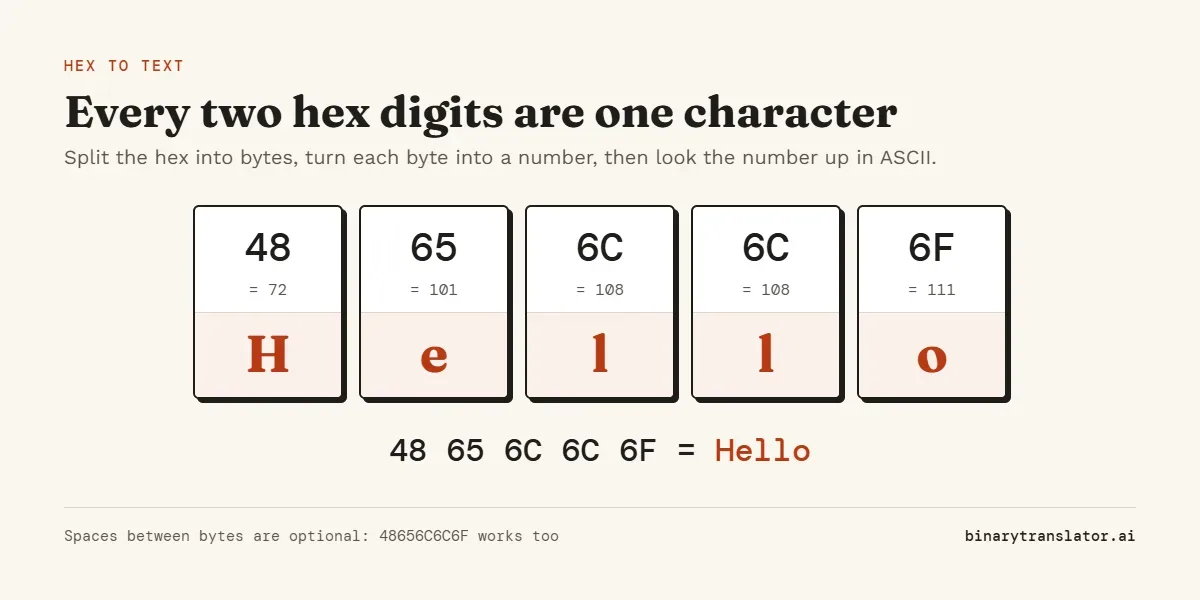
To do it by hand, split the hex into pairs from the left, convert each pair to decimal (the first digit × 16 plus the second), then look the number up. With practice you can skip the decimal step, because the hex chart below maps pairs straight to characters.
Hex to ASCII chart
Find the first hex digit in the left column and the second along the top. 4 then 1 lands on A, so 41 is A. SP is the space (20), and codes 00 to 1F are invisible control characters such as tab (09) and line feed (0A).
| 0 | 1 | 2 | 3 | 4 | 5 | 6 | 7 | 8 | 9 | A | B | C | D | E | F | |
|---|---|---|---|---|---|---|---|---|---|---|---|---|---|---|---|---|
| 2_ | SP | ! | " | # | $ | % | & | ' | ( | ) | * | + | , | - | . | / |
| 3_ | 0 | 1 | 2 | 3 | 4 | 5 | 6 | 7 | 8 | 9 | : | ; | < | = | > | ? |
| 4_ | @ | A | B | C | D | E | F | G | H | I | J | K | L | M | N | O |
| 5_ | P | Q | R | S | T | U | V | W | X | Y | Z | [ | \ | ] | ^ | _ |
| 6_ | ` | a | b | c | d | e | f | g | h | i | j | k | l | m | n | o |
| 7_ | p | q | r | s | t | u | v | w | x | y | z | { | | | } | ~ | DEL |
Two patterns make the chart easy to remember. Capital letters start at 41 and small letters at 61, exactly 20 apart, so changing case only changes the first digit from 4 or 5 to 6 or 7. Digits sit at 30 to 39, so the second hex digit is the number itself. The full list of 128 codes, with decimal, octal and binary columns, is on the ASCII table page.
Examples
| Hex | Text |
|---|---|
41 | A |
30 | 0 (the digit, not the number zero) |
48 69 | Hi |
48 65 6C 6C 6F | Hello |
48 65 6C 6C 6F 20 77 6F 72 6C 64 | Hello world |
49 20 6C 6F 76 65 20 79 6F 75 | I love you |
4F 4B 0A | OK followed by a new line |
Hex to ASCII vs hex to UTF-8
For plain English the two give the same result, because UTF-8 keeps every ASCII code unchanged. They differ once a byte is above 7F. UTF-8 uses two to four such bytes for one character, while ASCII has no meaning for them at all.
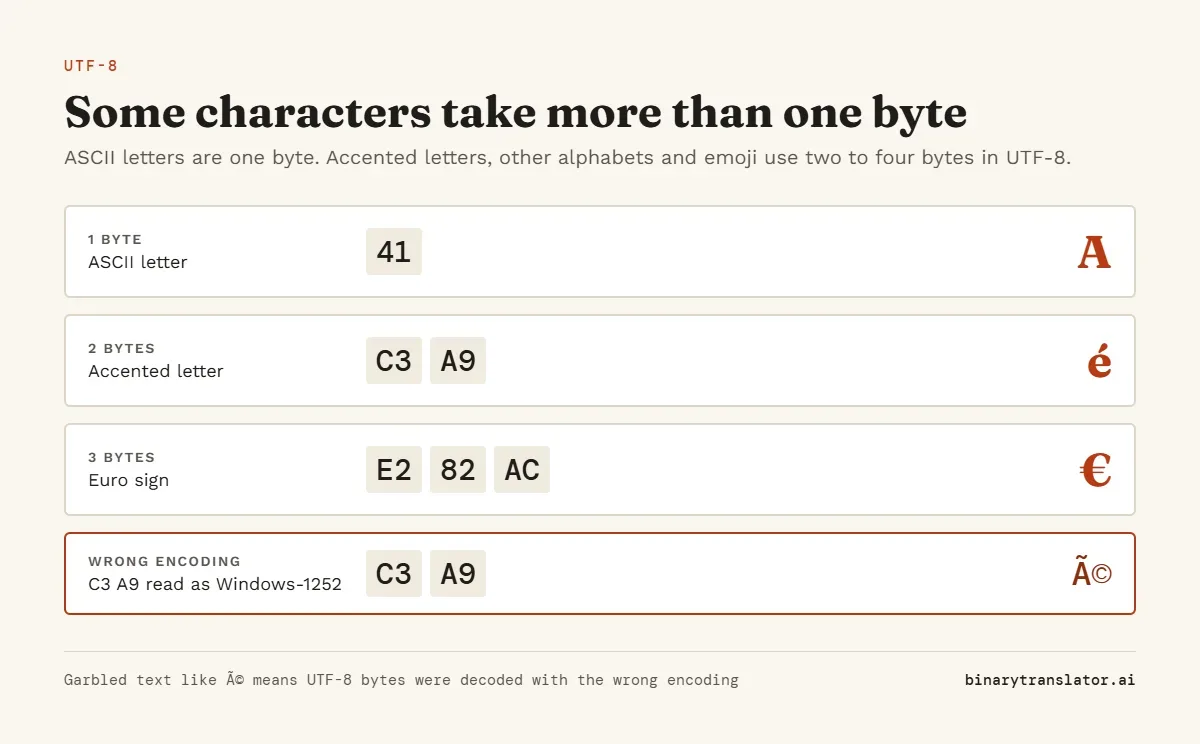
If you see garbage like é where é should be, UTF-8 bytes were decoded as Windows-1252 or Latin-1. Switch the Encoding menu to UTF-8. The opposite also happens. If the bytes are not valid UTF-8, the converter says so and shows them as Latin-1 instead. Try Windows-1252 for Western European text or Windows-1251 for Russian. Decoded as ASCII, any byte above 7F is shown as a replacement mark and the converter counts how many there were.
UTF-16 hex
Hex copied from Windows tools or Java strings is often UTF-16, where every ordinary character takes two bytes. "Hi" in UTF-16 little endian is 48 00 69 00. If your decoded text has a gap or odd symbol between every letter, choose UTF-16 little endian; if the zeros come first (00 48 00 69), choose big endian.
Common problems
An odd number of hex digits means one digit was lost while copying, since every byte needs two. Characters outside 0 to 9 and A to F, such as the letter O typed instead of a zero, also stop the decode. The message under the boxes says where the problem is, and "Show me" selects it.
If the output looks like random symbols even in UTF-8, the hex may not be text at all. Compressed files, images and encrypted data are bytes too, but they do not decode to anything readable. A hex value that is a single number, such as a memory address, belongs in hex to decimal instead.
Hex to string in code
Python: bytes.fromhex('48656c6c6f').decode('utf-8') returns 'Hello', and spaces in the hex are allowed (bytes.fromhex in the Python docs). JavaScript in a browser: split the string into pairs, turn each with parseInt(pair, 16) into a Uint8Array, then pass it to new TextDecoder('utf-8').decode(), which MDN's TextDecoder reference covers along with the other encodings it accepts.
Frequently asked questions
How do I convert 41 hex to text?
41 is 4 × 16 + 1 = 65, and 65 in ASCII is the capital letter A.
What is 30 in hex as text?
The character 0. 30 is 48 in decimal, the code for the digit zero. The value zero itself is 00, which is the invisible null character.
How do I convert hex code to English?
Paste it into the box above. English text is plain ASCII, so each pair of hex digits becomes one letter, digit, space or punctuation mark.
Do I need spaces between the bytes?
No. A continuous string such as 48656C6C6F is split into pairs automatically.
Why are some characters missing from the output?
Bytes below 20 are control codes such as tab, bell or null, and most have no visible shape. They are still in the output and are kept when you copy or download it.
Can I decode a hex file?
Yes. Press Open file to load a .txt or .hex file, or paste its contents. For a raw binary file, the binary translator's "Open .bin" button reads the bytes directly.
Is my input sent anywhere?
No. Decoding happens in your browser and nothing is uploaded.