XOR calculator
Enter two or more values and get their XOR in binary, hex, decimal or text. The calculator also does AND, OR, XNOR, NAND and NOR, and lines the bits up so you can check every column.
Show the working


Runs in your browser. Nothing you type is uploaded.
How to use the calculator
- Type two or more values, one per line. In Binary, Hex and Decimal mode you can also separate them with spaces.
- Choose the Input format: binary, hex, decimal or text.
- Pick the operation. XOR is the default; AND, OR, XNOR, NAND and NOR are there too, so you can check rules such as De Morgan's law on real numbers.
- Pick the Output format. The result in the other formats appears under the boxes, and a click on any of them copies it.
In Text mode each line is one string. Put the message on the first line and the key on the second; a shorter key repeats until it covers the whole message.
What XOR does
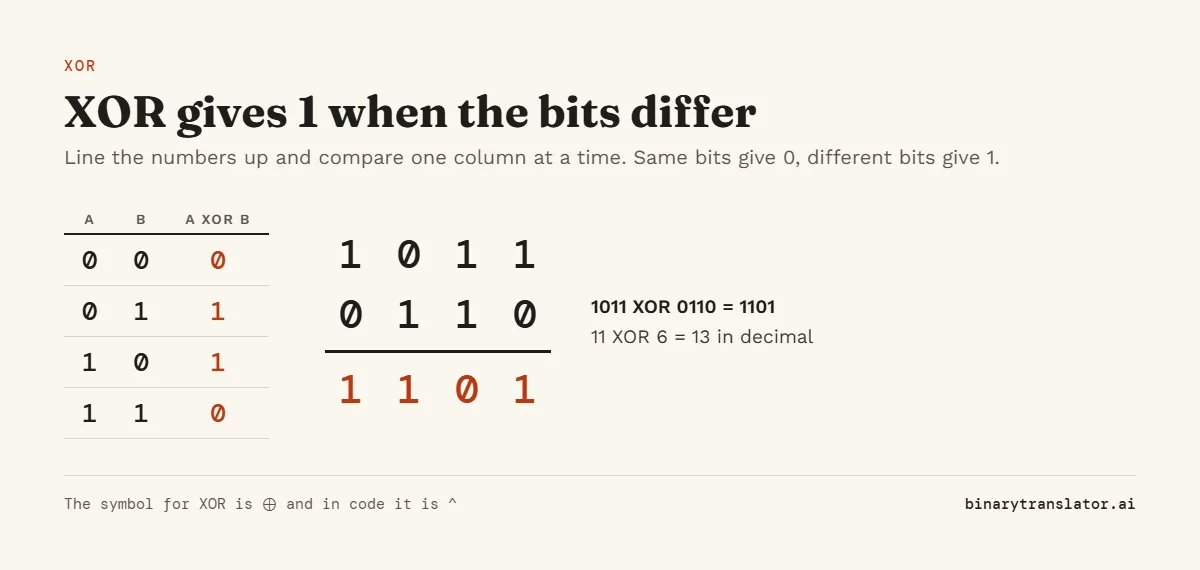
XOR, short for exclusive or, compares two bits and returns 1 when they are different and 0 when they are the same. For whole numbers it does this for every column at once. With three or more values, a column comes out as 1 when it holds an odd number of 1s.
How to calculate XOR by hand
- Write each value in binary.
- Pad the shorter value with zeros on the left so the columns line up.
- Compare each column: same bits give 0, different bits give 1.
- Convert the result back to hex or decimal if you need it.
For 1F XOR A5: 1F is 00011111 and A5 is 10100101. Comparing the columns gives 10111010, which is BA in hex and 186 in decimal. In decimal, 45 XOR 12 = 33, because 101101 XOR 001100 is 100001.
XOR examples
| A | B | A XOR B | Format |
|---|---|---|---|
| 1011 | 0110 | 1101 | Binary |
| 1111 | 1010 | 0101 | Binary |
| FF | 0F | F0 | Hex |
| 1F | A5 | BA | Hex |
| 45 | 12 | 33 | Decimal |
| 255 | 255 | 0 | Decimal |
Useful properties of XOR
- A XOR 0 = A, so XOR with zero changes nothing.
- A XOR A = 0, so any value XORed with itself cancels out.
- The order does not matter: A XOR B XOR C gives the same result in any order.
- A XOR B XOR B = A. Applying the same value twice undoes it, which is why XOR is used to scramble and restore data.
- XOR with a mask flips exactly the bits that are 1 in the mask, a common way to toggle flags.
These properties make XOR show up in parity bits, checksums, RAID 5 storage, hash functions and simple ciphers.
XOR cipher with text
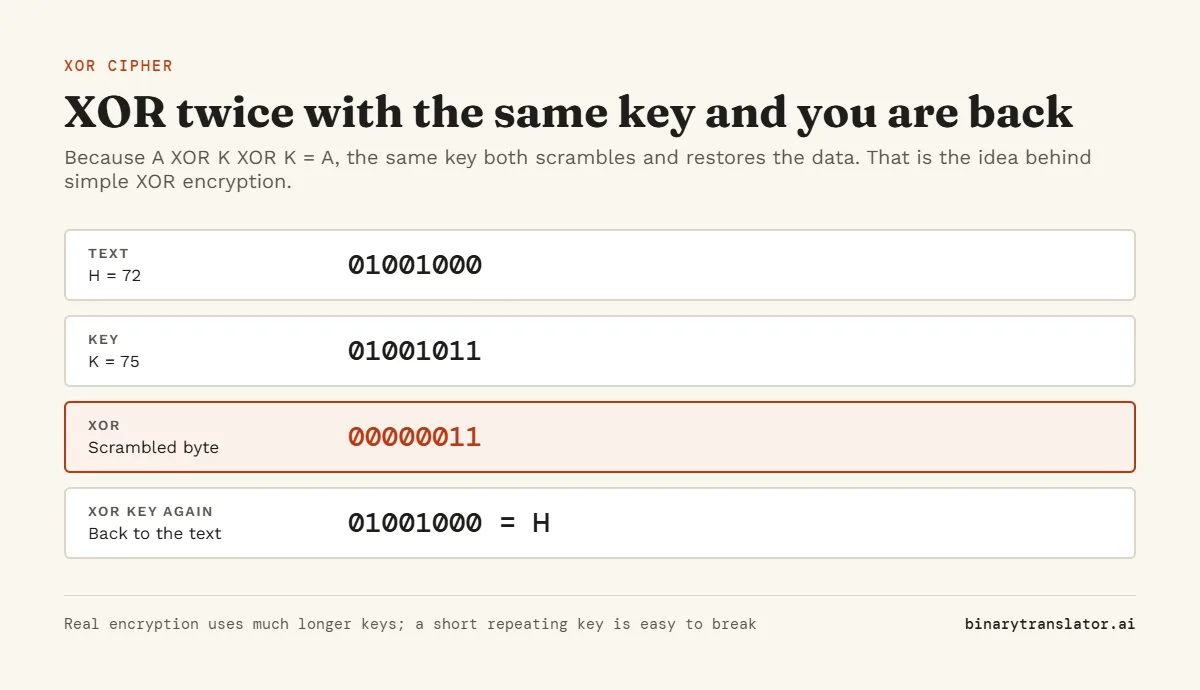
Switch Input to Text, type a message on the first line and a key on the second. XOR of "Hello" with the key "key" gives the bytes 23 00 15 07 0A: H (48) XOR k (6B) is 23, e XOR e is 00, and so on, with the key starting again after three letters. Put the scrambled bytes back in with the same key and the message returns. A short repeating key is easy to break, so use this for learning and puzzles, not for real secrets.
AND, OR, XNOR, NAND and NOR
| A | B | AND | OR | XOR | XNOR | NAND | NOR |
|---|---|---|---|---|---|---|---|
| 0 | 0 | 0 | 0 | 0 | 1 | 1 | 1 |
| 0 | 1 | 0 | 1 | 1 | 0 | 1 | 0 |
| 1 | 0 | 0 | 1 | 1 | 0 | 1 | 0 |
| 1 | 1 | 1 | 1 | 0 | 1 | 0 | 0 |
XNOR, NAND and NOR are XOR, AND and OR with every bit flipped. Flipping needs a fixed width, so the calculator uses the width of the longest value you typed: 1100 XNOR 1010 is 1001 in 4 bits. The hex calculator and binary calculator also do AND, OR, XOR and shifts on two numbers.
XOR in Python, JavaScript, C and Excel
- Python:
0b1011 ^ 0b0110returns 13, andformat(13, '04b')shows it as'1101'. Python's bitwise operators covers logical XOR and XOR on bytes too. - JavaScript:
11 ^ 6returns 13. Plain numbers are cut to 32 bits, as MDN's bitwise XOR reference explains, so use BigInt for larger values:11n ^ 6n. - C, C++, Java and C#: the
^operator works the same way on integers. - Excel and Google Sheets:
=BITXOR(11, 6)returns 13. Microsoft's BITXOR function reference lists its limits.
Frequently asked questions
What is XOR?
Exclusive or. It returns 1 when two bits are different and 0 when they are the same.
What is 1 XOR 1?
0. Two equal bits always give 0, and 1 XOR 0 gives 1.
Is XOR the same as addition?
It is addition in each column with the carry thrown away. 1 + 1 is 10 in binary; XOR keeps the 0 and drops the carried 1.
How do I XOR more than two numbers?
Put each value on its own line. The calculator combines them all, and a column ends up as 1 when it has an odd number of 1s.
Can I XOR two hex strings?
Yes. Set Input to Hex and type each string on its own line. For byte-by-byte XOR of text, use Text mode.
Is my input sent anywhere?
No. The calculation runs in your browser.