Byte converter
Convert any data size between bits, bytes, kilobytes, megabytes, gigabytes, terabytes and petabytes. Pick base 1000 or base 1024, and the table under the tool shows the same size in every unit at once.
Show the working
Same size in every unit
Conversion table


Runs in your browser. Nothing you type is uploaded.
How to use the byte converter
- Type a number in the From box. You can add the unit, such as
750 MBor2.5 TB, and the From menu changes to match. - Pick a unit in the To menu. The arrow button swaps the two units and carries the answer back.
- Choose the standard at the top. Decimal counts 1000 bytes in a kilobyte. Binary counts 1024, which is what Windows uses.
- Open "Same size in every unit" for the value from bits up to petabytes in both standards, or "Show the working" for the math.
The answer card always shows the other standard too, so you see both numbers without switching. With Decimals on Auto, exact answers print in full and long ones are rounded to a readable length.
Byte conversion chart
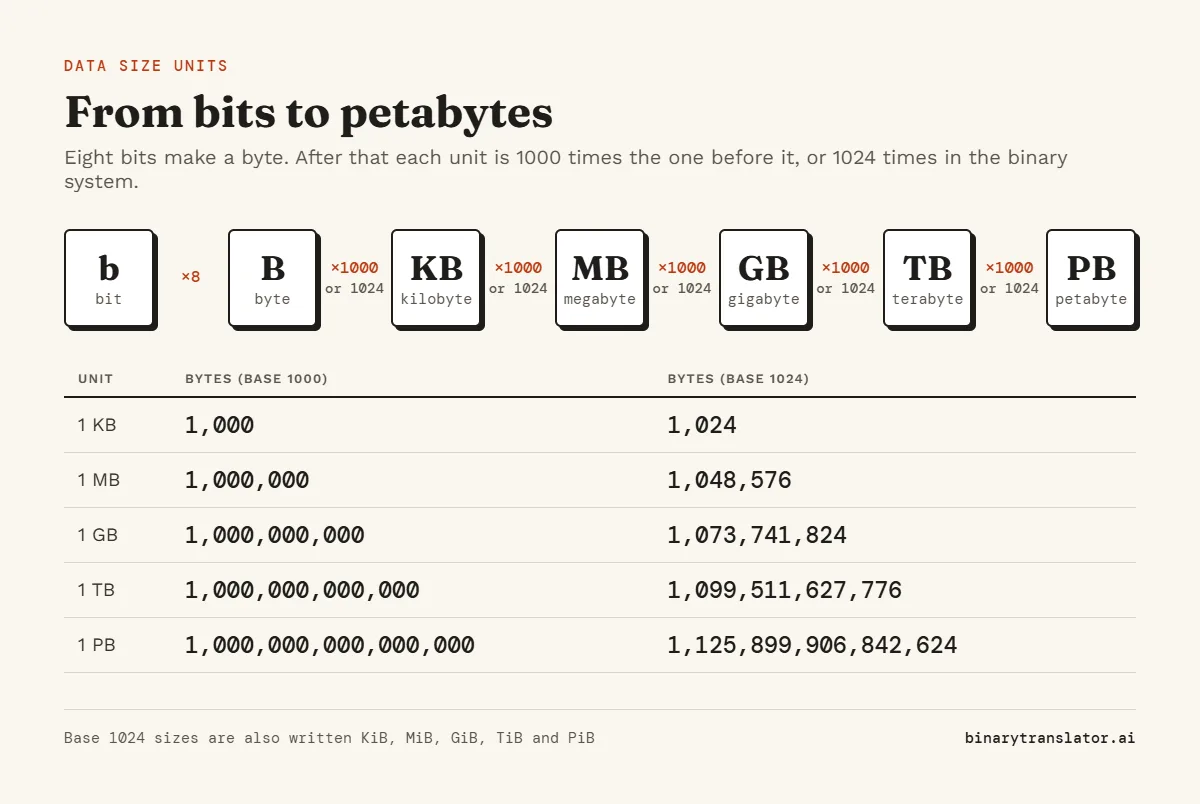
A bit is a single 0 or 1. Eight bits make one byte, enough to store one plain English letter. Every larger unit is a fixed multiple of the one below it: 1000 in the decimal system, 1024 in the binary one.
| Unit | Symbol | Bytes (base 1000) | Bytes (base 1024) |
|---|---|---|---|
| Byte | B | 1 | 1 |
| Kilobyte | KB or kB | 1,000 | 1,024 |
| Megabyte | MB | 1,000,000 | 1,048,576 |
| Gigabyte | GB | 1,000,000,000 | 1,073,741,824 |
| Terabyte | TB | 1,000,000,000,000 | 1,099,511,627,776 |
| Petabyte | PB | 1015 | 250 |
Read the chart from left to right to see how many bytes each unit holds. To convert between two units, divide one row by the other: 1 GB ÷ 1 MB = 1,000,000,000 ÷ 1,000,000 = 1000, so there are 1000 MB in a GB in decimal units and 1024 in binary units.
Why there are two answers: 1000 or 1024
Kilo means 1000 in the metric system, so a kilobyte should be 1000 bytes. Early computers worked in powers of two, and 210 = 1024 was close enough that 1024 bytes also got called a kilobyte. Both meanings are still in use.
In 1998 the IEC added separate names for the binary sizes: kibibyte (KiB) for 1024 bytes, mebibyte (MiB) for 1024 KiB, then GiB, TiB and PiB. Drive makers, macOS and network speeds use decimal units. Windows File Explorer and RAM use binary ones, but Windows still prints KB, MB and GB.
| Where you see it | Counts in | 1 GB means |
|---|---|---|
| Hard drive and SSD boxes | 1000 | 1,000,000,000 bytes |
| macOS Finder (since 10.6) | 1000 | 1,000,000,000 bytes |
| Windows File Explorer | 1024 | 1,073,741,824 bytes |
| RAM modules | 1024 | 1,073,741,824 bytes |
| Internet speeds (Gbps) | 1000 | 1,000,000,000 bits per second |
Why a new drive looks smaller in Windows
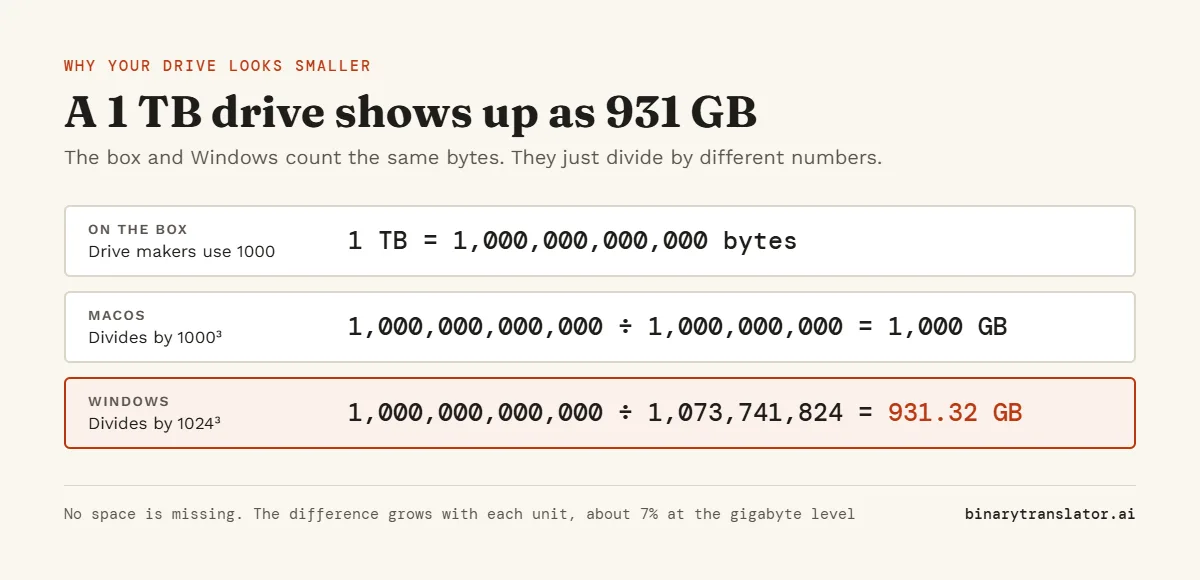
A drive sold as 1 TB holds 1,000,000,000,000 bytes. Windows divides that by 1024 three times to get gigabytes and shows 931 GB. Nothing is missing. The gap grows with each unit: about 2.4% at the kilobyte, 4.9% at the megabyte, 7.4% at the gigabyte and 10% at the terabyte. The TB to GB converter has a chart of what Windows shows for common drive sizes.
Bits and bytes
Lowercase b means bits and uppercase B means bytes. Internet plans are sold in megabits per second (Mbps), while downloads show megabytes. A 100 Mbps connection moves at most 12.5 MB per second, because 100 ÷ 8 = 12.5. Pick "bits" in either menu to switch between the two.
Single conversions
Each pair below has its own page with a worked example, a conversion table and answers to the questions people search for most, such as how many MB are in a GB.
- KB to MB for photos, documents and email attachments.
- MB to GB and the reverse, GB to MB, for downloads, phone storage and RAM.
- KB to GB when a program lists folder sizes in kilobytes.
- Bytes to MB for the raw byte counts that code and APIs return.
- GB to TB and TB to GB for hard drives and cloud storage.
Frequently asked questions
How many bytes are in a kilobyte?
1000 bytes in the decimal system and 1024 bytes in the binary system. The binary size is also called a kibibyte (KiB).
What is the order of data units from smallest to largest?
Bit, byte, kilobyte, megabyte, gigabyte, terabyte, petabyte. After that come the exabyte, zettabyte and yottabyte, each 1000 times larger again.
Is 1 GB 1000 MB or 1024 MB?
Both are in use. Storage makers and macOS count 1000 MB, while Windows and RAM count 1024 MB. Pick the standard in the converter to get either answer.
Is KB the same as kB?
Yes. The metric prefix is a lowercase k, so kB is the formal spelling, but KB is far more common and means the same unit. KiB is the 1024-byte unit.
Is my data sent anywhere?
No. The converter runs in your browser and nothing you type leaves the page.