KB to GB converter
Convert kilobytes straight to gigabytes. Divide by 1,000,000 for decimal gigabytes, or by 1,048,576 for the binary gigabytes Windows uses.
Show the working
Same size in every unit
Conversion table


Runs in your browser. Nothing you type is uploaded.
How many kilobytes in a gigabyte?
A gigabyte is 1,000,000 kilobytes in decimal units and 1,048,576 kilobytes in binary units. The binary figure is 1024 × 1024, because there are 1024 KB in a MB and 1024 MB in a GB.
KB to GB formula
GB = KB ÷ 1,000,000 (decimal) or GB = KB ÷ 1,048,576 (binary)
For a quick check in decimal units, move the decimal point six places to the left: 7,300,000 KB is 7.3 GB.
KB to MB to GB, step by step
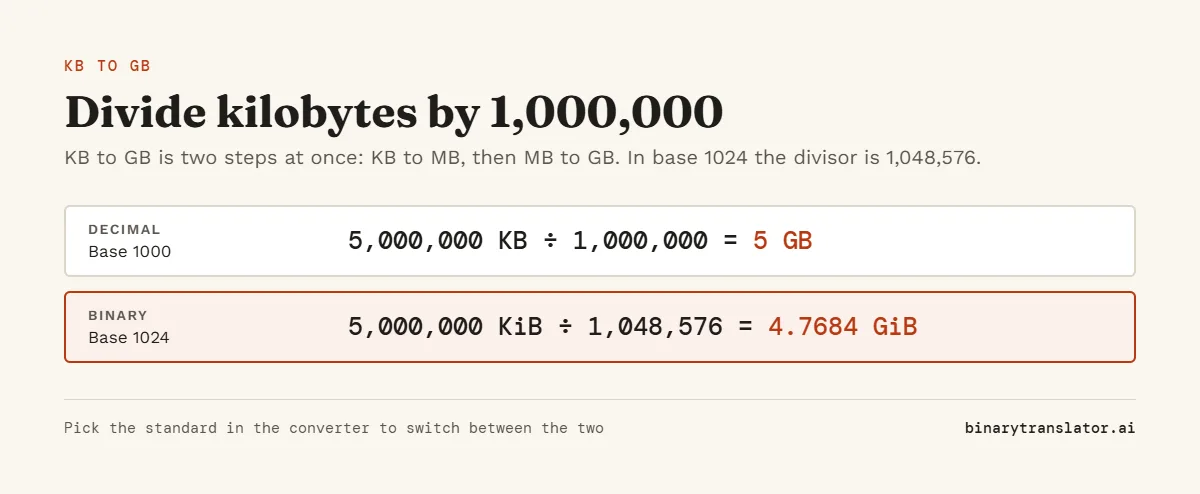
KB to GB is two conversions in a row. Kilobytes become megabytes, then megabytes become gigabytes. Doing it in two steps is easier to check:
- Divide the KB value by 1000 to get MB: 5,000,000 KB ÷ 1000 = 5000 MB.
- Divide the MB value by 1000 to get GB: 5000 MB ÷ 1000 = 5 GB.
- For binary units, use 1024 in both steps: 5,000,000 ÷ 1024 ÷ 1024 = 4.77 GB.
"Show the working" in the converter writes out the same chain, so you can see where each number comes from.
KB to GB examples
- 100,000 KB ÷ 1,000,000 = 0.1 GB, or 0.095 GB in binary.
- 1 million KB ÷ 1,000,000 = 1 GB, or 0.954 GB in binary.
- 2 million KB ÷ 1,000,000 = 2 GB, or 1.907 GB in binary.
- 1,048,576 KB ÷ 1,048,576 = exactly 1 GB in binary.
KB to GB conversion table
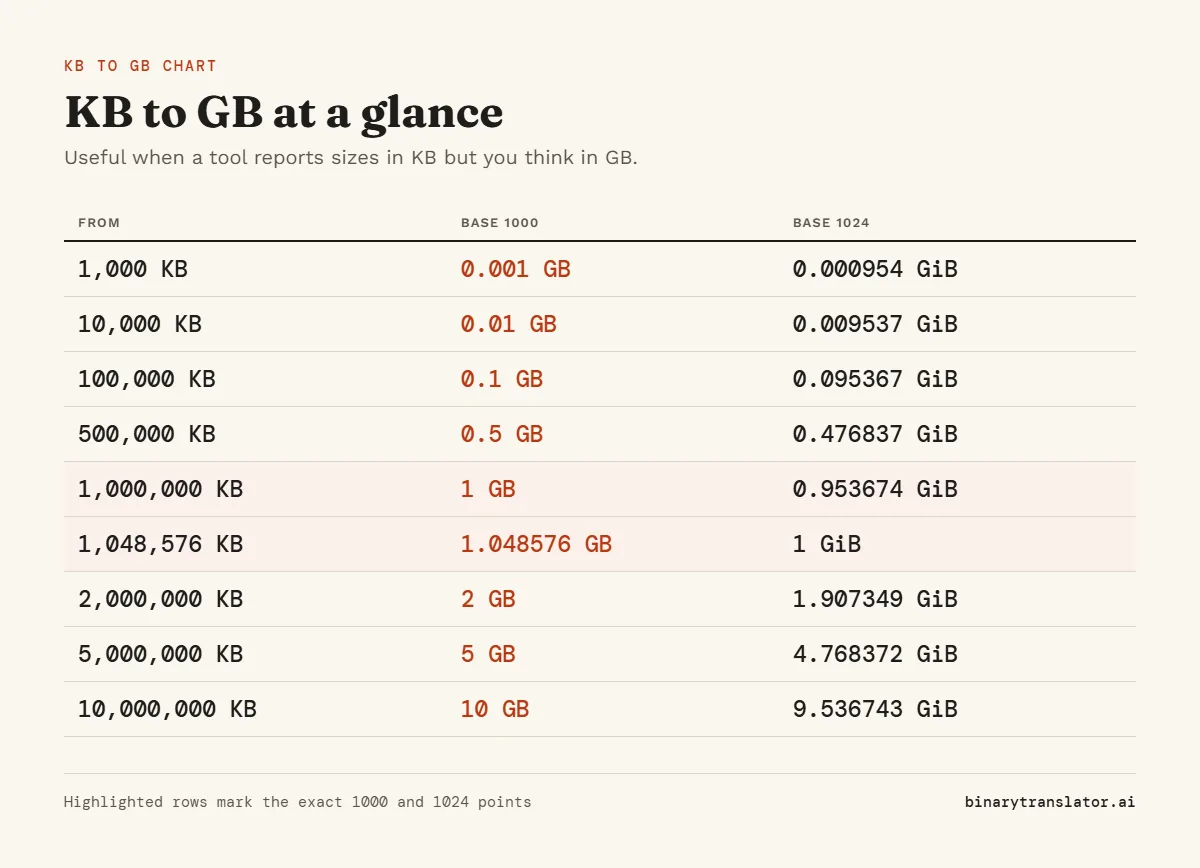
| Kilobytes | Gigabytes (1000) | Gigabytes (1024) |
|---|---|---|
| 10,000 KB | 0.01 GB | 0.0095 GB |
| 100,000 KB | 0.1 GB | 0.0954 GB |
| 500,000 KB | 0.5 GB | 0.4768 GB |
| 1,000,000 KB | 1 GB | 0.9537 GB |
| 1,048,576 KB | 1.0486 GB | 1 GB |
| 2,000,000 KB | 2 GB | 1.9073 GB |
| 5,000,000 KB | 5 GB | 4.7684 GB |
| 10,000,000 KB | 10 GB | 9.5367 GB |
| 50,000,000 KB | 50 GB | 47.6837 GB |
| 100,000,000 KB | 100 GB | 95.3674 GB |
Where you see sizes in KB
Windows File Explorer shows file sizes in KB in its Details view, even for large files, so a 3 GB video can appear as about 3,000,000 KB. Some backup tools, server logs and older programs also report everything in kilobytes. Those Windows numbers use 1024, so pick Binary in the converter to match them. The decimal answer from KB to GB is about 4.9% larger than the binary one, compared with 2.4% for a single step such as KB to MB.
Adding up sizes in different units
Lists of files often mix units, such as 850 KB, 12 MB and 1.2 GB. Turn each size into KB, add them, then divide the total by 1,000,000: 850 + 12,000 + 1,200,000 = 1,212,850 KB, which is 1.21 GB. Keep one standard all the way through. For other units, use GB to MB or the byte converter.
Frequently asked questions
How many KB are in 1 GB?
1,000,000 KB in decimal units and 1,048,576 KB in binary units.
Is KB more than GB?
No. A kilobyte is a millionth of a gigabyte. The order is KB, MB, GB, from smallest to largest.
How many GB is 1 million KB?
1 GB in decimal units, or 0.954 GB in binary units.
How do I convert KB to GB in Excel?
Divide the cell by 1000000 for decimal GB, for example =A2/1000000, or by 1048576 for binary GB.
How do I convert GB to KB?
Multiply by 1,000,000, or by 1,048,576 for binary units. Swap the units in the converter to do it in one click.
How do I see a folder size in GB in Windows?
Right-click the folder and choose Properties. Windows shows the size in GB with the exact byte count next to it, both in binary units.