Binary calculator
Add, subtract, multiply or divide two binary numbers, or combine them with AND, OR, XOR and bit shifts. The answer is shown in binary with its decimal, hex and octal values underneath, so 1011 + 110 gives 10001, which is 17. To convert a single number without doing any math on it, use binary to decimal, decimal to binary or binary to hex.
Show the working


Runs in your browser. Nothing you type is uploaded.
How to use the calculator
- Choose an operation from the menu above the boxes.
- Type the first and second binary numbers. The result updates as you type.
- Open "Show the working" to see the same sum in decimal, and for AND, OR and XOR the bits lined up column by column.
Step-by-step working. For add, subtract, multiply and divide, "Show the working" lays out the full sum: the carry row for addition, borrows for subtraction, one shifted row per 1 bit for multiplication, and a long division table. Modulo gives the remainder only, Power raises the first number to the second, and NOT flips every bit of the first number within the digits you typed.
The swap button between the boxes exchanges the two numbers, which is handy for subtraction and division. Inputs must be whole numbers; a leading minus sign is allowed, and results can be negative. Values of any length are calculated exactly, with no 32-bit or 64-bit cut-off.
Binary addition
Binary addition works like decimal addition, column by column from the right, but a column overflows at 2 instead of 10. In a chip, each column is handled by a full adder. There are only four cases to learn: 0 + 0 = 0, 0 + 1 = 1, 1 + 1 = 10 (write 0, carry 1) and 1 + 1 + 1 = 11 (write 1, carry 1).
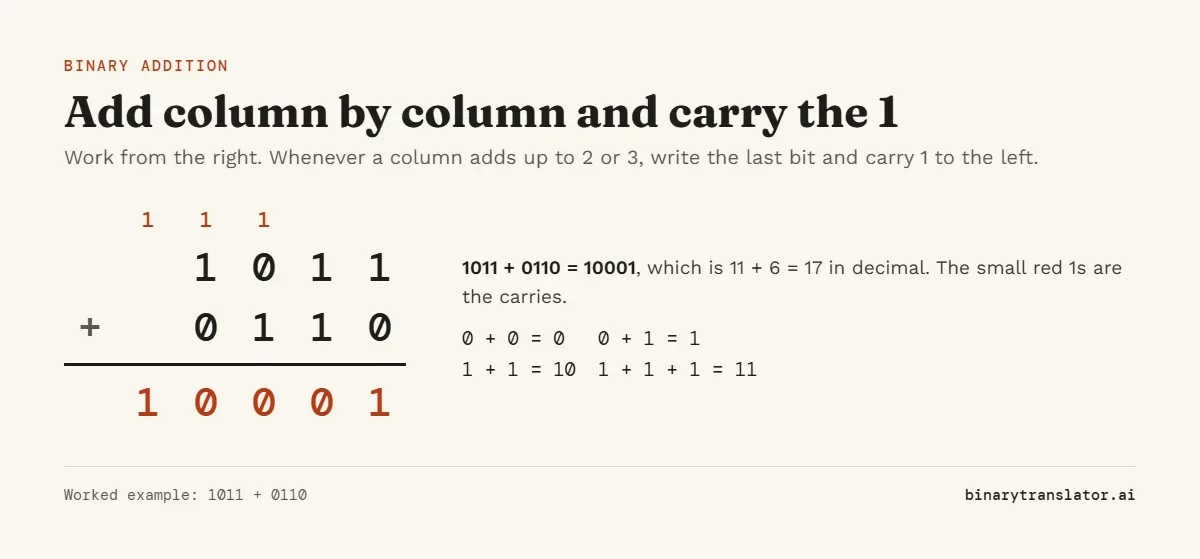
From the right: 1 + 0 = 1. 1 + 1 = 0 carry 1. 0 + 1 + 1 = 0 carry 1. 1 + 0 + 1 = 0 carry 1. The last carry drops down as the leading 1, giving 10001.
With three numbers, add two first and then add the third. 101 + 110 = 1011, and 1011 + 011 = 1110, which is 5 + 6 + 3 = 14. A longer example: 01011111 + 01110101 = 11010100 (95 + 117 = 212).
Binary subtraction
Subtract column by column from the right. When the top bit is 0 and the bottom bit is 1, borrow from the next column to the left. The borrowed 1 is worth 2 in the current column, so the column becomes 10 - 1 = 1, and the column you borrowed from drops by 1. The binary subtraction guide also covers the two's complement method that processors use.
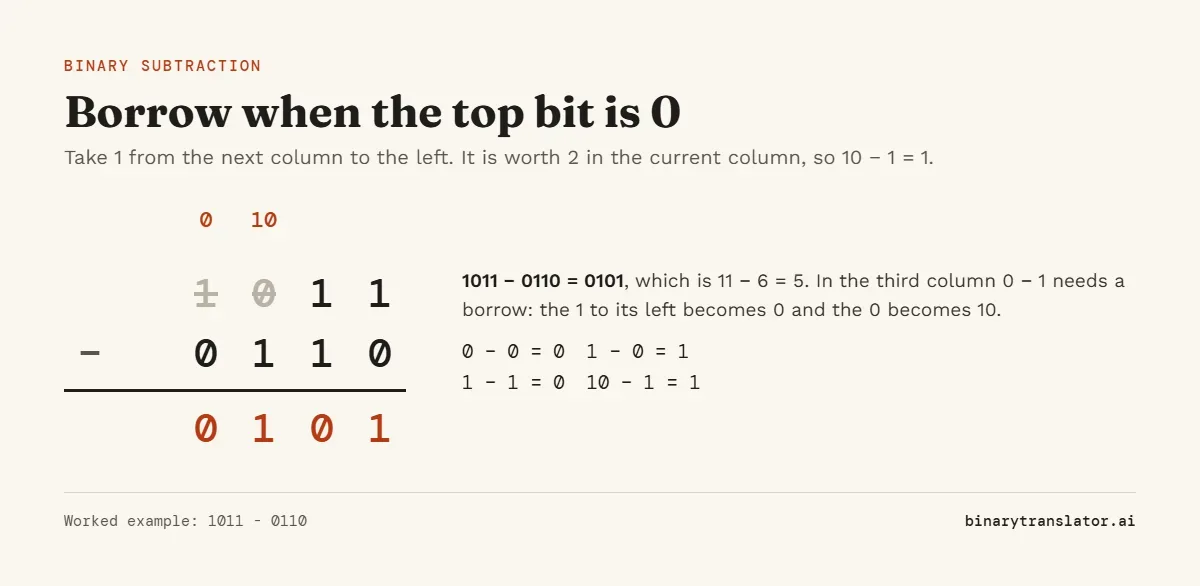
If the next column to the left is also 0, keep moving left until you find a 1. Every 0 you pass on the way becomes 1. That chain of borrows is where most mistakes happen, so check the answer by adding it back: 0101 + 0110 should give 1011 again.
Subtraction with two's complement
Computers do not borrow. They add the negative of the second number instead, written in two's complement. To work out 1011 - 0110 in 4 bits, flip the bits of 0110 to get 1001, add 1 to get 1010, then add: 1011 + 1010 = 10101. Drop the carry out of the fourth bit and the answer is 0101, the same 5 as before.
Binary multiplication
Multiplying by a single bit is easy: by 1 the number stays the same, by 0 it becomes 0. So long multiplication in binary is just shifting and adding. Write one row for each bit of the bottom number, shifted one place further left each time, and add the rows.
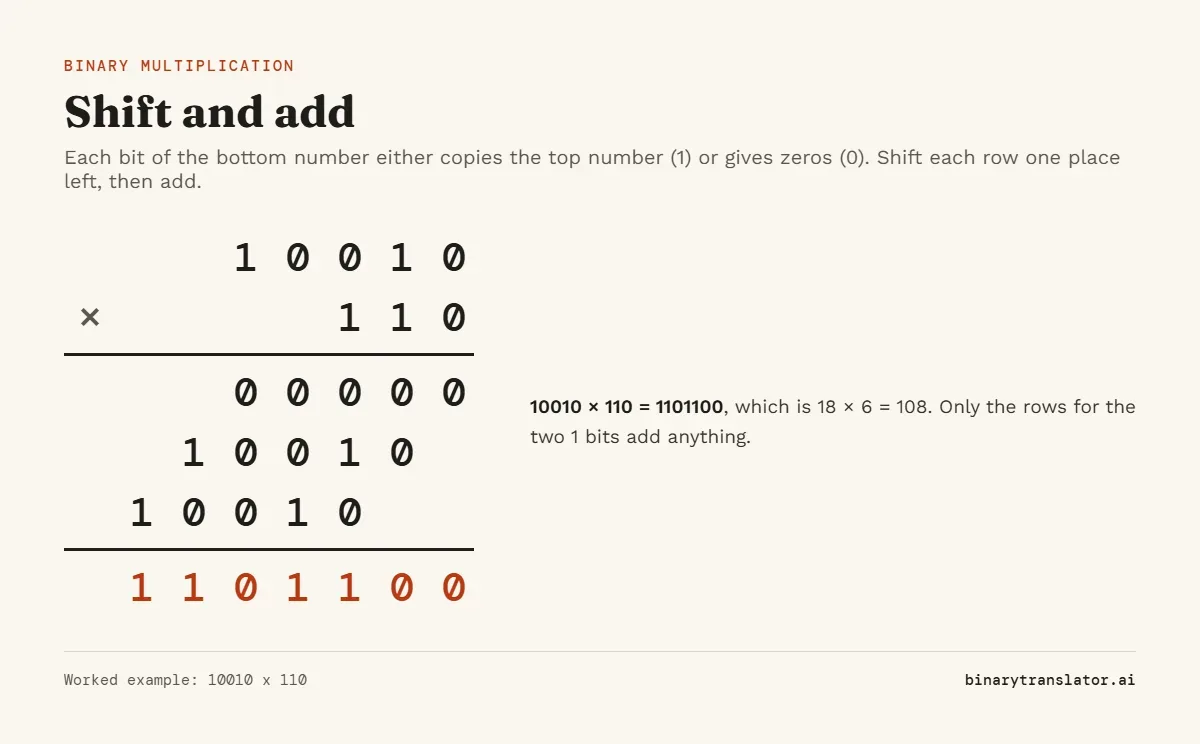
A smaller one: 101 × 11 is 101 plus 1010, which is 1111 (5 × 3 = 15). Multiplying by 10 just adds a 0 on the right, the same way multiplying by 10 does in decimal.
Binary division
Long division in binary is simpler than in decimal, because each step only asks one question: does the divisor fit, yes (1) or no (0)? For 101101 ÷ 101:
101fits into the first three bits101once. Write 1, remainder 0.- Bring down the next bit to get
1. Too small: write 0. - Bring down the next bit to get
10. Still too small: write 0. - Bring down the last bit to get
101. It fits once: write 1, remainder 0.
The quotient is 1001, which checks out as 45 ÷ 5 = 9. When the division does not come out even, the calculator shows the remainder too: 1101 ÷ 100 is 11 remainder 1 (13 ÷ 4 = 3 remainder 1). Dividing by zero shows a message instead of a result.
AND, OR, XOR and shifts
These bitwise operations compare the two numbers one bit position at a time, with no carrying. For XOR of three or more values, or of text, use the XOR calculator; for the same sums in base 16, the hex calculator.
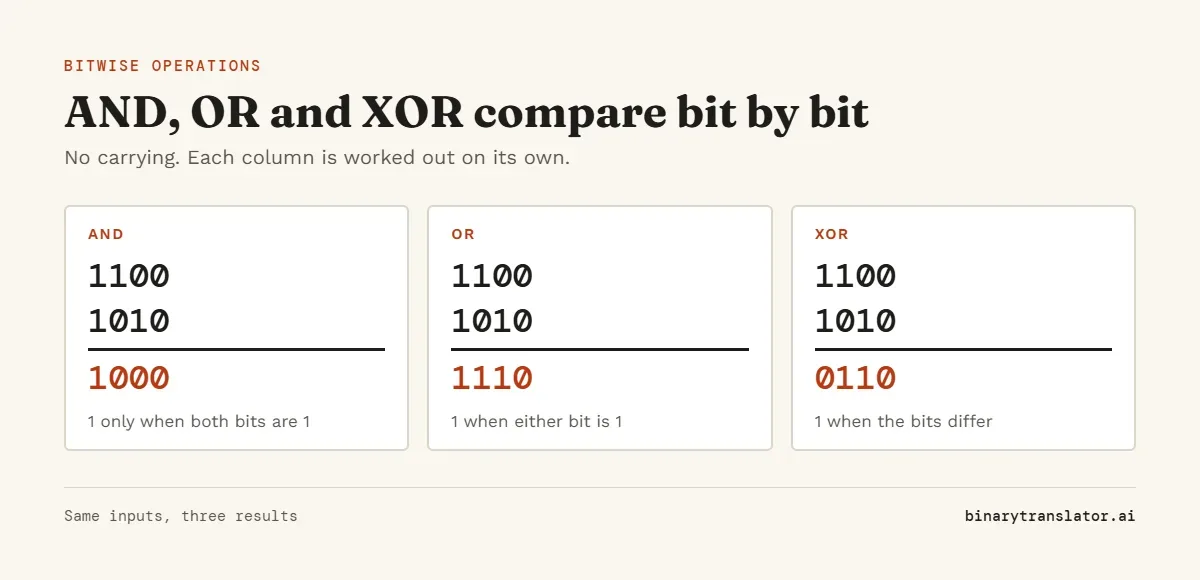
AND is used to clear bits (masking), OR to set them and XOR to flip them. XOR has a handy property: applying it twice with the same value gets you back where you started, which is why it shows up in checksums and simple ciphers. To try it on a word, turn the letters into bits with text to binary first.
For shifts, the second box is how many places to move, also written in binary. 1011 shifted left by 10 (two places) is 101100, which multiplies 11 by 4 to get 44. Shifting right by 1 drops the last bit, so 1011 becomes 101, which is 11 ÷ 2 rounded down. Python's notes on bitwise operations on integers state both rules the same way.
Frequently asked questions
What is 1 + 1 in binary?
10, which is 2 in decimal. You write 0 and carry 1 to the next column.
What is 1111 + 1 in binary?
10000, which is 16. The carry ripples through all four 1s, just as 9999 + 1 does in decimal.
How do you calculate binary numbers?
The same way as decimal numbers, column by column, except that each column can only hold 0 or 1. A column that reaches 2 carries 1 to the left. The calculator above does it for you and shows the decimal check.
Does the calculator handle negative numbers?
Yes, with a minus sign in front, such as -101. It does not treat a leading 1 as a sign bit, so 11111111 is 255, not -1.
Is there a limit on the size of the numbers?
No fixed limit. The calculator uses whole-number arithmetic without rounding, so 64-bit and larger values give exact answers.