Text to binary converter
Type any text and get its binary code as you go. "Hi" becomes 01001000 01101001. Letters, numbers, spaces, accents and emoji all convert, using UTF-8 by default. To decode binary instead, use the binary translator.


Runs in your browser. Nothing you type is uploaded.
How to convert text to binary
- Type or paste your text in the left box.
- The binary shows up on the right as you type. Pick a separator (space, none, new line or comma) and a style: 8-bit, 7-bit, 4-bit groups or a 0b prefix.
- Copy the binary, download it as a .txt file, or press Share to send someone a link.
What the converter does with different text
Text pasted from a chat, a document or a code editor carries more than letters. Each input below was typed into the converter on this page with Encoding on UTF-8, Separator on Space and Style on 8-bit, unless the row says otherwise.
| Input | What you get |
|---|---|
hi (lowercase) | 01101000 01101001. Capital Hi is 01001000 01101001. Only the third bit of the first byte changes, because a small letter's code is 32 higher. |
| Hi, a new line, then yo | 01001000 01101001 00001010 01111001 01101111. The line break is a character too: 00001010, code 10. |
| a, a tab, then b | 01100001 00001001 01100010. The tab is code 9. |
é (an accented letter) | 11000011 10101001, two bytes in UTF-8 |
| 😀 (an emoji) | 11110000 10011111 10011000 10000000, four bytes |
Hi with Separator set to None | 0100100001101001 |
Hi with Separator set to Comma | 01001000, 01101001 |
Hi with Style set to 4-bit groups | 0100 1000 0110 1001 |
Hi with Style set to 0b prefix | 0b01001000 0b01101001 |
Hi with Encoding set to UTF-16 little endian | 01001000 00000000 01101001 00000000. Every letter takes two bytes, the zero byte second. |
é with Encoding set to ASCII (7-bit) | No result. The message says "é" does not exist in ASCII and suggests UTF-8. |
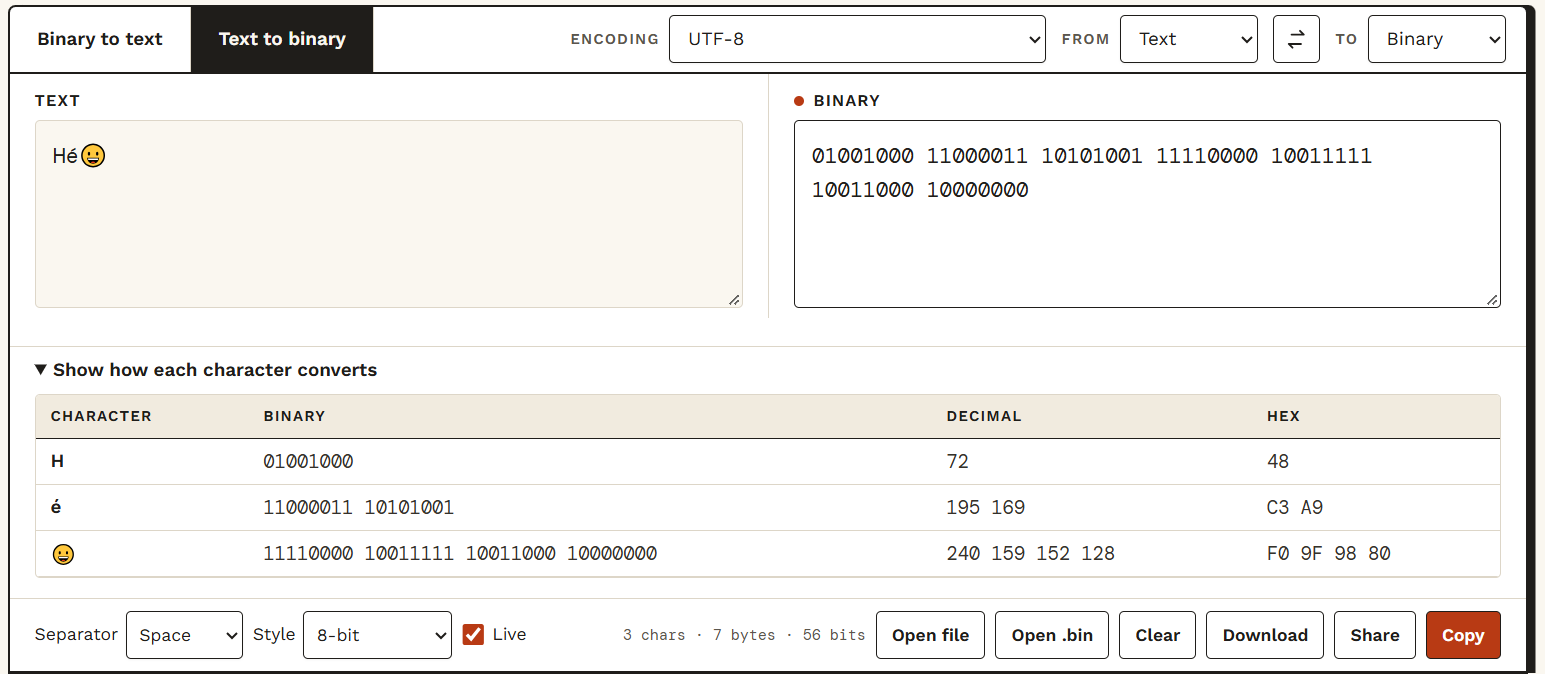
How text becomes binary
Every character has a number. In ASCII, capital A is 65, lowercase a is 97 and a space is 32. The converter writes that number in base 2 and pads it to 8 bits, so A becomes 01000001.
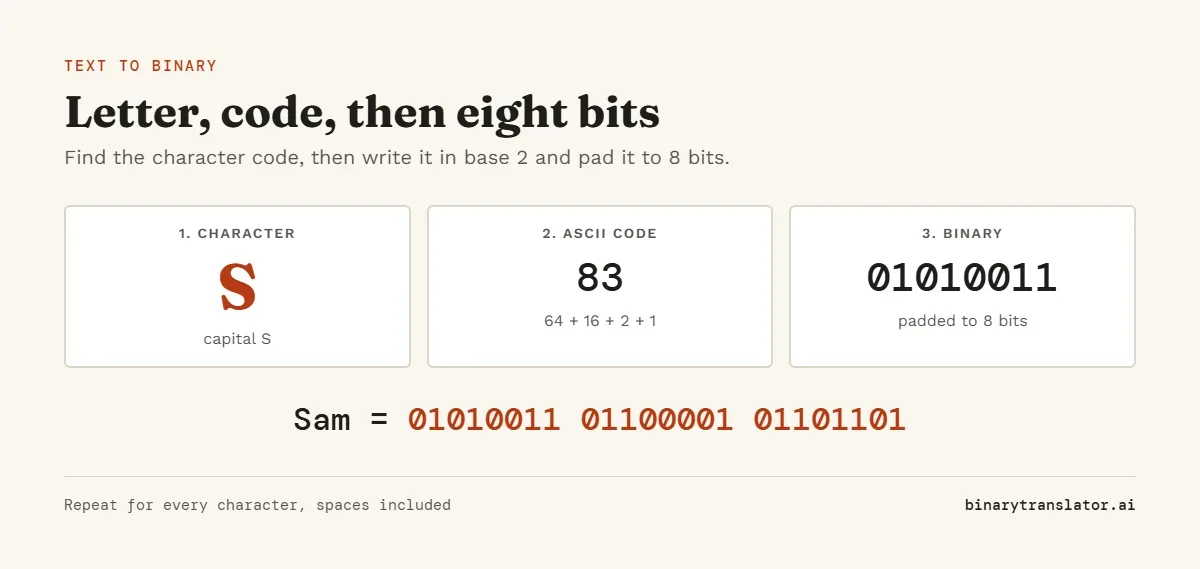
Take the letter H. Its code is 72, and 72 is 64 + 8. Turn on the bits worth 64 and 8 and leave the rest at 0, and you get 01001000.
Characters outside ASCII take 2 to 4 bytes in UTF-8. The letter é becomes 11000011 10101001, and the 😀 emoji takes four bytes: 11110000 10011111 10011000 10000000. Open "Show how each character converts" under the tool to see this for your own text.
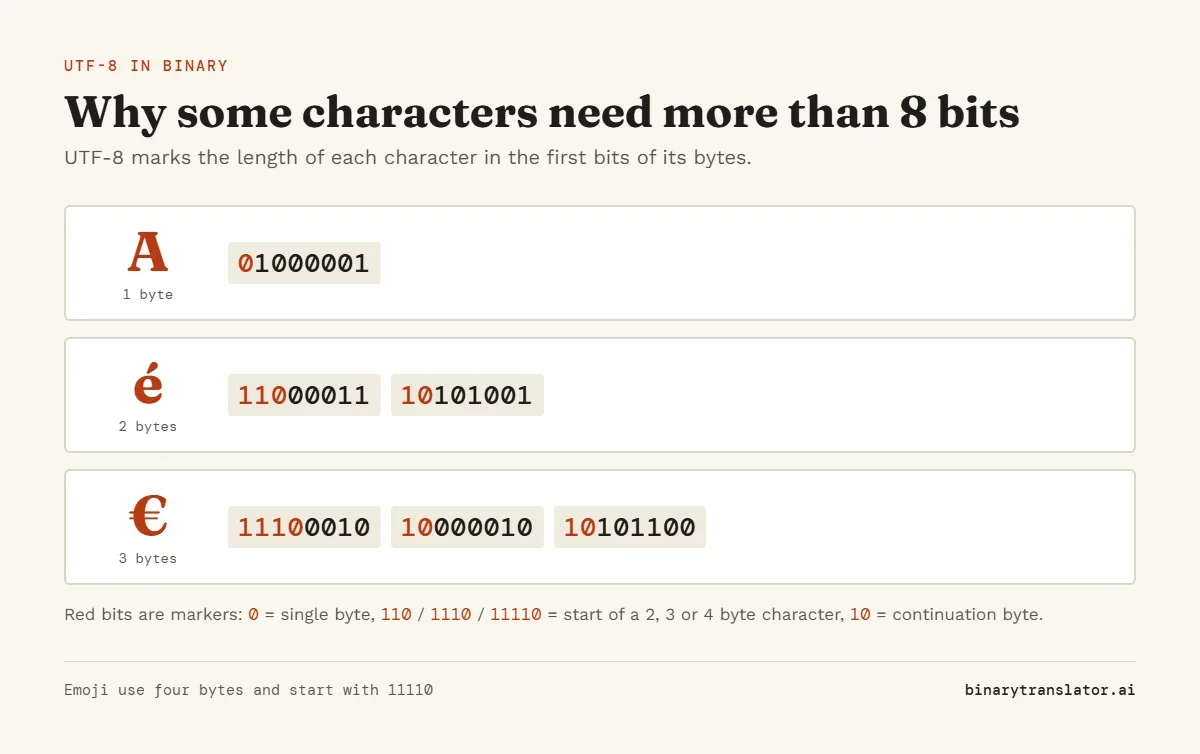
The red bits in each byte are length markers. A leading 0 means a one-byte ASCII character, 110 starts a two-byte character, 1110 a three-byte one and 11110 a four-byte one such as an emoji. Every byte after the first starts with 10.
Common words and phrases in binary
| Text | Binary |
|---|---|
| Hi | 01001000 01101001 |
| hi | 01101000 01101001 |
| Hello | 01001000 01100101 01101100 01101100 01101111 |
| hello | 01101000 01100101 01101100 01101100 01101111 |
| Hello world | 01001000 01100101 01101100 01101100 01101111 00100000 01110111 01101111 01110010 01101100 01100100 |
| Yes | 01011001 01100101 01110011 |
| No | 01001110 01101111 |
| Love | 01001100 01101111 01110110 01100101 |
| I love you | 01001001 00100000 01101100 01101111 01110110 01100101 00100000 01111001 01101111 01110101 |
| Thank you | 01010100 01101000 01100001 01101110 01101011 00100000 01111001 01101111 01110101 |
Numbers and punctuation in binary
Digits typed as text are not the same as numbers. The character 7 is ASCII code 55, so it becomes 00110111, not 111. For the binary value of a number, use the decimal to binary converter instead. The ASCII table lists the code for every character.
| Character | ASCII code | Binary |
|---|---|---|
| 0 | 48 | 00110000 |
| 1 | 49 | 00110001 |
| 2 | 50 | 00110010 |
| 3 | 51 | 00110011 |
| 4 | 52 | 00110100 |
| 5 | 53 | 00110101 |
| 6 | 54 | 00110110 |
| 7 | 55 | 00110111 |
| 8 | 56 | 00111000 |
| 9 | 57 | 00111001 |
| space | 32 | 00100000 |
| ! | 33 | 00100001 |
| , | 44 | 00101100 |
| . | 46 | 00101110 |
| ? | 63 | 00111111 |
7-bit vs 8-bit binary
ASCII only needs 7 bits, because its highest code is 127. Many textbooks and puzzles write letters in 7 bits, so H is 1001000. Computers store each character in a full 8-bit byte with the top bit set to 0, as RFC 20, the ASCII interchange standard describes, which is why the converter pads to 8 by default.
Pick 7-bit in the Style menu when an assignment asks for it. Accented letters and emoji need more than 7 bits, so the converter will tell you when a character does not fit.
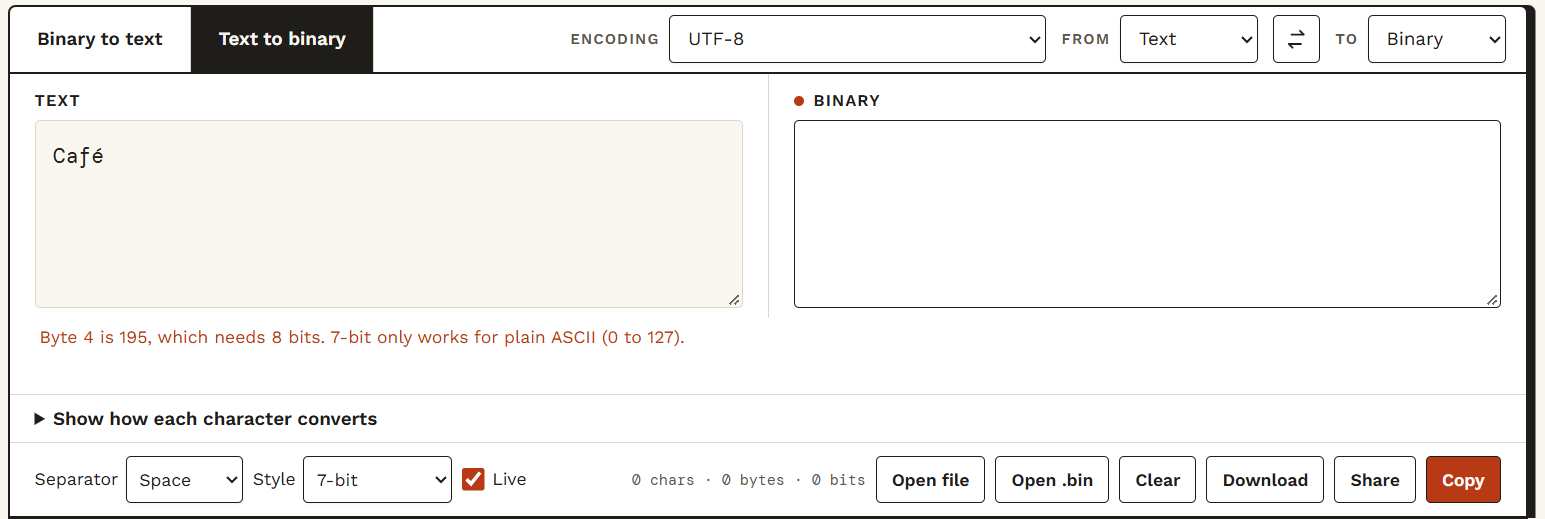
The message names the byte that failed, so in a longer text you can find the character that needs changing.
The same character in different encodings
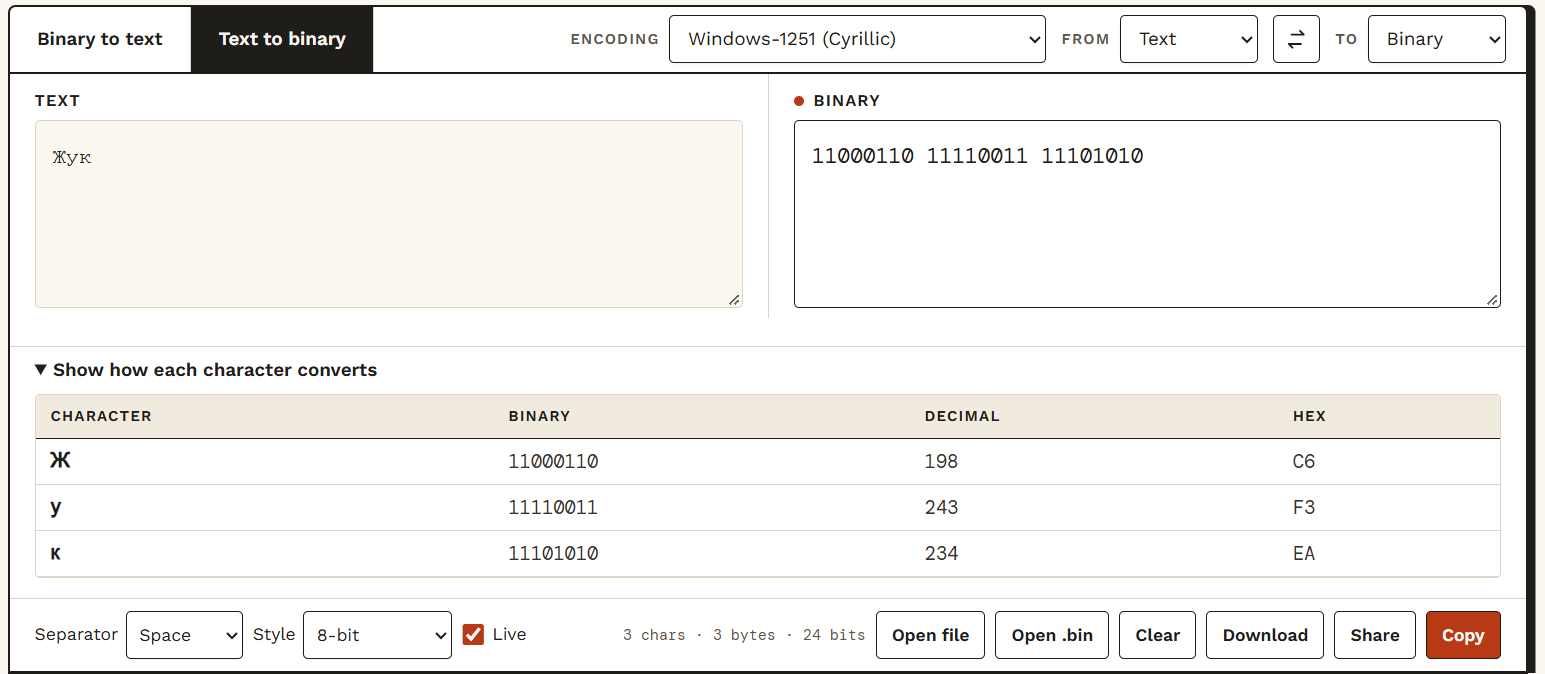
The Encoding menu changes which bytes a character becomes. English letters come out the same in UTF-8, ASCII and the Windows code pages. Everything else depends on the encoding, which is why text saved in one and opened in another turns into the wrong letters.
| Character | UTF-8 | UTF-16 little endian | Older single-byte encodings |
|---|---|---|---|
é | 11000011 10101001 | 11101001 00000000 | 11101001 in ISO-8859-1 and Windows-1252 |
€ | 11100010 10000010 10101100 | 10101100 00100000 | 10000000 in Windows-1252, 10100100 in ISO-8859-15, not in ISO-8859-1 at all |
Ж | 11010000 10010110 | 00010110 00000100 | 11000110 in Windows-1251, 11110110 in KOI8-R, 10110110 in ISO-8859-5 |
| 😀 | 11110000 10011111 10011000 10000000 | 00111101 11011000 00000000 11011110 | Not available. The converter says the emoji does not exist in that encoding. |
Text to hex, decimal and octal
Set To to Hex, Decimal or Octal to get the same bytes in another base. "Hi" is 48 69 in hex, 72 105 in decimal and 110 151 in octal. Hex can also be written with a 0x or \x prefix for code.
Text to binary in code
Both snippets encode the text as UTF-8 first, so accented letters and emoji give the same bytes as the converter.
// JavaScript
const bits = [...new TextEncoder().encode("Hé")]
  .map(b => b.toString(2).padStart(8, "0"))
  .join(" ");
// "01001000 11000011 10101001"
# Python
text = "Hi"
bits = " ".join(format(b, "08b") for b in text.encode("utf-8"))
# '01001000 01101001'If you loop over the characters with Python's ord() instead, é comes out as 11101001, its code point, rather than the two UTF-8 bytes the converter shows.
Frequently asked questions
How do I write my name in binary?
Type your name in the box. Each letter becomes 8 bits, so "Sam" is 01010011 01100001 01101101. Capital and small letters give different codes.
Is text to binary the same as English to binary?
Yes. English letters are stored as ASCII codes, so converting English to binary means writing each letter's code in base 2. A binary code generator is another name for the same kind of tool.
How many bits is one letter?
8 bits in this converter. Plain ASCII needs only 7, while UTF-8 uses up to 4 bytes (32 bits) for emoji. To turn a long byte count into KB or MB, use the bytes to MB converter.
Why does my binary have spaces in it?
The spaces separate the bytes so they are easier to read. Choose None under Separator to get one continuous string.
How do I turn binary back into text?
Press the swap button next to From and To, or use the binary translator, which decodes binary to text.
What is 01101001 in binary?
It is the lowercase letter i. 01101001 is 64 + 32 + 8 + 1 = 105, and 105 is i in ASCII. Capital I is 01001001, which is 73.