Online hex editor
Open any file to see its bytes in hex next to the text they spell. Click a byte and type two hex digits to change it, search for a pattern, then download the edited file. The file is read in your browser and never uploaded.
Paste hex or text instead of opening a file


Runs in your browser. Nothing you type is uploaded.
How to use the hex editor
- Press Open file or drop a file on the grid. Files up to 10 MB load at once. To try it without a file, open "Paste hex or text" and load some bytes.
- Click a byte in the hex area and type two hex digits. The changed byte turns red and the count of changes shows at the bottom.
- Press Tab to jump to the text column, then type normal characters to overwrite bytes as text.
- Use Find next for a hex pattern like
FF D8or plain text. Use Go to for an offset in decimal or0xhex. - Press Download file to save your changes, or Undo all to go back to the original.
Arrow keys move one byte, and Page Up and Page Down move one screen. The panel on the right decodes the selected byte as decimal, signed decimal, binary, octal and a character, and reads the next bytes as 16-bit and 32-bit numbers in both byte orders.
How to read a hex editor
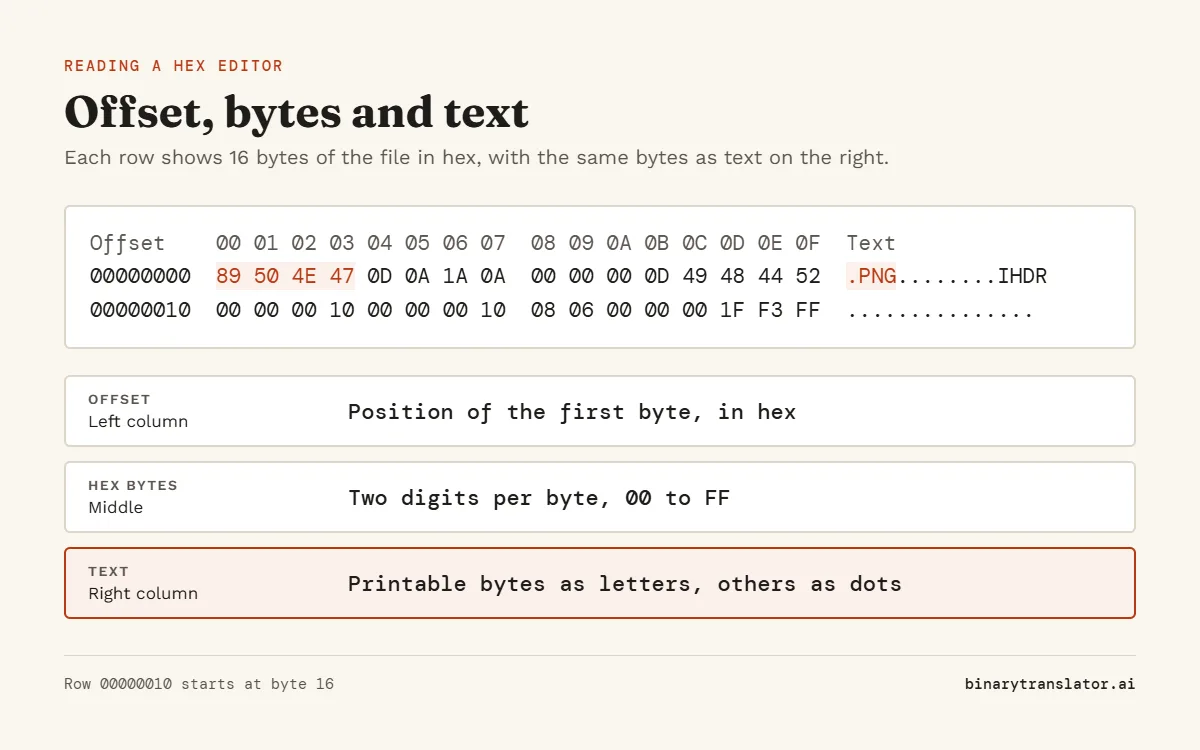
Each row shows 16 bytes. The left column is the offset, the position of the first byte in the row, counted from 0 in hex. The middle shows each byte as two hex digits from 00 to FF. The right column shows the same bytes as text, with a dot for any byte that is not a printable ASCII character.
So a row starting at offset 00000010 holds bytes 16 to 31 of the file. To find byte 300, go to 0x12C, because 300 in hex is 12C.
File signatures to look for
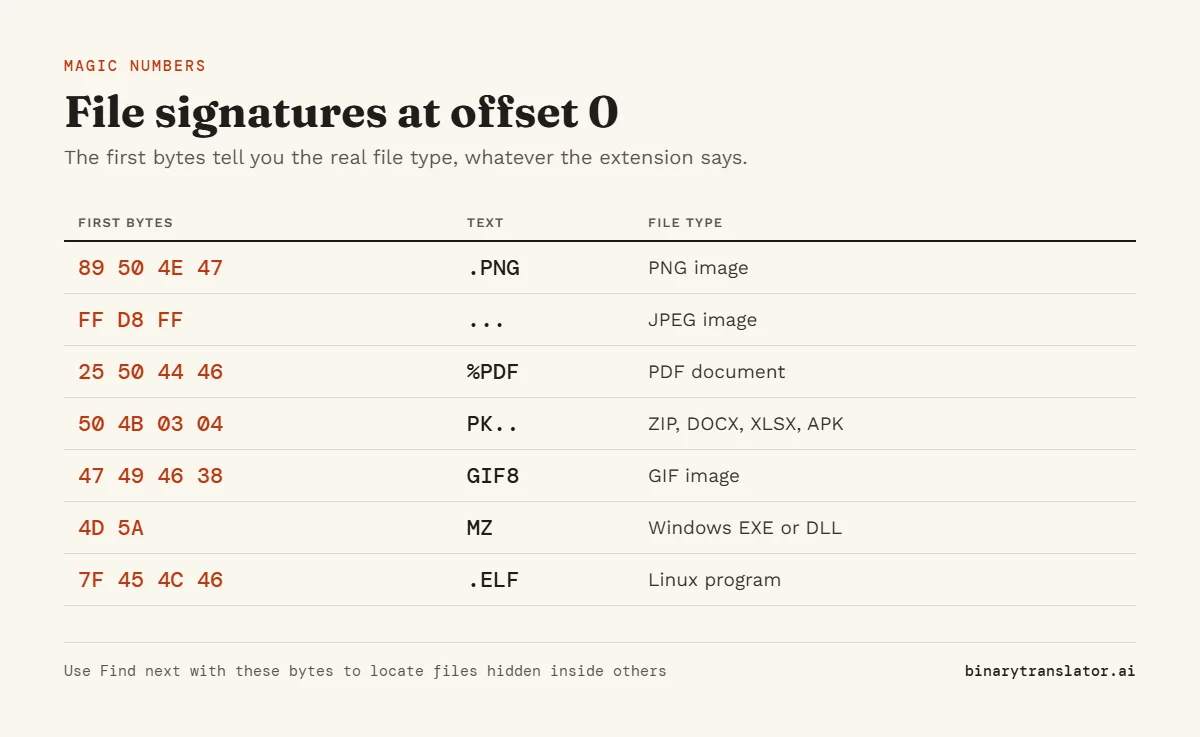
Most file types start with a fixed set of bytes, often called magic numbers, like the eight-byte PNG file signature. A hex editor shows them at offset 0, which tells you the real type even when the file extension is wrong.
| Bytes at offset 0 | Text | File type |
|---|---|---|
| 89 50 4E 47 0D 0A 1A 0A | .PNG.... | PNG image |
| FF D8 FF | ... | JPEG image |
| 25 50 44 46 2D | %PDF- | PDF document |
| 50 4B 03 04 | PK.. | ZIP, also DOCX, XLSX, APK and JAR |
| 47 49 46 38 | GIF8 | GIF image |
| 7F 45 4C 46 | .ELF | Linux program |
| 4D 5A | MZ | Windows program (EXE or DLL) |
| EF BB BF | ... | UTF-8 text with a byte order mark |
What people use a hex editor for
- Checking why a file will not open, by comparing its first bytes with the table above.
- Changing a value in a game save or a settings file where the number sits at a known offset.
- Removing a byte order mark or a stray character that a text editor hides.
- Learning how numbers are stored: select four bytes and the inspector shows the 32-bit value in little and big endian.
Hex editor tips
- Keep a copy of the original file. Undo all restores the version you opened, but only until you open another file.
- This editor changes bytes in place and keeps the file length the same, which is what most patching needs.
- Little endian, used by Intel and ARM chips, stores the lowest byte first. The bytes
2C 01 00 00are the number 300.
To get a text listing you can paste into a ticket or a chat, use the hex dump tool. To decode a selection of hex as text, use hex to text.
Frequently asked questions
Is this hex editor safe for private files?
Yes. The file is read by your browser and edited in memory. Nothing is uploaded to a server.
Can I insert or delete bytes?
Not in this version. It overwrites bytes and keeps the file size, which avoids breaking offsets inside the file.
What is the largest file I can open?
10 MB. Larger files work better in a desktop hex editor.
What is the difference between a hex viewer and a hex editor?
A viewer only shows the bytes. An editor also lets you change them and save the result. This tool does both.