Decimal to hex converter
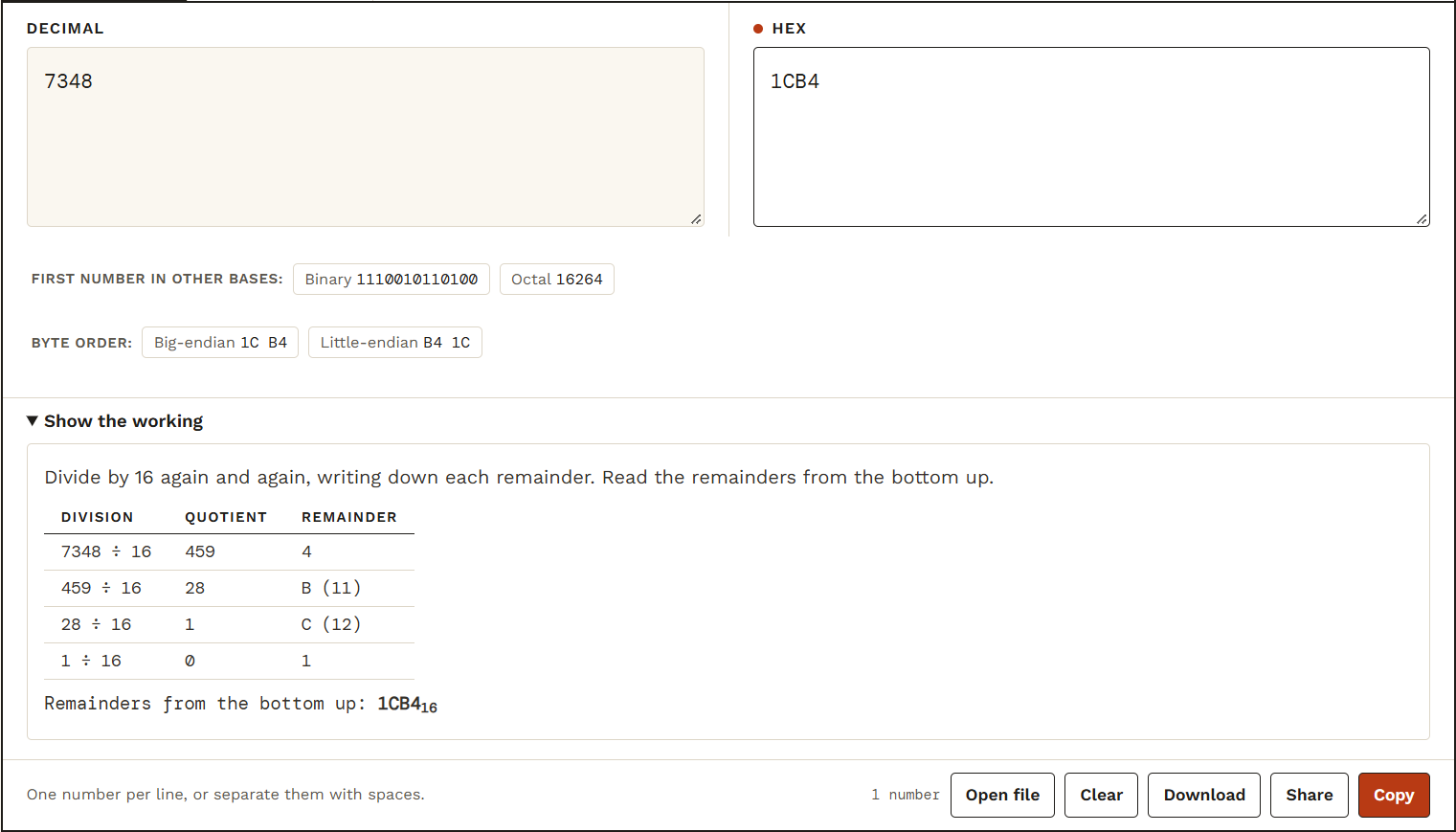
Type a decimal number and get the hexadecimal form as you type: 255 is FF and 1000 is 3E8. Output in uppercase, lowercase or with a 0x prefix, and open "Show the working" to see the divide-by-16 steps.
Show the working


Runs in your browser. Nothing you type is uploaded.
How to use the converter
- Enter one decimal number, or a list with one per line.
- Pick the hex style you need from the Output menu.
- Copy, download or share the result.
Width and Signed. Tick Signed and choose a Width to get the two's complement hex that programs print: -10 at 32 bits gives FFFFFFF6, and at 8 bits gives F6. Width also pads positive numbers, so 255 at 16 bits becomes 00FF. Binary and octal for the first number appear under the boxes, and Open file loads a list from a .txt or .csv file.
What the converter does with different inputs
Decimal numbers arrive with commas, exponents, minus signs and more digits than a calculator can hold. Each input below was typed into the converter on this page, and the right column shows what came back.
| Input | What you get |
|---|---|
| 1e3 (scientific notation) | 3E8, with a note that 1e3 was read as 1000 |
| 1_000 (underscore between groups) | 3E8 |
| 1,000 (comma as a thousands separator) | 1 and 0, as two separate values. Remove the comma. |
| 255 with Width set to 16-bit | 00FF |
| 256 with Width set to 8-bit | No result. The message says 256 does not fit in 8 bits and that the largest 8-bit value is 255. |
| -10 with Signed unticked | -A |
| -10 with Signed ticked, 32-bit | FFFFFFF6 |
| 200 with Signed ticked, 8-bit | No result. The message gives the signed 8-bit range, -128 to 127. |
| 0.1 (a fraction that never ends in hex) | 0.1999 and on to 32 places, with a note that the digits repeat |
| 340282366920938463463374607431768211455 (39 digits) | FFFFFFFFFFFFFFFFFFFFFFFFFFFFFFFF, with every digit kept |
| 0x10 (a number that is already hex) | Not accepted. The message says decimal can only use 0 to 9. Use the Hex to decimal tab for this one. |
How to convert decimal to hexadecimal
Divide the number by 16 and keep the remainder. Divide the quotient by 16 again, and repeat until the quotient is 0. Remainders from 10 to 15 become the letters A to F. The hex number is the remainders read from the last one up to the first.
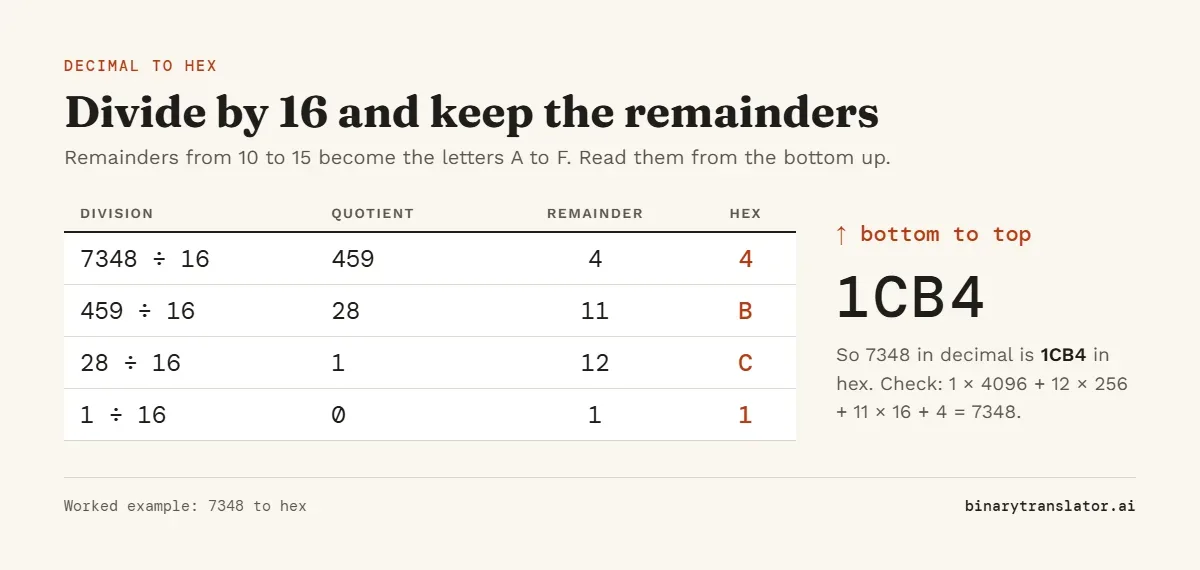
For 7348 the remainders are 4, 11 (B), 12 (C) and 1, so the answer is 1CB4. To check it, multiply back: 1 × 4096 + 12 × 256 + 11 × 16 + 4 = 7348. The hex to decimal converter does that sum for you. A smaller example: 1000 ÷ 16 = 62 remainder 8, 62 ÷ 16 = 3 remainder 14 (E), 3 ÷ 16 = 0 remainder 3, which gives 3E8.
The shortcut through binary
If dividing by 16 in your head is slow, convert to binary first and then group the bits in fours from the right. 1000 is 1111101000, which groups as 11 1110 1000, or 3, E, 8. The decimal to binary converter and binary to hex show each half of that route.
Worked examples
| Decimal | Remainders, first to last | Hex |
|---|---|---|
| 255 | 15, 15 | FF |
| 500 | 4, 15, 1 | 1F4 |
| 1000 | 8, 14, 3 | 3E8 |
| 1583 | 15, 2, 6 | 62F |
| 6854 | 6, 12, 10, 1 | 1AC6 |
| 7348 | 4, 11, 12, 1 | 1CB4 |
| 48879 | 15, 14, 14, 11 | BEEF |
| 63548 | 12, 3, 8, 15 | F83C |
| 65535 | 15, 15, 15, 15 | FFFF |
The middle column is in the order you write the remainders down. Reverse it to get the hex digits.
Decimal to hex table
| Decimal | Hex | Decimal | Hex |
|---|---|---|---|
| 10 | A | 100 | 64 |
| 11 | B | 127 | 7F |
| 12 | C | 128 | 80 |
| 13 | D | 255 | FF |
| 14 | E | 256 | 100 |
| 15 | F | 1000 | 3E8 |
| 16 | 10 | 4096 | 1000 |
| 32 | 20 | 65535 | FFFF |
RGB to hex color codes
Web colors are three decimal values from 0 to 255, one each for red, green and blue. To get the hex code, convert each value to two hex digits and join them.
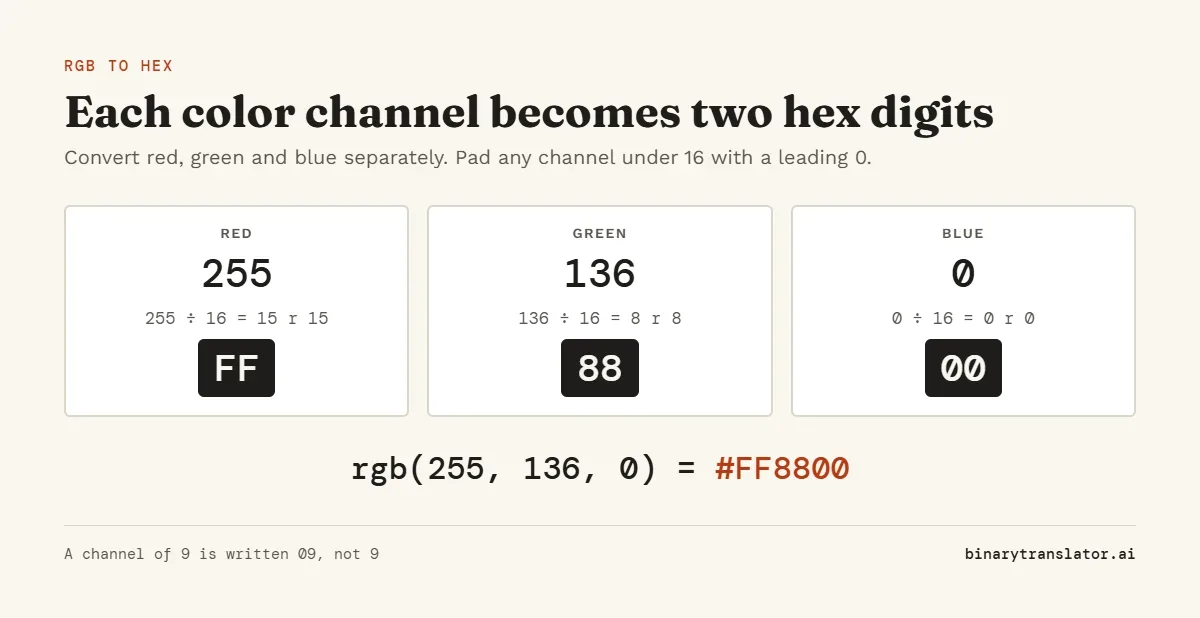
Any value under 16 needs a leading zero, so 9 becomes 09, not 9. Leaving it out shifts every digit after it and gives a different color. Type the three numbers on separate lines to convert them together.
Set Width to 8-bit and the converter adds the leading zero for you, so 9 comes out as 09.

Fractions and negative numbers
For a fraction, multiply by 16 instead of dividing, and take the whole-number part each time as the next digit. 0.5 × 16 = 8, so 0.5 is 0.8. 0.1 gives 1.6, then 0.6 × 16 = 9.6, and the 9 repeats forever: 0.1999.... The converter shows up to 32 hex places and says when the digits repeat.
A negative number like -10 comes out as -A. Tick Signed with a 32-bit width to get FFFFFFF6 instead. Programs that print a negative int in hex usually show the two's complement form instead, which for a 32-bit -10 is FFFFFFF6. You get it by adding 4294967296 to the negative number and converting the result. For 16 bits add 65536, and -10 becomes FFF6.

Decimal to hex in Excel, Python and JavaScript
Excel and Google Sheets: =DEC2HEX(255) returns FF, and =DEC2HEX(9, 2) pads to 09. As Microsoft's DEC2HEX reference explains, Excel returns negative numbers as 10-digit two's complement values, so =DEC2HEX(-10) gives FFFFFFFFF6.
Python: hex(255) returns '0xff' and format(255, '02X') returns 'FF', and the Python int to hex guide covers padding and converting back with int(text, 16). Python's format specification lists the other options. JavaScript: (255).toString(16) returns "ff"; add .toUpperCase() and .padStart(2, '0') for color codes.
Frequently asked questions
What is 10 decimal in hex?
A. Hex uses the letters A to F for the values 10 to 15, and 16 is written 10.
What is 255 in hex?
FF, the largest value that fits in one byte.
What is 100 in hex?
64. 6 × 16 + 4 = 100.
How do I convert a color to a hex code?
Take the red, green and blue values (0 to 255), convert each to two hex digits and write them after a #. rgb(255, 136, 0) becomes #FF8800.
Why does hex use letters?
Base 16 needs sixteen single-character digits. 0 to 9 cover ten of them, so A to F stand for 10 to 15.