Python
Convert int to binary and hex in Python
bin(), hex(), format() and int(text, base) cover every conversion between integers, binary, hex and octal strings, including padding and negatives.
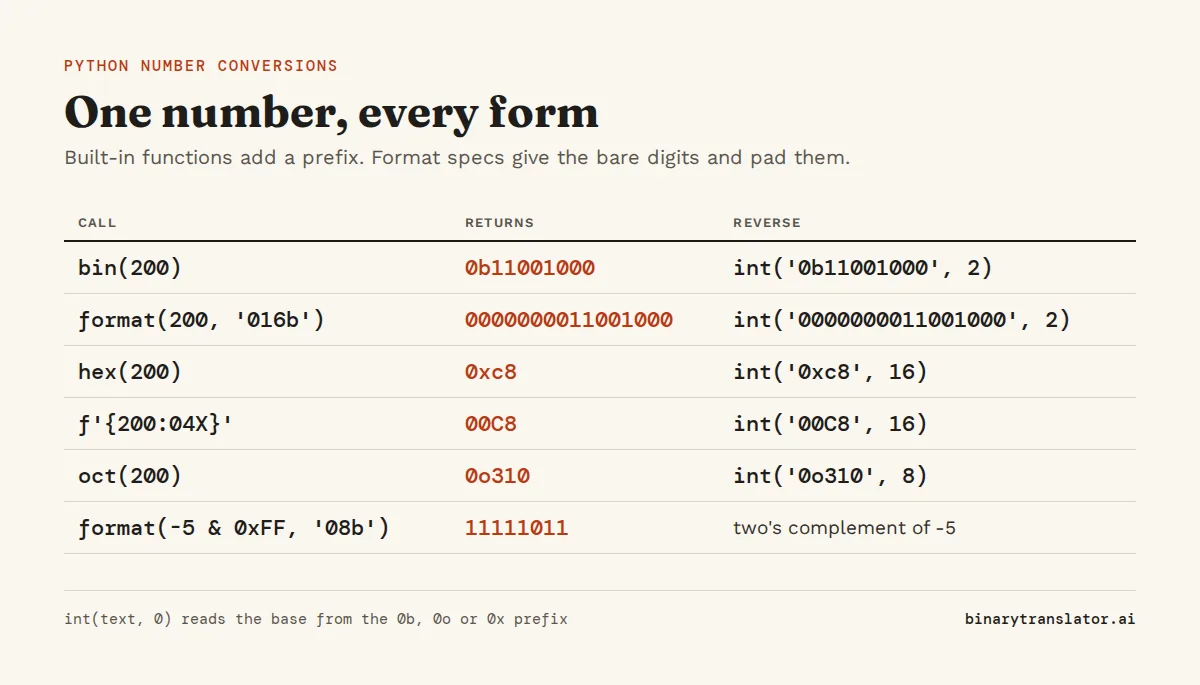
Turning 10 into '1010', 255 into 'ff', or '1010' back into 10 takes one call in Python. Use format(n, 'b') for binary, format(n, 'x') for hex and int(text, base) to go back. The built-ins bin() and hex() work too, but they put a 0b or 0x prefix in front. Format specs give you the bare digits, and a width such as '08b' pads them with zeros.
Key takeaways
| format(n, 'b') gives binary digits without a prefix, and bin(n) adds 0b. | |
| A width such as '08b' or '02x' pads the result with leading zeros. | |
| int(text, 2) and int(text, 16) read binary and hex strings, and base 0 reads the prefix. | |
| Negative numbers need a mask such as n & 0xFF to show their two's complement bits. | |
| Text must be encoded to bytes before it has a binary or hex form. |
n = 10
print(bin(n), format(n, 'b'), format(n, '08b'))
print(hex(255), format(255, 'x'), format(255, '02X'))
print(int('1010', 2), int('ff', 16))
0b1010 1010 00001010
0xff ff FF
10 255Try a number
Enter a number in decimal, binary, hex or octal. The tool shows each Python expression next to the exact value it returns, so you can copy the one that fits your code.
Convert an int to binary
Python gives you bin(), format() and f-strings. All three produce the same digits and differ only in the prefix and the padding. For most code, use format(n, 'b') or the f-string version.
n = 37
print(bin(n))
print(format(n, 'b'))
print(f'{n:b}')
print(f'{n:08b}')
print(f'{n:#010b}')
print(f'{1234567:_b}')
0b100101
100101
100101
00100101
0b00100101
1_0010_1101_0110_1000_0111bin() always adds 0b. A lot of code strips it with bin(n)[2:], which works until a negative number shows up: bin(-5)[2:] gives 'b101', because the string starts with a minus sign and the slice cuts in the wrong place. format(n, 'b') never adds the prefix, so there is nothing to cut.
In Python's format spec mini-language, the number before b is the minimum width, and a leading 0 fills the gap with zeros. That is how you get a full byte such as 00100101. With # the prefix counts toward the width, so '#010b' means 10 characters including 0b. An underscore groups the digits in fours, which makes long values easier to read.
Negative numbers and two's complement
bin(-5) returns '-0b101', a minus sign in front of the positive value. Python does this because its integers have no fixed size, so there is no top bit to use as a sign. Hardware and file formats work with a fixed number of bits and store negatives in two's complement, where -5 in 8 bits is stored as 256 - 5 = 251. To get that form, mask the number to the width you want with & 0xFF for 8 bits, & 0xFFFF for 16 bits, and so on.
n = -5
print(bin(n))
print(format(n & 0xFF, '08b'))
print(format(n & 0xFFFF, '016b'))
-0b101
11111011
1111111111111011To check a result, run the same number through the two's complement calculator. For -5 in 8 bits you should get 11111011.
Convert binary to int
int() takes a second argument, the base, as the Python docs for int() explain. With base 2 it reads a string of 0s and 1s. The 0b prefix and underscores are both allowed. With base 0, Python reads the base from the prefix, so one call handles 0b, 0o and 0x input.
print(int('100101', 2))
print(int('0b100101', 2))
print(int('1111_0000', 2))
print(int('0b100101', 0), int('0x25', 0), int('0o45', 0))
print(0b100101)
37
37
240
37 37 37
37The last line is a binary literal in source code, which Python turns into the int 37 when the file is compiled. Base 0 has one trap: without a prefix it treats the string as decimal, so int('1010', 0) is one thousand and ten, not ten.
To read a binary string as a signed two's complement number, convert it normally, then subtract 2 to the power of the width if the top bit is 1. That undoes the masking from the previous section: 11111011 reads as 251, and 251 - 256 is -5.
def signed(bits):
    n = int(bits, 2)
    return n - (1 << len(bits)) if bits[0] == '1' else n

print(signed('11111011'), signed('01111111'), signed('1000000000000000'))
-5 127 -32768Convert an int to hex
hex() returns lowercase digits with 0x in front. For the bare digits, use 'x' for lowercase or 'X' for uppercase. Add a width with a leading zero when the length matters: a byte should always be 2 digits and a color 6, so 10 has to come out as 0a, not a.
print(hex(48879))
print(format(48879, 'x'), format(48879, 'X'))
print(f'{10:02x}', f'{10:#06x}')
r, g, b = 46, 139, 87
print(f'#{r:02X}{g:02X}{b:02X}')
0xbeef
beef BEEF
0a 0x000a
#2E8B57The last line builds a CSS color from three channel values, the same thing the RGB to hex converter does.
Convert a hex string to int
int(text, 16) reads hex. Upper or lowercase both work, and so does the 0x prefix. If you paste a color code straight in, you get ValueError: invalid literal for int() with base 16: '#2E8B57', because # is not a hex digit. Spaces inside the string fail the same way. Strip them first (spaces at the ends are fine).
print(int('ff', 16), int('FF', 16), int('0xff', 16))
print(int('#2E8B57'.lstrip('#'), 16))
color = '2E8B57'
print(tuple(int(color[i:i + 2], 16) for i in (0, 2, 4)))
255 255 255
3050327
(46, 139, 87)A hex string that stands for raw bytes, such as '48 65 6c 6c 6f', is a different job. Use bytes.fromhex() for that, covered in the bytes and strings guide.
Octal: oct() and int(text, 8)
Octal works the same way with oct(), the 'o' format spec and base 8. You will mostly meet it in Unix file permissions, where 755 means rwxr-xr-x. Octal fits there because each digit is exactly 3 bits, one bit each for read, write and execute.
import stat
print(oct(493), format(493, 'o'))
print(int('755', 8))
print(stat.filemode(0o100755))
0o755 755
493
-rwxr-xr-xText to binary or hex and back
A string has no binary form until you pick an encoding, because the same character can be different bytes. In UTF-8, é is two bytes, c3 a9. So encode the text first, then format each byte. To go back, turn each group into an int and decode the bytes. This is what the text to binary converter and the text to hex converter do in the browser.
text = 'Hi!'
data = text.encode('utf-8')
print(' '.join(f'{b:08b}' for b in data))
print(data.hex(' '))

bits = '01001000 01101001 00100001'
print(bytes(int(x, 2) for x in bits.split()).decode('utf-8'))
01001000 01101001 00100001
48 69 21
Hi!Write the conversion yourself
Interview questions and some courses ask for the conversion without bin() or int(). Repeated division by 2 builds the binary digits from right to left, and the doubling method reads them back from left to right. Both are explained step by step on the decimal to binary and binary to decimal pages.
def to_binary(n):
    if n == 0:
        return '0'
    digits = []
    while n > 0:
        digits.append(str(n % 2))
        n //= 2
    return ''.join(reversed(digits))

def from_binary(s):
    total = 0
    for bit in s:
        total = total * 2 + int(bit)
    return total

print(to_binary(37), from_binary('100101'))
100101 37Replace 2 with 16 and map 10 to 15 onto the letters A to F, and the same two functions convert hex.
What about floats?
bin() and hex() only accept integers, so bin(5.75) raises a TypeError. float.hex() prints the float in hex scientific notation. If you want the raw IEEE 754 bits as they sit in memory, pack the float with the struct module and format the bytes, which gives the same layout the IEEE 754 converter draws.
import struct
x = 5.75
print(x.hex())
raw = struct.pack('>f', x)
print(raw.hex(), format(int.from_bytes(raw, 'big'), '032b'))
0x1.7000000000000p+2
40b80000 01000000101110000000000000000000The Python struct guide explains the '>f' format string.
Cheat sheet
| Task | Code | Result for 200 |
|---|---|---|
| Int to binary | format(n, 'b') | 11001000 |
| Int to 16-bit binary | format(n, '016b') | 0000000011001000 |
| Int to binary with prefix | bin(n) | 0b11001000 |
| Int to hex | format(n, 'x') | c8 |
| Int to 4-digit uppercase hex | f'{n:04X}' | 00C8 |
| Int to octal | format(n, 'o') | 310 |
| Binary string to int | int('11001000', 2) | 200 |
| Hex string to int | int('c8', 16) | 200 |
| Any prefixed string to int | int('0xc8', 0) | 200 |
| Count the 1 bits | n.bit_count() (3.10+) | 3 |
| Number of bits needed | n.bit_length() | 8 |
Questions people ask
How do I convert an int to binary in Python?
Use format(n, 'b') for the bare digits or bin(n) for a string with the 0b prefix. Add a width to pad it, for example format(5, '08b') returns 00000101.
How do I convert binary to int in Python?
Call int() with base 2: int('1010', 2) returns 10. The string may include the 0b prefix and underscores.
How do I remove the 0b prefix from bin() in Python?
Use format(n, 'b') or f'{n:b}' instead of bin(). Slicing with bin(n)[2:] works for positive numbers but gives a wrong result for negative ones.
How do I convert a hex string to int in Python?
Use int(text, 16). It accepts upper and lowercase digits and the 0x prefix, so int('0xFF', 16) returns 255.
How do I convert an int to hex without 0x in Python?
Use format(n, 'x') for lowercase or format(n, 'X') for uppercase. Add a width such as '02x' to pad single digits with a zero.
How do I show a negative number in binary in Python?
Mask it to a fixed width first. format(-5 & 0xFF, '08b') returns 11111011, the 8-bit two's complement form. bin(-5) returns -0b101 instead.
About the authors

Zachary Painter is a technical writer at GitLab, where he writes developer documentation and UI text. He has written API documentation for REST and GraphQL APIs and reference docs for Kubernetes, Docker and command-line tools, earlier as a technical writer at Pomerium and a senior technical content writer at Stream. He holds a BA in English and German studies from the University of North Carolina at Greensboro. On binarytranslator.ai he writes guides and the how-to sections on tool pages.

Jack Goldsmith is a software engineer and data analyst in New York with a background in teaching. He taught computer science one-on-one at Arts and Athletics, where he worked through students' code with them, and taught Regents Algebra as a lead math teacher at Success Academy. He is an IT and data analysis fellow at the NYC Department of Health and Mental Hygiene and holds a BA in computer science from Queens College. On binarytranslator.ai he checks that worked examples and step-by-step explanations are correct and easy to follow.
Keep reading
All posts Programming
The xxd command: hex dumps on Linux and macOS
Use xxd to read the bytes in any file, get plain hex with -p, turn hex back into binary with -r, patch a byte, print bits, make C arrays and diff binary files.9 min read Programming
Base64 encode and decode in Python, JavaScript, Linux and PowerShell
Base64 one-liners for Python, the browser, Node.js, Linux, macOS and PowerShell, with a command builder and fixes for padding errors, echo newlines, line wrapping and UTF-16.13 min read Programming