Encoding
Base64 encode and decode in Python, JavaScript, Linux and PowerShell
Copy-ready Base64 one-liners for every platform, plus the newline, padding, line-wrap and text encoding problems that give wrong results.
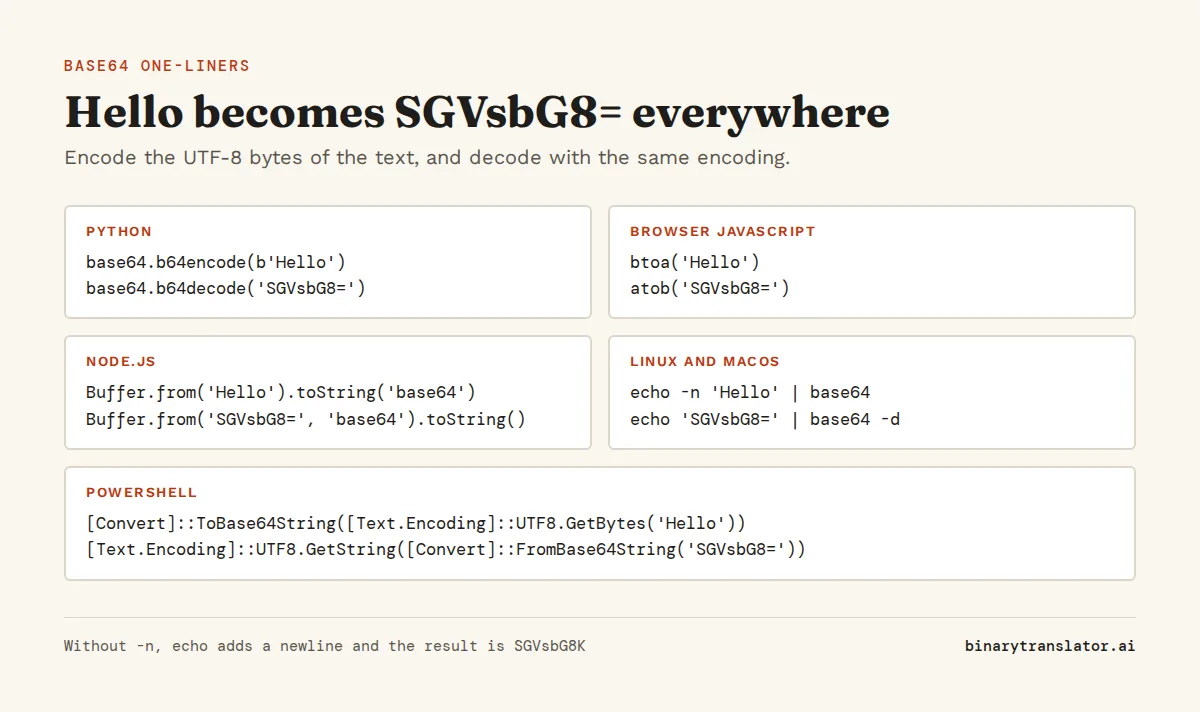
You've got a string like SGVsbG8= in a log file or an API response, and you want to know what's in it. Or you need to turn a password or a file into Base64 for a config. Every platform can do it in one line, and the table below has the line for each one. The catch is that Base64 works on bytes, not text. Your text becomes bytes, then the bytes become Base64, and almost every wrong result is one of those two steps going wrong: a stray newline, a different text encoding, missing = padding or the URL-safe alphabet.
Key takeaways
| Python uses base64.b64encode() and b64decode() on bytes, so encode text first and decode the result. | |
| btoa() and atob() only handle characters up to U+00FF, so use TextEncoder or Node.js Buffer for Unicode. | |
| On Linux, echo -n or printf keeps a newline out of the result, and -w 0 stops line wrapping. | |
| PowerShell needs an explicit text encoding: UTF8 for data, Unicode (UTF-16LE) only for -EncodedCommand. | |
| URL-safe Base64 swaps + and / for - and _ and often drops the = padding, which must be added back before decoding. |
| Where | Encode | Decode |
|---|---|---|
| Python | base64.b64encode(b'Hello').decode() | base64.b64decode('SGVsbG8=').decode() |
| JavaScript (browser) | btoa('Hello') | atob('SGVsbG8=') |
| Node.js | Buffer.from('Hello').toString('base64') | Buffer.from('SGVsbG8=', 'base64').toString() |
| Linux, macOS | echo -n 'Hello' | base64 | echo 'SGVsbG8=' | base64 -d |
| PowerShell | [Convert]::ToBase64String([Text.Encoding]::UTF8.GetBytes('Hello')) | [Text.Encoding]::UTF8.GetString([Convert]::FromBase64String('SGVsbG8=')) |
Get the command for your text
Type the text you want to encode. The tool shows the Base64 result and the exact command for each language, with the quotes and escapes already handled, ready to copy.
To decode a string without writing any code, paste it into the Base64 decoder. It also detects images and PDFs, which the Base64 to image and Base64 to PDF converters save as files.
Base64 in Python
The base64 module takes bytes and returns bytes, in both directions. So a text round trip has two extra steps: .encode('utf-8') before you encode, and .decode() on the result when you want a normal string to print or put in JSON.
import base64

encoded = base64.b64encode('Hello, World'.encode('utf-8')).decode('ascii')
print(encoded)

decoded = base64.b64decode(encoded).decode('utf-8')
print(decoded)
SGVsbG8sIFdvcmxk
Hello, WorldLeave off the final .decode() and you get bytes, printed as b'SGVsbG8sIFdvcmxk'. Writing those bytes to a file is fine. Put them in an f-string or a JSON body, though, and the receiver gets the literal text b'SGVsbG8sIFdvcmxk', with the b and quotes, and it no longer decodes to your text. The bytes and strings guide explains the difference.
Encode and decode files
Read the file in binary mode and pass the bytes straight in. This is how you embed an image in HTML or JSON, or send a PDF through an API that only accepts text.
import base64

with open('photo.png', 'rb') as f:
    b64 = base64.b64encode(f.read()).decode('ascii')

with open('copy.png', 'wb') as f:
    f.write(base64.b64decode(b64))
Fix "Incorrect padding"
Base64 always comes in groups of 4 characters, and = fills the last group when the data runs out. URLs and JWTs often strip those = signs to save space, so when you paste one into Python, b64decode() raises binascii.Error: Incorrect padding. Add them back and it decodes:
import base64
s = 'SGVsbG8'
print(base64.b64decode(s + '=' * (-len(s) % 4)))b'Hello'By default b64decode() also skips characters that are not in the Base64 alphabet, such as spaces and line breaks, so 'SGVs bG8=' still gives b'Hello'. That is convenient for pasted text, but it also hides corrupted input. Pass validate=True when you would rather get binascii.Error: Only base64 data is allowed than a quietly different result.
From the terminal with python -m base64
Python also works as a command-line tool. Reach for it on a Windows machine that has Python but no base64 command, or in a script that has to work on any system with Python installed.
echo -n 'Hello' | python3 -m base64
echo 'SGVsbG8=' | python3 -m base64 -d
SGVsbG8=
HelloBase64 in JavaScript (browser)
btoa() encodes and atob() decodes. Both exist in every browser and in Node.js 16 and later. The problem is that btoa() treats each character as one byte, so it only accepts characters from U+0000 to U+00FF, as MDN's btoa() reference notes. Anything above that, such as the euro sign or an emoji, throws an InvalidCharacterError.
console.log(btoa('Hello'));
console.log(atob('SGVsbG8='));
try {
btoa('Price: 5 €');
} catch (e) {
console.log(e.name);
}SGVsbG8=
Hello
InvalidCharacterErrorFor Unicode text, convert it to UTF-8 bytes with TextEncoder first, then turn each byte into a character for btoa(). Decoding reverses the steps with TextDecoder. These two helpers work in every current browser:
function toBase64(text) {
const bytes = new TextEncoder().encode(text);
let bin = '';
for (const b of bytes) bin += String.fromCharCode(b);
return btoa(bin);
}
function fromBase64(b64) {
const bin = atob(b64);
const bytes = Uint8Array.from(bin, c => c.charCodeAt(0));
return new TextDecoder().decode(bytes);
}
const enc = toBase64('Price: 5 €');
console.log(enc);
console.log(fromBase64(enc));UHJpY2U6IDUg4oKs
Price: 5 €Recent browser versions also add Uint8Array.prototype.toBase64() and Uint8Array.fromBase64(), which skip the string step and support the URL-safe alphabet. Check that your target browsers support them before you rely on them.
Base64 in Node.js
In Node.js, use Buffer rather than btoa(). It converts text to UTF-8 bytes for you, so the euro sign that broke btoa() above works without a helper. It also supports the URL-safe variant under the name 'base64url'.
const enc = Buffer.from('Price: 5 €', 'utf8').toString('base64');
console.log(enc);
console.log(Buffer.from(enc, 'base64').toString('utf8'));
console.log(Buffer.from('Hi?>', 'utf8').toString('base64url'));UHJpY2U6IDUg4oKs
Price: 5 €
SGk_PgBase64 on the Linux and macOS command line
The base64 command reads standard input or a file, and -d (or --decode) decodes. When you encode a string with echo, add -n or use printf, because plain echo adds a newline and the newline gets encoded too:
echo -n 'Hello' | base64
echo 'Hello' | base64
printf '%s' 'Hello' | base64
echo 'SGVsbG8=' | base64 -d; echoSGVsbG8=
SGVsbG8K
SGVsbG8=
HelloThe second line ends in K instead of = because the encoded data is Hello plus a line feed. This is the classic version of the bug: you encode a password with echo, paste it into a config file or a Kubernetes secret, and login fails. Decode the stored value and you will find a newline at the end of the password. Encode it again with echo -n. The final echo in the last command only prints a newline, because the decoded text has none.
Files and line wrapping
GNU base64, the version on most Linux systems, wraps its output at 76 characters. That breaks values that must stay on one line, such as Kubernetes secrets and environment variables, because the line break ends up inside the value. Turn wrapping off with -w 0.
head -c 60 /dev/zero > zeros.bin
base64 zeros.bin
echo '---'
base64 -w 0 zeros.bin; echo
base64 -w 0 zeros.bin | base64 -d | wc -c
AAAAAAAAAAAAAAAAAAAAAAAAAAAAAAAAAAAAAAAAAAAAAAAAAAAAAAAAAAAAAAAAAAAAAAAAAAAA
AAAA
---
AAAAAAAAAAAAAAAAAAAAAAAAAAAAAAAAAAAAAAAAAAAAAAAAAAAAAAAAAAAAAAAAAAAAAAAAAAAAAAAA
60To decode a file, base64 -d encoded.txt > output.bin writes the original bytes. macOS ships a different base64. It does not wrap by default, older versions decode with -D rather than -d, and current versions accept -d, -D and --decode and take the input file with -i. If a script must run on both systems, skip those differences and use openssl base64 -A to encode and openssl base64 -d -A to decode, which behave the same everywhere.
When base64 -d says "invalid input"
GNU base64 -d stops with base64: invalid input when it meets a character outside the alphabet, or a string whose length is not a multiple of 4. It still prints whatever it decoded before the error. So the output can look right while the exit code is 1, and a script that checks $? fails for no visible reason. For missing padding, add the = signs as in the Python section. For URL-safe input, convert it first with tr '_-' '/+'. For pasted text with stray spaces, the -i flag on Linux skips characters outside the alphabet.
echo 'SGVsbG8' | base64 -d; echo " (exit $?)"
echo 'SGVsbG8=' | base64 -d; echo " (exit $?)"
Hello (exit 1)
Hello (exit 0)Base64 in PowerShell
PowerShell has no base64 command, but .NET does the work in one line. [Convert]::ToBase64String() takes a byte array, so you first turn the text into bytes with an encoding you choose. [Convert]::FromBase64String() gives you bytes back, and you turn them into text with the same encoding.
$text = 'Hello'
$b64 = [Convert]::ToBase64String([Text.Encoding]::UTF8.GetBytes($text))
$b64
[Text.Encoding]::UTF8.GetString([Convert]::FromBase64String($b64))
SGVsbG8=
HelloThat choice of encoding is where PowerShell goes wrong most often. The name [Text.Encoding]::Unicode sounds like the safe default, but in .NET it means UTF-16LE, two bytes per character. That is what powershell -EncodedCommand expects, but not what most other systems send. The same word gives a different Base64 string, and decoding a UTF-8 string with Unicode gives Chinese-looking characters instead of the text:
[Convert]::ToBase64String([Text.Encoding]::Unicode.GetBytes('Hello'))
[Text.Encoding]::Unicode.GetString([Convert]::FromBase64String('SGVsbG8='))
SABlAGwAbABvAA==
效汬�Use UTF8 for anything that goes to other systems, because that is what Python, Node.js and Linux tools produce and expect. Keep Unicode for -EncodedCommand, which you encode like this:
$cmd = 'Write-Output hi'
$enc = [Convert]::ToBase64String([Text.Encoding]::Unicode.GetBytes($cmd))
powershell -EncodedCommand $enchiFor files, [IO.File]::ReadAllBytes() and [IO.File]::WriteAllBytes() pair with the same two methods. In the old Command Prompt, certutil -encode in.bin out.txt and certutil -decode out.txt in.bin do the job. Expect BEGIN and END CERTIFICATE lines around the output of -encode, and delete them if the value goes anywhere other than certutil -decode.
URL-safe Base64 and JWTs
Standard Base64 uses + and /, and both cause trouble in URLs: a + in a query string can turn into a space, and / separates path segments and folders. The URL-safe alphabet defined in RFC 4648, the Base64 standard, replaces them with - and _, and usually drops the = padding. JSON Web Tokens use it for all three of their parts, so a JWT header decodes like this:
import base64, json

def b64url_decode(s):
    return base64.urlsafe_b64decode(s + '=' * (-len(s) % 4))

header = 'eyJhbGciOiJIUzI1NiIsInR5cCI6IkpXVCJ9'
print(json.loads(b64url_decode(header)))
print(base64.urlsafe_b64encode(b'Hi?>'), base64.b64encode(b'Hi?>'))
{'alg': 'HS256', 'typ': 'JWT'}
b'SGk_Pg==' b'SGk/Pg=='Decoding a JWT shows you what is inside, but it does not check the signature. Anyone can edit the payload and re-encode it, so verify the token with a JWT library before you trust its claims.
Errors and wrong output
Problems show up in one of two ways. Either the decoder stops with an error, or it decodes without complaint and the result is wrong: Hello comes back with a newline, or the text arrives with a 0 byte between letters. Find what you see in the first column.
| What you see | Cause | Fix |
|---|---|---|
binascii.Error: Incorrect padding (Python) | The = padding was removed | Add '=' * (-len(s) % 4) |
InvalidCharacterError (JavaScript) | btoa() got a character above U+00FF, or atob() got URL-safe or broken input | Use the TextEncoder helper, or replace - and _ |
base64: invalid input (Linux) | Missing padding, URL-safe characters or stray text | Fix the padding, map -_ to +/, or add -i for stray spaces or line breaks |
The result ends in K or Cg== unexpectedly | A newline from echo was encoded | Use echo -n or printf |
| The decoded text is garbled or has a 0 byte between letters | Encoded as UTF-16 and decoded as UTF-8, or the reverse | Use the same text encoding on both sides |
| The output has line breaks in it | GNU base64 wraps at 76 characters | Add -w 0 |
To check which one you have, paste the Base64 string into the Base64 to hex converter and look at the bytes. A stray newline shows up as 0a at the end, and UTF-16 text has 00 after every letter, as in 48 00 65 00 for He.
Questions people ask
How do I decode Base64 in Python?
Use base64.b64decode(s), which returns bytes, then call .decode('utf-8') if the data is text. For URL-safe strings use base64.urlsafe_b64decode() and add any missing = padding first.
How do I decode Base64 on Linux?
Pipe the string into base64 -d, for example echo 'SGVsbG8=' | base64 -d, or decode a file with base64 -d input.txt > output.bin.
How do I encode a string to Base64 in PowerShell?
Run [Convert]::ToBase64String([Text.Encoding]::UTF8.GetBytes('your text')). Use [Text.Encoding]::Unicode instead of UTF8 only when the result is for powershell -EncodedCommand.
Why does btoa() fail with InvalidCharacterError?
btoa() only accepts characters up to U+00FF. Convert the text to UTF-8 bytes with TextEncoder first, or use Buffer in Node.js.
Why is my Base64 output different from an online encoder?
Usually a trailing newline from echo, or a different text encoding such as UTF-16 instead of UTF-8. Encode with echo -n or printf and make sure both sides use UTF-8.
What is the difference between Base64 and Base64url?
Base64url replaces + with - and / with _, and usually leaves out the = padding, so the result is safe in URLs and file names. JWTs use Base64url.
About the authors

Zachary Painter is a technical writer at GitLab, where he writes developer documentation and UI text. He has written API documentation for REST and GraphQL APIs and reference docs for Kubernetes, Docker and command-line tools, earlier as a technical writer at Pomerium and a senior technical content writer at Stream. He holds a BA in English and German studies from the University of North Carolina at Greensboro. On binarytranslator.ai he writes guides and the how-to sections on tool pages.

Sam Siewert is the O'Connell Endowed Professor of computer science at California State University, Chico, where he teaches numeric and parallel computing, computer vision and machine learning. He has taught real-time embedded systems at the University of Colorado Boulder since 2000 and co-founded its Embedded Systems Engineering program. Both fields depend on how computers store numbers in binary, from fixed-width integers to floating point. He earned his PhD and MS in computer science at the University of Colorado Boulder and is a senior member of IEEE. On binarytranslator.ai he reviews the math behind the converters and the number system guides.
Keep reading
All posts Programming
The xxd command: hex dumps on Linux and macOS
Use xxd to read the bytes in any file, get plain hex with -p, turn hex back into binary with -r, patch a byte, print bits, make C arrays and diff binary files.9 min read Programming
Python bitwise operators and XOR, with examples
Python's bitwise operators &, |, ^, ~, << and >> explained bit by bit. XOR for flipping bits, ciphers and logical XOR, masks and flags, shifts, and & versus and.10 min read Programming