Encoding
What is Base64?
How Base64 turns any data into 64 safe characters, why the result ends in = and is a third bigger, and where you will see it.
You open an API response, an email source or a web page and find a long run of letters like SGVsbG8sIFdvcmxk, often ending in one or two = signs. That is Base64. It writes any data, a photo, a PDF or plain text, using only 64 characters that every system can carry safely: A to Z, a to z, 0 to 9, + and /. Every 3 bytes of data become 4 characters, so the encoded version is about a third bigger than the original. It is an encoding, not encryption, so anyone can turn it back into the original bytes.
Key takeaways
| Base64 writes any bytes with 64 safe characters: A to Z, a to z, 0 to 9, + and /. | |
| Every 3 bytes (24 bits) become 4 characters of 6 bits each, so the output is about 33% bigger. | |
| One or two = signs at the end pad a last block that had only 2 or 1 bytes. | |
| Base64 is an encoding, not encryption: anyone can decode it, so never use it to protect secrets. | |
| Base64url swaps + and / for - and _ and drops the padding so the result is safe in URLs and JWTs. |
Type something below to watch it happen. The tool splits your text into bytes, regroups the bits in sixes and looks up one character for each group.
How Base64 encoding works, step by step
Take the text Hi!. It is three characters, and in ASCII each one is one byte: H is 72, i is 105 and ! is 33. Write those bytes in binary and you get 24 bits in a row.
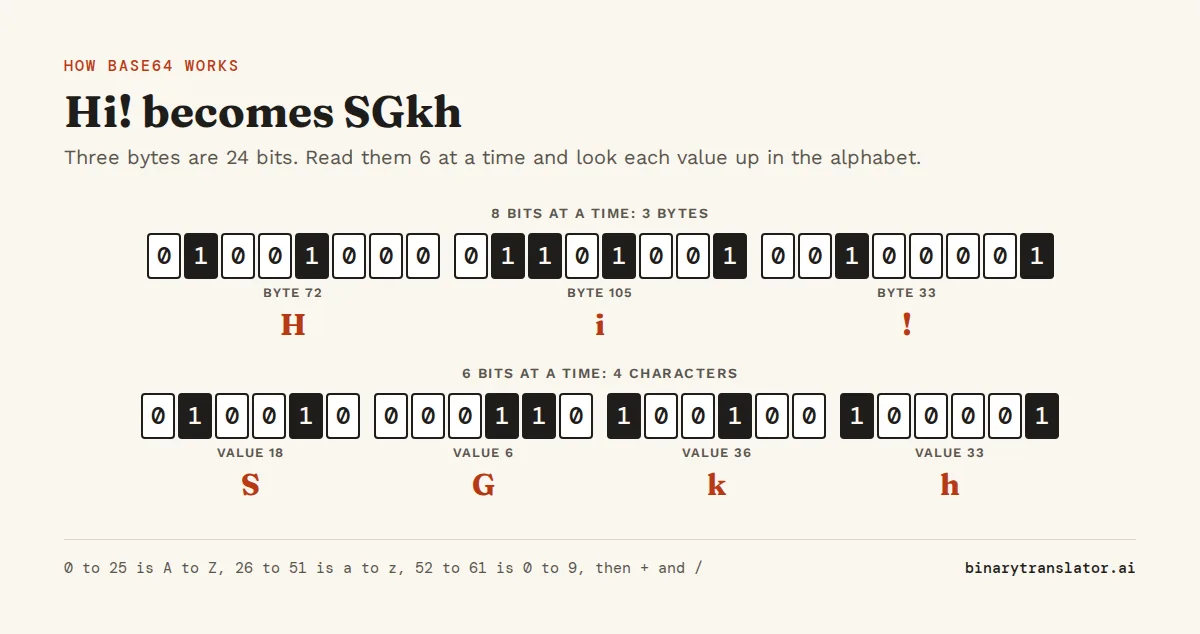
- Write each byte as 8 bits:
01001000 01101001 00100001. - Cut the same 24 bits into four groups of 6:
010010 000110 100100 100001. - Read each group as a number from 0 to 63: 18, 6, 36 and 33.
- Look each number up in the Base64 alphabet: 18 is S, 6 is G, 36 is k and 33 is h.
So Hi! is SGkh in Base64. The bits never change. Base64 only changes how many of them you read at a time, 6 instead of 8, and 6 bits can always be shown as one printable character. Decoding runs the same steps backwards, which is all the Base64 decoder does with a string you paste in.
Three bytes are 24 bits, and 24 bits are exactly four groups of 6. That is why Base64 always works in blocks of 3 bytes in and 4 characters out.
The 64 characters in the Base64 alphabet
Each 6-bit group is a number from 0 to 63, and the alphabet in RFC 4648, the Base64 standard, gives each number one character:
| Values | Characters | Example |
|---|---|---|
| 0 to 25 | A to Z | 0 is A, 18 is S |
| 26 to 51 | a to z | 26 is a, 36 is k |
| 52 to 61 | 0 to 9 | 52 is 0, 61 is 9 |
| 62 | + | |
| 63 | / | |
| padding | = | fills the last block when the data runs out |
The characters were picked because they look the same in every character set that mattered when Base64 was designed, including the old IBM mainframe sets, and because no mail server or text system treats them as special. A space, a quote or a line break could be changed or removed on the way. These 64 characters survive.
The count is 64 because 64 is 2 to the power of 6, so one character holds exactly 6 bits. With 128 characters each one could hold 7 bits, but there are not 128 characters that are safe everywhere. Base64 is case sensitive: a is 26 and A is 0, so changing the case of a single letter changes the data.
Why Base64 strings end with = or ==
The 3-bytes-to-4-characters rule needs the data to divide by 3. When it does not, the last block is short, and = marks how short it was.
import base64
for text in [b'Hi!', b'Hi', b'H']:
    print(text, base64.b64encode(text))
b'Hi!' b'SGkh'
b'Hi' b'SGk='
b'H' b'SA=='- Three bytes fill a block, so
Hi!gets no padding. - Two bytes are 16 bits. Base64 adds two zero bits to make 18, writes three characters and adds one
=:SGk=. - One byte is 8 bits. Base64 adds four zero bits to make 12, writes two characters and adds
==:SA==.
That is why a Base64 string's length is always a multiple of 4, and why you never see three = signs. The padding tells the decoder that the zero bits it added are not real data. Some formats, such as URLs and JSON Web Tokens, leave the = off to save space, and a strict decoder then fails with a padding error until you add them back.
Why Base64 makes data bigger
Base64 output is 4 characters for every 3 bytes, rounded up to a full block. The length of the encoded string is 4 × ceil(n ÷ 3), where n is the number of bytes. A 30 KB image becomes 40 KB of text, and a 3 MB PDF becomes 4 MB.
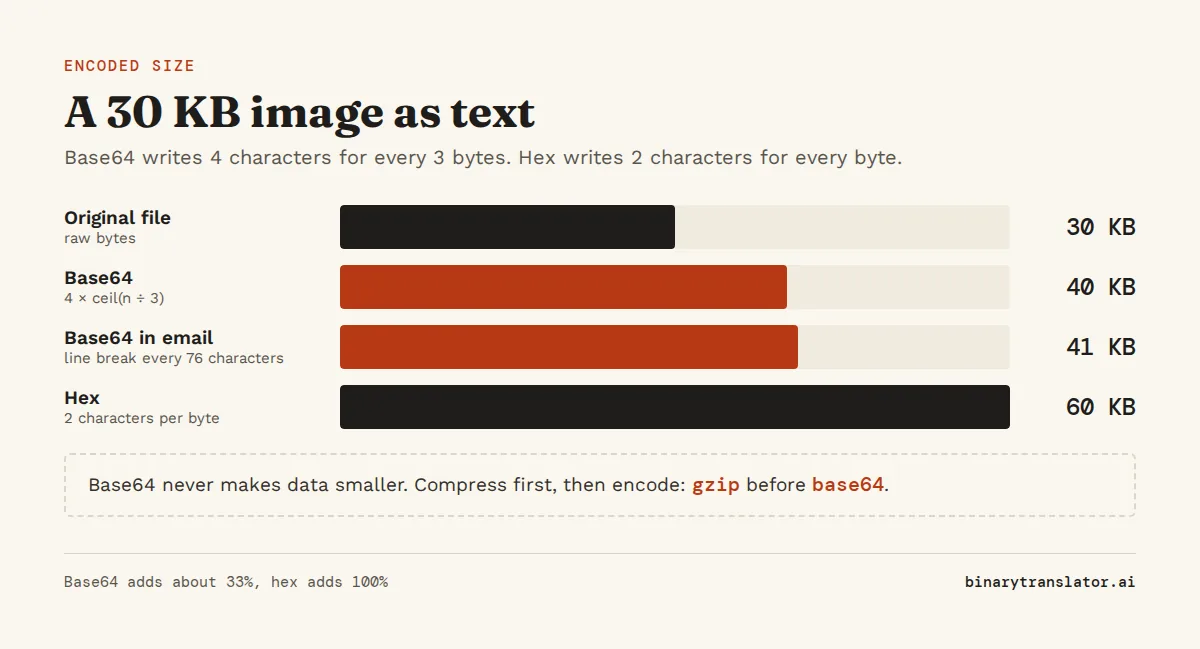
Email adds a little more. the MIME standard, RFC 2045, says encoded lines can be at most 76 characters long, so every 76 characters get a line break, which adds about 2.6% on top of the 33%. Base64 never makes data smaller. If size matters, compress the file first, for example with gzip, and then encode the compressed bytes. Encoding first and compressing after works less well, because Base64 text has less repetition for the compressor to find.
Why Base64 exists
A lot of software was built to move text, not raw bytes. Early email could only carry 7-bit ASCII in lines of limited length. A byte such as 0 or 10, which appears all the time in an image, could end a line, end a string or be dropped by a mail server along the way. JSON, XML, URLs and HTTP headers have the same problem today: they hold text, and some byte values have special meanings in them.
Base64 solves this by giving up some space in exchange for safety. The encoded data uses only characters that every one of these systems passes through unchanged, so a file can travel inside an email, a JSON field or a URL and come out the other end with every byte intact.
Where you will meet Base64
Most Base64 you see falls into a handful of cases, and the first few characters often tell you which one it is.
- Images inside HTML and CSS. A data URI such as
data:image/png;base64,iVBORw0KGgo...holds the whole image in the page, so the browser needs no extra request. The Base64 to image converter turns one back into a file you can save. - Email attachments. Open the source of an email and every attachment sits under
Content-Transfer-Encoding: base64, in lines of 76 characters. - Files in API responses. Shipping labels, invoices and signed documents often arrive as a Base64 field in JSON, and the Base64 to PDF converter opens them.
- JSON Web Tokens. A JWT is three Base64url parts separated by dots. The first two usually start with
eyJ, which is how{"looks in Base64. - HTTP Basic authentication. The header
Authorization: Basic dXNlcjpwYXNzcarriesuser:pass, Base64 encoded. - Certificates and keys. A PEM file between
-----BEGIN CERTIFICATE-----lines is Base64 of the binary certificate.
Recognize what is inside from the first characters
Files start with fixed bytes called magic numbers, so their Base64 versions start with fixed characters too. If you know these, you can guess what a string holds before you decode it.
| Base64 starts with | Decoded bytes start with | What it is |
|---|---|---|
iVBORw0KGgo | 89 50 4E 47 | PNG image |
/9j/ | FF D8 FF | JPEG image |
R0lGOD | GIF8 | GIF image |
JVBERi0 | %PDF- | PDF document |
UEsDB | PK | ZIP file, and Word or Excel files, which are ZIP inside |
eyJ | {" | JSON, often part of a JWT |
The Base64 decoder checks these signatures for you and says what kind of file it found. To look at the raw bytes yourself, the Base64 to hex converter shows them in hex.
Base64 is not encryption
Base64 has no key and no secret. Anyone who sees dXNlcjpwYXNz can decode it to user:pass in a second, which is why HTTP Basic authentication is only safe over HTTPS, where the whole connection is encrypted. Base64 hides data from a casual glance and nothing more.
So do not use it to store passwords or to protect personal data. Passwords belong in a password hash such as bcrypt or Argon2, and data that must stay private needs real encryption such as AES. Base64 is often used after encryption, to turn the encrypted bytes into text that fits in JSON or a database column, and that is the right job for it.
Base64url and other variants
Plain Base64 has two characters that cause trouble in URLs and file names: + can turn into a space in a query string, and / looks like a folder separator. Base64url swaps them for - and _ and usually drops the = padding. JWTs, many API keys and some file names use it. Everything else works the same way.
MIME Base64, the email version, is standard Base64 with a line break every 76 characters. Most decoders skip line breaks and spaces, so you can paste wrapped Base64 straight into a decoder. Our guide to Base64 in Python, JavaScript, Linux and PowerShell shows the commands for each variant.
Base64 compared with hex and other encodings
Base64 is one of several ways to write bytes as text. They differ in how much space they need and how easy they are to read.
| Encoding | Characters per 3 bytes | Size increase | Where it is used |
|---|---|---|---|
| Hex | 6 | 100% | hashes, colors, debugging, the hex dump view |
| Base32 | 4.8 | about 60% | one-time password secrets, case-insensitive codes |
| Base64 | 4 | about 33% | email, data URIs, JSON, JWTs |
| Ascii85 | 3.75 | about 25% | PDF and PostScript files |
Hex is the easiest to read, because each byte is always two characters, and it is the best choice when a person needs to look at the bytes. Base64 is the usual choice when data has to travel through a text channel, since it is compact and supported everywhere. Use Base32 when the text might be typed by hand or read out loud, because it has no lowercase letters and avoids look-alike characters.
Questions people ask
What is Base64 used for?
It carries binary data, such as images, PDFs and encrypted bytes, through systems that only handle text: email, JSON, XML, URLs, HTTP headers and HTML. Data URIs, email attachments and JWTs are the most common examples.
Is Base64 encryption?
No. Base64 is an encoding with no key, so anyone can decode it. Use encryption such as AES to keep data private and a password hash such as bcrypt for passwords.
Why does Base64 end with == or =?
The = signs are padding. Base64 works in blocks of 3 bytes, and when the data is one byte short of a full block it ends with one =, and two bytes short with ==.
Does Base64 encoding reduce file size?
No. Base64 makes data about 33% larger, because every 3 bytes become 4 characters. Compress the data before encoding if size matters.
What does Base64 look like?
A string of letters, digits, + and /, with a length that is a multiple of 4 and sometimes one or two = signs at the end, for example SGVsbG8sIFdvcmxk.
Is Base64 case sensitive?
Yes. Uppercase and lowercase letters stand for different values, so A is 0 and a is 26. Changing the case of any letter changes the decoded data.
About the authors

Uma Victor is a technical writer and software engineer with seven years of engineering work. He writes API documentation, integration guides and tutorials for developer tools, and his articles have run in Smashing Magazine, freeCodeCamp and LogRocket. He runs the code before he writes about it. On binarytranslator.ai he writes the guides on binary, hex and text encoding.

Khushboo Gupta is a PhD student in computer science at the University of Illinois Chicago, where she researches natural language processing. As a graduate teaching assistant she has taught Program Design, Data Structures, Introduction to Data Science and Natural Language Processing. Before her PhD she was a software development engineer at Amazon Web Services and a software engineer at Pacific Northwest National Laboratory, and she holds an MS in computer science from Syracuse University. On binarytranslator.ai she reviews the guides on text encoding, data structures and number systems.
Keep reading
All posts Binary basics
MSB and LSB: most and least significant bits, signed integers and overflow
The MSB is the leftmost, highest-value bit and the LSB the rightmost. See what each tells you, how signed integers use the MSB as a sign bit, and how integer overflow wraps values around.9 min read Binary basics
Floating point numbers explained: why 0.1 + 0.2 is not 0.3
A floating point number is scientific notation in binary. See why 0.1 + 0.2 is 0.30000000000000004, how precise floats are, float vs double, and how to compare floats and handle money.9 min read Binary basics