Number systems
Floating point numbers explained
Why 0.1 + 0.2 gives 0.30000000000000004, how floats are stored, float vs double, and how to compare and round them safely.
You add 0.1 and 0.2 in your code and get 0.30000000000000004. Nothing is broken. Your computer stores most decimal numbers as floating point numbers, which are binary approximations, and 0.1 has no exact binary form. A floating point number is stored like scientific notation in base 2: a sign, a string of significant bits and an exponent that says where the point goes. That lets one 64-bit number hold values from about 10-308 to 10308, at the cost of about 16 significant digits of precision.
Key takeaways
| A floating point number stores a sign, an exponent and a fraction, like scientific notation in base 2. | |
| 0.1 has no exact binary form, so it is stored slightly high, and 0.1 + 0.2 becomes 0.30000000000000004. | |
| A double (64-bit) keeps about 15 to 17 significant digits and every whole number up to 2^53 exactly. | |
| Compare floats with a tolerance such as math.isclose(), never with ==. | |
| Store money as whole cents or in a decimal type, not in a float. |
Type a decimal number to see the value the computer actually stores for it, in 64-bit and 32-bit floating point.
What a floating point number is
Scientists write very large and very small numbers in scientific notation. The Avogadro constant is 6.022 × 10²³: a few significant digits, plus a power of ten that moves the decimal point. Floating point does the same thing in binary. The point "floats" to wherever the exponent puts it, which is where the name comes from.
Take 5.75. In binary it is 101.11, because 4 + 1 + 0.5 + 0.25 = 5.75. Move the point two places left and you get 1.0111 × 22. The computer stores three parts:
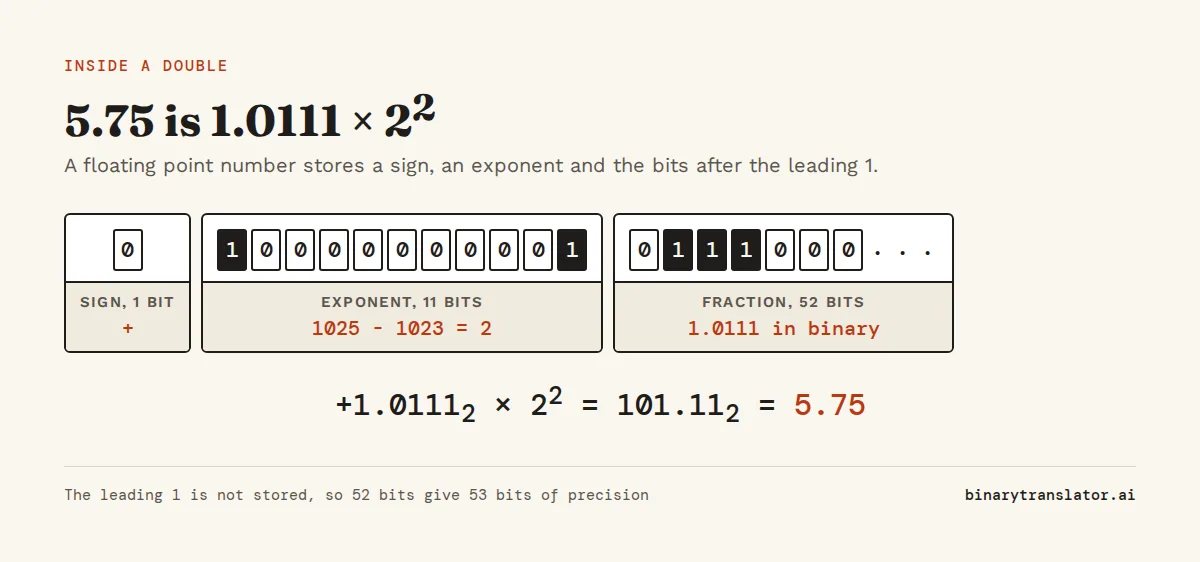
- The sign: 0 for positive, 1 for negative.
- The exponent: here 2, stored with an offset (a bias) so it can also be negative.
- The fraction: the bits after the leading 1, here
0111. The leading 1 is always there, so it is not stored at all.
Almost every computer follows the IEEE 754 standard for this layout. In the 64-bit format, called double precision, the sign takes 1 bit, the exponent 11 bits and the fraction 52 bits. The IEEE 754 converter shows those bits for any number you type, with the working for each part.
Why 0.1 + 0.2 is not 0.3
One third has no exact decimal form: 0.3333 goes on forever, and any decimal you write is slightly off. Binary has the same problem with different numbers. A binary fraction can only be built from halves, quarters, eighths and so on, and 0.1 is not a sum of a few of those. In binary it is 0.0001100110011... with 0011 repeating forever.
The computer keeps 52 bits of that pattern and rounds the rest. The number it stores for 0.1 is a tiny bit more than 0.1:
from decimal import Decimal
print(Decimal(0.1))
print(0.1 + 0.2)
print(0.1 + 0.2 == 0.3)
0.1000000000000000055511151231257827021181583404541015625
0.30000000000000004
False0.1 and 0.2 are both stored a little high. When you add them, the two small errors add up, and the result lands on the next floating point number above 0.3 instead of the one closest to 0.3. Printing shows that number in full: 0.30000000000000004. JavaScript, Java, C and every other language that uses IEEE 754 doubles give the same result. Python's floating-point tutorial goes through more examples of the same effect.
Numbers that are sums of powers of two have no such error. 0.5, 0.25, 0.75 and 5.75 are stored exactly, and so is every whole number up to 253.
How precise floating point is
A 64-bit double has 53 significant bits counting the hidden leading 1. That is about 15 to 17 decimal digits. Any decimal number with up to 15 significant digits survives a round trip into a double and back unchanged. Past that, digits get lost.
print(2**53)
print(float(2**53 + 1))
print(9007199254740993 == float(9007199254740993))
9007199254740992
9007199254740992.0
False253 is 9,007,199,254,740,992. Above it, a double can no longer hold every whole number, so 9,007,199,254,740,993 is stored as its neighbor. This matters in JavaScript, where every number is a double: database IDs and Twitter-style 64-bit IDs above this limit come back slightly wrong unless you keep them as strings or use BigInt. Number.MAX_SAFE_INTEGER is 253 - 1 for that reason.
Float vs double
Most languages offer two sizes of floating point number. float is 32 bits, also called single precision. double is 64 bits, double precision. Python's float and JavaScript's Number are both doubles, even though Python calls its type float.
| float (32-bit) | double (64-bit) | |
|---|---|---|
| Sign bits | 1 | 1 |
| Exponent bits | 8 | 11 |
| Fraction bits | 23 | 52 |
| Significant decimal digits | about 7 | about 15 to 17 |
| Largest value | about 3.4 × 1038 | about 1.8 × 10308 |
| 0.1 is stored as | 0.100000001490116... | 0.1000000000000000055... |
| Typical use | graphics, games, machine learning weights, sensors | everything else |
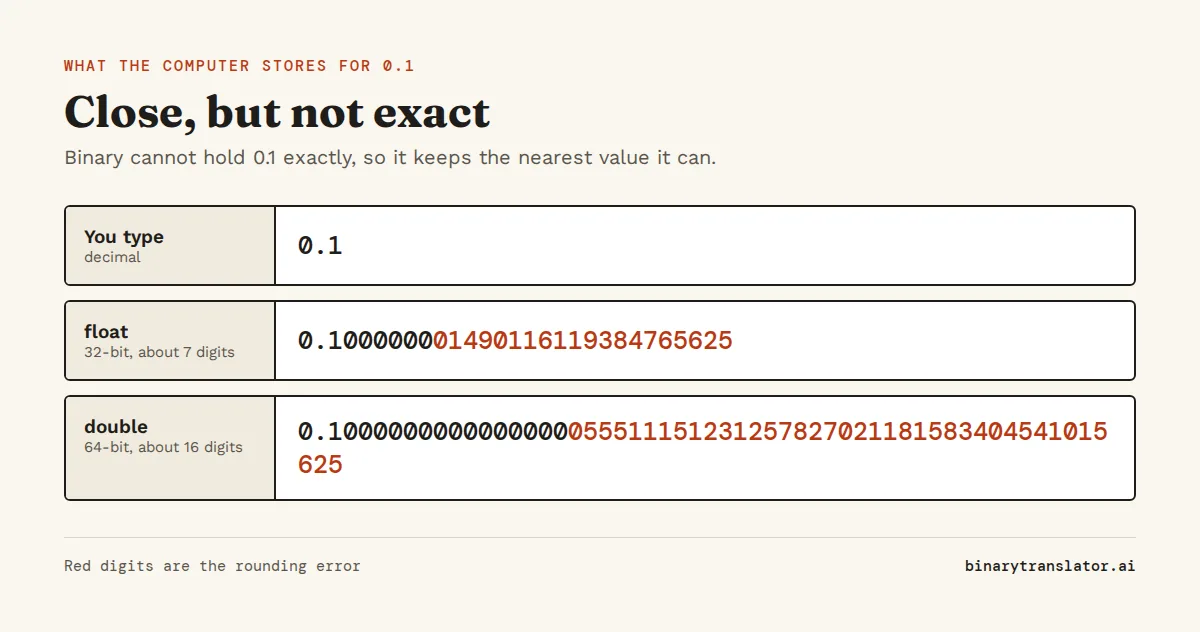
Use double unless you have a reason not to. A float runs out of precision fast: it stores 16,777,217 as 16,777,216, and summing many small values in a float drifts visibly. Float makes sense when you store millions of values and memory matters, such as vertex positions on a GPU or the weights of a neural network, or on small microcontrollers that only have 32-bit floating point hardware.
How to compare floating point numbers
Because results carry tiny rounding errors, testing two floats with == fails when you expect it to pass. Compare them with a tolerance instead: two numbers are equal if they are close enough for your purpose.
import math
a = 0.1 + 0.2
print(a == 0.3)
print(math.isclose(a, 0.3))
print(abs(a - 0.3) < 1e-9)
False
True
Truemath.isclose() uses a relative tolerance of 10-9 by default, which scales with the size of the numbers, so it works for both 0.3 and 3,000,000. In JavaScript, write the same check by hand with Math.abs(a - b) < 1e-9 or a tolerance that suits your data.
const a = 0.1 + 0.2;
console.log(a === 0.3, Math.abs(a - 0.3) < 1e-9);false trueMoney and other exact decimals
Never store money in a float. A shop that adds 0.10 to a total thousands of times will drift by fractions of a cent, and the books will not balance. There are two safe ways to handle it.
- Store whole cents as integers. $19.99 becomes 1999, every sum is exact, and you divide by 100 only when you display the amount.
- Use a decimal type. Python has
decimal.Decimal, Java hasBigDecimaland SQL databases haveDECIMALcolumns. They store base 10 digits, so 0.1 is exactly 0.1.
from decimal import Decimal
print(Decimal('0.1') + Decimal('0.2'))
print(sum([0.1] * 10), sum([Decimal('0.1')] * 10))0.3
0.9999999999999999 1.0Create a Decimal from a string, as above. Decimal(0.1) without quotes copies the float's error into the decimal, which is the long number you saw earlier.
Infinity, NaN and negative zero
Floating point has a few special values for results that are not ordinary numbers. A division by zero or a result too large to store becomes infinity. An undefined result, such as infinity minus infinity, becomes NaN, short for "not a number".
import math
big = 1e308 * 10
print(big, -big, big - big)
nan = float('nan')
print(nan == nan, math.isnan(nan))
print(-0.0 == 0.0, math.copysign(1, -0.0))inf -inf nan
False
True
True -1.0NaN is the one value that is not equal to itself, so x == x is false when x is NaN. Use math.isnan() or Number.isNaN() to test for it. Negative zero equals zero in comparisons but keeps its sign, which shows up when you divide by it or format it.
Fixed point vs floating point
Fixed point keeps the point in the same place for every number, for example always two digits after it. Storing money as whole cents is fixed point. It is exact and fast but has a fixed range: a 32-bit count of cents tops out around $21 million. Floating point gives up exactness to cover a huge range with the same number of bits. Use fixed point or decimal types when every digit must be exact, and floating point for measurements, science and graphics, where a relative error of 10-16 does not matter.
To see how any number is laid out in memory, try the IEEE 754 converter with 0.1, then with 0.5. The second one ends in zeros. For how whole numbers are stored, the powers of 2 chart shows where 253 and the other limits come from.
Questions people ask
What is a floating point number in simple terms?
A number stored like scientific notation in binary: a sign, about 16 significant digits and an exponent that moves the point. It can hold very large and very small values, but most decimals are stored as close approximations.
Why is 0.1 + 0.2 not equal to 0.3?
0.1 and 0.2 have no exact binary form, so each is stored slightly too large. The two errors add up, and the sum is stored as 0.30000000000000004 instead of the double closest to 0.3.
What is the difference between float and double?
float is a 32-bit floating point number with about 7 significant digits. double is 64-bit with about 15 to 17 digits and a much larger range. Use double unless memory is tight.
How many digits of precision does a double have?
About 15 to 17 significant decimal digits, from 53 significant bits. Any decimal with 15 or fewer significant digits converts to a double and back without change.
Should I use float for money?
No. Store whole cents as integers or use a decimal type such as Python's Decimal or SQL's DECIMAL, which keep base 10 digits exactly.
What is NaN?
NaN, not a number, is the result of an undefined operation such as 0/0 in floating point or infinity minus infinity. It is not equal to anything, including itself.
About the authors

Uma Victor is a technical writer and software engineer with seven years of engineering work. He writes API documentation, integration guides and tutorials for developer tools, and his articles have run in Smashing Magazine, freeCodeCamp and LogRocket. He runs the code before he writes about it. On binarytranslator.ai he writes the guides on binary, hex and text encoding.

Mehran Mozaffari Kermani is a professor at the Bellini College of Artificial Intelligence, Cybersecurity and Computing at the University of South Florida. His research covers computer arithmetic, cryptographic hardware and fault detection in digital circuits, and he worked as an ASIC design engineer at AMD before he joined academia. He earned his PhD in electrical and computer engineering at the University of Western Ontario, was a postdoctoral fellow at Princeton and is a senior member of IEEE. On binarytranslator.ai he reviews the logic gate, binary arithmetic and floating-point tools.
Keep reading
All posts Binary basics
MSB and LSB: most and least significant bits, signed integers and overflow
The MSB is the leftmost, highest-value bit and the LSB the rightmost. See what each tells you, how signed integers use the MSB as a sign bit, and how integer overflow wraps values around.9 min read Binary basics
What is hexadecimal? The base 16 number system explained
Hexadecimal is base 16, with digits 0 to 9 and A to F. See how place values work, why programmers use hex for bytes, the values worth knowing and how octal compares.7 min read Binary basics