Python
Python struct: pack and unpack binary data
Use struct.pack() and struct.unpack() to read and write binary files, network data and C structs, with format strings, byte order and real examples.
You have raw bytes from a file header, a socket or a sensor, and you need the numbers inside them. Or you need to write numbers in the exact byte layout a file format or a C program expects. That is the job of the struct module, described in full in Python's struct documentation. struct.pack(format, values...) turns values into bytes, and struct.unpack(format, data) turns bytes back into a tuple of values. The format string describes the layout: the byte order, then the type and size of each field.
Key takeaways
| struct.pack(format, values) returns bytes and struct.unpack(format, data) returns a tuple. | |
| Start the format with <, > or ! for files and network data, so sizes are standard and there is no padding. | |
| Lowercase type characters are signed and uppercase are unsigned, for example h and H for 2-byte integers. | |
| unpack() needs data exactly as long as calcsize(), and unpack_from() reads from an offset. | |
| The f format keeps only 32-bit float precision, so use d to keep a Python float unchanged. |
import struct
data = struct.pack('<I', 1000)
print(data, data.hex(' '))
print(struct.unpack('<I', data))
b'\xe8\x03\x00\x00' e8 03 00 00
(1000,)Here < means little endian, which puts the lowest byte first, and I means an unsigned 4-byte integer. So 1000 (0x3E8) becomes the four bytes E8 03 00 00.
If you came here looking for a C-style struct to group named fields, that is a different thing. Python uses a class for that, usually a dataclass. The struct module only deals with bytes.
from dataclasses import dataclass

@dataclass
class Point:
    x: int
    y: int

print(Point(3, 4))
Point(x=3, y=4)Pack a value and see the bytes
Choose a byte order and a type, then enter a value. The tool shows the bytes struct.pack() returns, in the order they would be written to a file, along with the Python call.
Format strings
A format string starts with an optional byte order character, followed by one character per field. Always start with <, > or ! when you read or write files and network data. Without one, struct uses the native byte order, sizes and alignment of the machine running the code. That is right for talking to C code on the same computer, but the same format can give different bytes on another machine.
| Character | Byte order | Sizes and alignment |
|---|---|---|
@ | native (the default) | native sizes, with padding for alignment |
= | native | standard sizes, no padding |
< | little endian | standard sizes, no padding |
> | big endian | standard sizes, no padding |
! | network order, which is big endian | standard sizes, no padding |
The type characters below use the standard sizes that apply with <, >, ! and =. For the integer types, lowercase letters are signed and uppercase are unsigned.
| Character | C type | Python type | Bytes |
|---|---|---|---|
x | pad byte | none | 1 |
c | char | bytes of length 1 | 1 |
b / B | signed / unsigned char | int | 1 |
? | _Bool | bool | 1 |
h / H | short / unsigned short | int | 2 |
i / I | int / unsigned int | int | 4 |
l / L | long / unsigned long | int | 4 |
q / Q | long long / unsigned long long | int | 8 |
e | half precision float | float | 2 |
f | float | float | 4 |
d | double | float | 8 |
s | char[] | bytes | the count, for example 10s |
A number in front of a type repeats it: '3B' is the same as 'BBB'. For s the number is the length of one byte string instead, so '10s' is a single 10-byte field. struct.calcsize() tells you how many bytes a format takes.
Pack several values
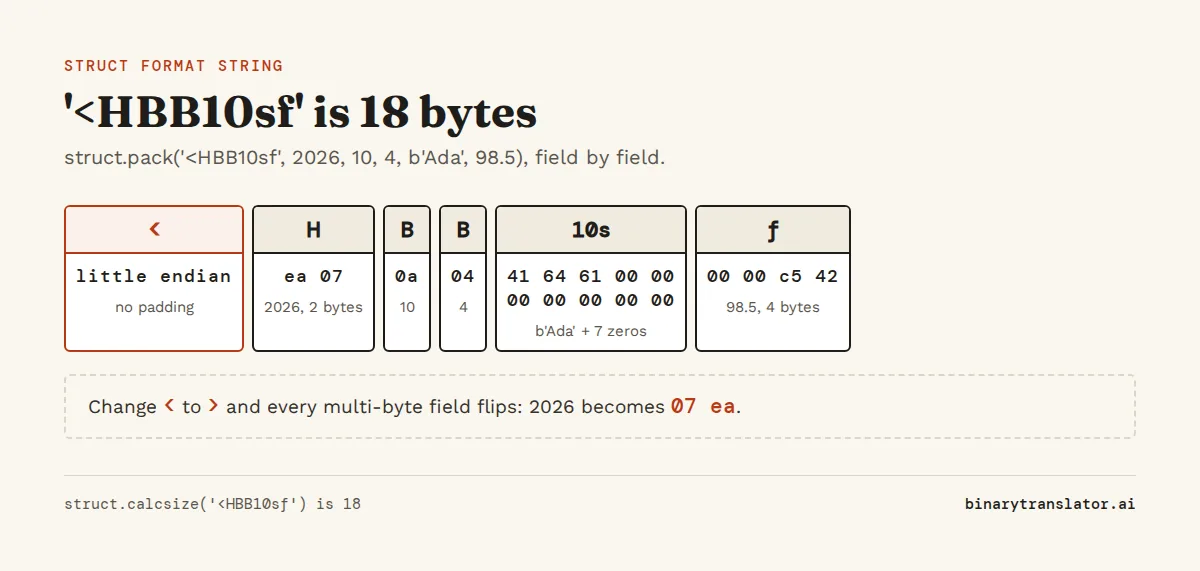
Pass one value per field, in order. Text has to be encoded first, because an s field holds bytes and a str raises argument for 's' must be a bytes object. The field always takes its full size, so a short value is padded with zero bytes and a long one is cut to fit.
import struct
fmt = '<HBB10sf'
print(struct.calcsize(fmt))
record = struct.pack(fmt, 2026, 10, 4, 'Ada'.encode(), 98.5)
print(record)
print(record.hex(' '))
18
b'\xea\x07\n\x04Ada\x00\x00\x00\x00\x00\x00\x00\x00\x00\xc5B'
ea 07 0a 04 41 64 61 00 00 00 00 00 00 00 00 00 c5 42That is a 2-byte year, two 1-byte fields, a 10-byte name and a 4-byte float, 18 bytes in all. The name Ada takes 3 bytes and the other 7 are zeros.
Unpack bytes into values
unpack() always returns a tuple, even for a single field. Index it with [0] or unpack it with a trailing comma, as in (value,) =. The data must be exactly as long as the format: pass 17 bytes to the 18-byte format above and you get struct.error: unpack requires a buffer of 18 bytes. To read a field from the middle of a larger buffer, use unpack_from() with an offset.
import struct
record = struct.pack('<HBB10sf', 2026, 10, 4, b'Ada', 98.5)
year, month, day, name, score = struct.unpack('<HBB10sf', record)
print(year, month, day, name.rstrip(b'\x00').decode(), score)

(value,) = struct.unpack('>H', b'\x01\x02')
print(value)
print(struct.unpack_from('<B', record, 2))
2026 10 4 Ada 98.5
258
(10,)Strip the padding zeros from s fields before you decode them. Otherwise the name decodes as 'Ada\x00\x00\x00\x00\x00\x00\x00'. It prints like Ada, but a comparison with 'Ada' returns False.
Byte order changes the result
Say you read the width of a 640-pixel PNG with '<I' and get 2147614720. The bytes are fine. You read them in the wrong order. struct cannot guess the byte order, so take it from the format's spec. PNG, JPEG and network protocols use big endian, while BMP, WAV, ZIP and x86 memory use little endian. When a value comes out absurdly large, try the other order first. The big endian vs little endian guide explains where each comes from.
import struct
data = bytes.fromhex('12 34 56 78')
print(hex(struct.unpack('>I', data)[0]))
print(hex(struct.unpack('<I', data)[0]))
0x12345678
0x78563412Alignment and padding
In native @ mode, struct inserts padding so each field starts at an address that is a multiple of its size, the same thing a C compiler does, because the CPU reads aligned values faster. That is why '@bi' is 8 bytes on a typical 64-bit machine: 1 byte, 3 bytes of padding, then the 4-byte int. '<bi' is 5. Padding only goes before a field, so '@ib' stays at 5. Use a byte order character for anything you store or send, and keep @ for matching a C struct in the same process.
import struct
for fmt in ['@bi', '<bi', '@ib', '@bq']:
    print(fmt, struct.calcsize(fmt))
@bi 8
<bi 5
@ib 5
@bq 16Example: read the size of a PNG image
A PNG file starts with an 8-byte signature followed by the IHDR chunk, which holds the width and height as big-endian 4-byte integers, as laid out in the W3C PNG specification. The code below builds the first 29 bytes of a 640 by 480 PNG, then reads them back the way an image library would. If you see 640 and 480, the format string matches the layout.
import struct
header = b'\x89PNG\r\n\x1a\n' + struct.pack('>I4sIIBBBBB', 13, b'IHDR', 640, 480, 8, 2, 0, 0, 0)

assert header[:8] == b'\x89PNG\r\n\x1a\n'
length, chunk, width, height = struct.unpack_from('>I4sII', header, 8)
print(chunk, width, height)
b'IHDR' 640 480To try it on a real file, replace the line that builds header with header = open('image.png', 'rb').read(29). The hex editor shows the same bytes if you open a PNG in it.
Example: a file of fixed-size records
When a file holds many records with the same layout, such as sensor logs, compile the format once with struct.Struct. The object keeps the parsed format and its size in rec.size. iter_unpack() then steps through the buffer one record at a time. A cut-off last record fails with iterative unpacking requires a buffer of a multiple of 6 bytes.
import struct
rec = struct.Struct('<Hf')
data = b''.join(rec.pack(i, i * 1.5) for i in range(1, 4))
print(rec.size, len(data))
for sensor_id, reading in rec.iter_unpack(data):
    print(sensor_id, reading)
6 18
1 1.5
2 3.0
3 4.5Example: an IPv4 address as a number
Network protocols send numbers big endian, which is why ! exists as a readable name for it. Combined with socket.inet_aton(), it turns a dotted address like 192.168.1.1 into one 32-bit integer and back. The IP to binary converter shows the bits.
import socket, struct
n = struct.unpack('!I', socket.inet_aton('192.168.1.1'))[0]
print(n, format(n, '032b'))
print(socket.inet_ntoa(struct.pack('!I', n)))
3232235777 11000000101010000000000100000001
192.168.1.1Floats lose precision in 4 bytes
The f format stores a 32-bit IEEE 754 float, while Python floats are 64-bit doubles. Packing with f and unpacking gives the nearest 32-bit value, so 0.1 comes back as 0.10000000149011612. Use d when you need the value unchanged, and f only when the file format says 4-byte floats. The IEEE 754 converter shows the sign, exponent and mantissa bits for both sizes.
import struct
print(struct.pack('>f', 5.75).hex())
print(struct.unpack('<f', struct.pack('<f', 0.1))[0])
print(struct.unpack('<d', struct.pack('<d', 0.1))[0])
40b80000
0.10000000149011612
0.1Errors and what they mean
Most struct errors mean the value and the field disagree. You pack a port number such as 8080 into a B field and get struct.error saying the format requires 0 <= number <= 255, because one byte cannot hold it. Or the last 4-byte chunk of a file comes up short, and unpack asks for a buffer of 4 bytes.
| Message | Cause |
|---|---|
struct.error: unpack requires a buffer of 4 bytes | The data is shorter or longer than the format. Check calcsize() or use unpack_from(). |
struct.error: 'B' format requires 0 <= number <= 255 (Python 3.11 and older: ubyte format requires...) | The value does not fit the type. Use a larger type such as H or I. |
struct.error: 'I' format requires 0 <= number <= 4294967295 for a negative value (Python 3.11 and older: argument out of range) | A negative number was packed into an unsigned type such as I. Use the signed i. |
struct.error: required argument is not an integer | A float or a string was passed to an integer field. |
struct.error: argument for 's' must be a bytes object | Text was passed to an s field. Call .encode() on it first. |
struct or something else?
Use struct when the bytes have a fixed layout of mixed fields, like the PNG header above. For a single integer, int.from_bytes() is shorter and handles any size.
| Tool | Best for |
|---|---|
int.to_bytes() / int.from_bytes() | One integer of any size, as shown in the bytes and strings guide |
struct | Records with several fields of fixed types, file headers and packets |
array module | Long lists of numbers that are all the same type |
ctypes.Structure | Passing structs to and from C libraries |
NumPy frombuffer and dtypes | Large binary arrays and scientific data |
Questions people ask
What is struct in Python?
struct is a standard library module that converts between Python values and packed binary data. struct.pack() turns numbers and byte strings into bytes, and struct.unpack() reads bytes back into a tuple of values.
What does struct.pack do in Python?
It takes a format string and values and returns a bytes object. For example struct.pack('<H', 1000) returns b'\xe8\x03', the value 1000 as a little-endian 2-byte unsigned integer.
What does struct.unpack return?
A tuple, even when the format has a single field. Use (x,) = struct.unpack(fmt, data) or struct.unpack(fmt, data)[0] to get one value.
What does < and > mean in a struct format string?
< means little endian and > means big endian. Both also switch to standard sizes with no alignment padding, which is what you want for files and network data.
Does Python have a struct like C?
Not as a language feature. Use a dataclass or a namedtuple to group named fields, the struct module to read and write the bytes of a C struct, and ctypes.Structure to pass structs to C code.
Why does struct.calcsize give a bigger number than I expected?
Without a byte order character, struct uses native alignment and adds padding between fields. Start the format with <, > or ! to remove the padding.
About the authors

Uma Victor is a technical writer and software engineer with seven years of engineering work. He writes API documentation, integration guides and tutorials for developer tools, and his articles have run in Smashing Magazine, freeCodeCamp and LogRocket. He runs the code before he writes about it. On binarytranslator.ai he writes the guides on binary, hex and text encoding.

Sam Siewert is the O'Connell Endowed Professor of computer science at California State University, Chico, where he teaches numeric and parallel computing, computer vision and machine learning. He has taught real-time embedded systems at the University of Colorado Boulder since 2000 and co-founded its Embedded Systems Engineering program. Both fields depend on how computers store numbers in binary, from fixed-width integers to floating point. He earned his PhD and MS in computer science at the University of Colorado Boulder and is a senior member of IEEE. On binarytranslator.ai he reviews the math behind the converters and the number system guides.
Keep reading
All posts Programming
The xxd command: hex dumps on Linux and macOS
Use xxd to read the bytes in any file, get plain hex with -p, turn hex back into binary with -r, patch a byte, print bits, make C arrays and diff binary files.9 min read Programming
Base64 encode and decode in Python, JavaScript, Linux and PowerShell
Base64 one-liners for Python, the browser, Node.js, Linux, macOS and PowerShell, with a command builder and fixes for padding errors, echo newlines, line wrapping and UTF-16.13 min read Programming