Python
Python bytes to string and string to bytes
decode() turns bytes into text and encode() turns text into bytes. Pick the right encoding, fix decode errors, and convert ints and hex.
You read a file, a socket or an API response and got something like b'caf\xc3\xa9' instead of text. Call .decode() on it with the encoding it was written in, usually UTF-8, and you get the string 'café'. To go the other way, call .encode() on the string. Both default to UTF-8, so for most text b.decode() and s.encode() are all you need.
Key takeaways
| Use b.decode('utf-8') to turn bytes into a string and s.encode('utf-8') to turn a string into bytes. | |
| str(b) without an encoding returns the text b'...', not the decoded string. | |
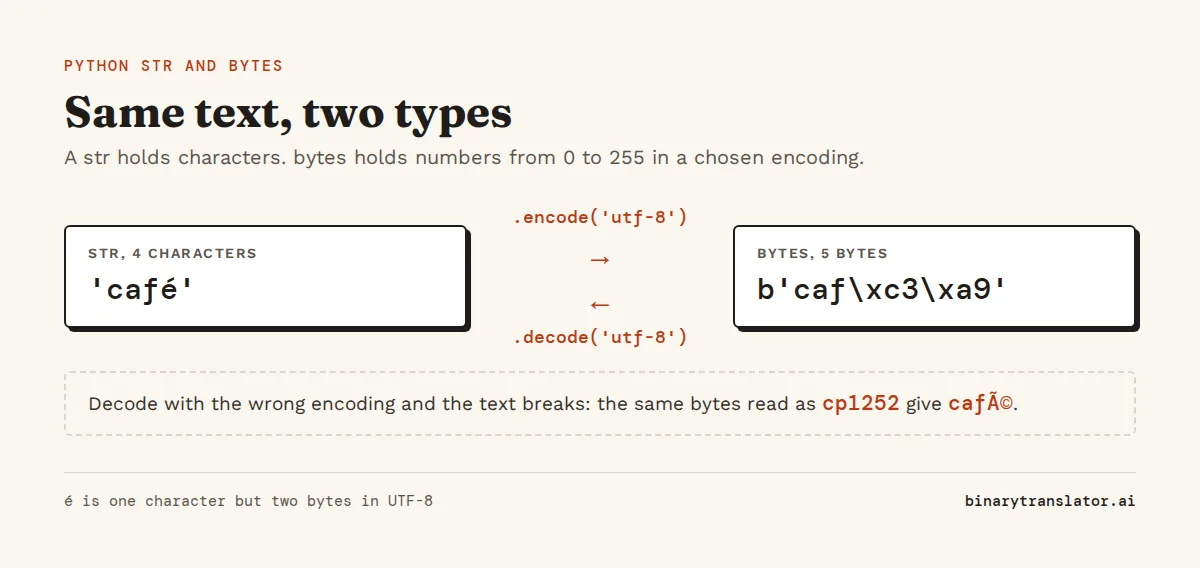
| Decoding only works with the encoding the bytes were written in, and garbled text like é means the wrong one was used. | |
| errors='replace', 'ignore' or 'backslashreplace' decide what happens to bytes that are not valid. | |
| int.to_bytes() and int.from_bytes() convert numbers, while bytes(5) creates five zero bytes. |
data = b'caf\xc3\xa9'
text = data.decode('utf-8')
print(text)
print(text.encode('utf-8'))
café
b'caf\xc3\xa9'See what encode() produces
Type some text and pick an encoding. The tool shows the bytes literal Python prints, the same bytes in hex and as a list of numbers, and whether the encoding can store every character.
Convert bytes to a string with decode()
bytes.decode(encoding='utf-8', errors='strict') reads the bytes as text in the given encoding and returns a str. Passing the bytes and the encoding to str() does the same thing, but .decode() is the form most code uses, so it is easier for the next reader to recognize.
raw = b'Hello, World'
print(raw.decode())
print(raw.decode('utf-8'))
print(str(raw, 'utf-8'))
Hello, World
Hello, World
Hello, WorldLeave out the encoding in str() and you get a different result. str(raw) does not decode anything. It returns the printed form of the bytes object, with the b and the quotes inside the string. You notice it when a log line or a CSV cell reads b'Hello' instead of Hello, and the string is 8 characters long instead of 5:
raw = b'Hello'
wrong = str(raw)
print(wrong, len(wrong))
right = raw.decode()
print(right, len(right))
b'Hello' 8
Hello 5Convert a string to bytes with encode()
str.encode(encoding='utf-8', errors='strict') returns a bytes object, as the Python docs for str.encode() describe. bytes(s, 'utf-8') does the same, but .encode() reads more clearly. You need it whenever an API wants bytes, such as sockets, hashing with hashlib, Base64, binary files and most cryptography libraries. Pass a str to hashlib.sha256() and you get TypeError: Strings must be encoded before hashing.
import hashlib
s = 'Hello'
b = s.encode()
print(b, bytes(s, 'utf-8'))
print(hashlib.sha256(b).hexdigest()[:16])
b'Hello' b'Hello'
185f8db32271fe25A b'...' literal also creates bytes, but it only accepts ASCII characters. Writing b'café' raises SyntaxError: bytes can only contain ASCII literal characters. For anything beyond ASCII, write a normal string and encode it.
What a bytes object is
A str is a sequence of Unicode characters. A bytes object is a sequence of integers from 0 to 255 that has no meaning until you decide on an encoding. That is why indexing the two types gives different results:
s = 'Hi'
b = b'Hi'
print(s[0], type(s[0]).__name__)
print(b[0], type(b[0]).__name__)
print(list(b))
print(len('é'), len('é'.encode('utf-8')))
H str
72 int
[72, 105]
1 2When Python prints bytes, a byte that is printable ASCII shows as its character. Any other byte shows as a \x escape with two hex digits. That is why the UTF-8 bytes for é show up as b'\xc3\xa9'. Bytes objects can't be changed after they are created. If you need to build or edit data in place, use bytearray, which has the same methods plus append(), extend() and item assignment.
Pick the right encoding
Decoding only works with the encoding the bytes were written in. The same six characters produce different bytes in each encoding, and some encodings cannot store every character at all:
s = 'café €'
for enc in ['utf-8', 'utf-16-le', 'latin-1', 'cp1252', 'ascii']:
    try:
        print(f'{enc:10}', s.encode(enc).hex(' '))
    except UnicodeEncodeError as e:
        print(f'{enc:10}', 'cannot encode', repr(e.object[e.start]))
utf-8 63 61 66 c3 a9 20 e2 82 ac
utf-16-le 63 00 61 00 66 00 e9 00 20 00 ac 20
latin-1 cannot encode '€'
cp1252 63 61 66 e9 20 80
ascii cannot encode 'é'UTF-8 is the right choice for files, APIs, JSON and anything sent over a network. Windows-1252 (cp1252) and Latin-1 show up in older Windows exports and CSV files, and UTF-16 inside Windows APIs. When text comes out garbled, the bytes were usually decoded with the wrong one. UTF-8 read as Windows-1252 turns é into é, and reversing the mistake recovers the original:
garbled = 'café'.encode('utf-8').decode('cp1252')
print(garbled)
print(garbled.encode('cp1252').decode('utf-8'))
café
caféIf you do not know the encoding of a file, the third-party charset-normalizer package (used by requests) can guess it from the bytes. A guess is still a guess, so check a few lines of the output. The Unicode, UTF-8 and ASCII guide explains how UTF-8 lays out its bytes.
Handle UnicodeDecodeError
You open a CSV exported from an older Windows program, decode it as UTF-8, and the program stops. With the default errors='strict', any byte that is not valid in the chosen encoding raises an error:
b'caf\xe9'.decode('utf-8')UnicodeDecodeError: 'utf-8' codec can't decode byte 0xe9 in position 3: unexpected end of dataHere the bytes were written in Latin-1, where é is the single byte E9, and UTF-8 does not allow E9 on its own. The best fix is the right encoding, .decode('latin-1'). When the data really is mixed or damaged, the errors argument picks one of Python's standard error handlers to decide what happens to the bad bytes:
bad = b'caf\xe9 ok'
for mode in ['replace', 'ignore', 'backslashreplace']:
    print(f'{mode:17}', bad.decode('utf-8', errors=mode))
print(f'{"latin-1":17}', bad.decode('latin-1'))
replace caf� ok
ignore caf ok
backslashreplace caf\xe9 ok
latin-1 café okreplace puts the U+FFFD replacement character where each bad byte was. ignore drops the bytes without telling you, so data can disappear unnoticed. backslashreplace keeps them visible as escapes, and that is the one to use for logs because you can still see which byte was wrong. surrogateescape keeps them in a form that encode(..., errors='surrogateescape') can turn back into the exact original bytes, which matters when you pass file names through unchanged.
Files saved by Notepad and Excel sometimes start with a byte order mark, EF BB BF. Decoding them with 'utf-8' leaves an invisible '\ufeff' at the start of the first line. In a CSV that breaks the first column name: csv.DictReader gives you a key with the mark stuck to the front of name, so row['name'] raises a KeyError. Decode with 'utf-8-sig' and the mark is removed.
data = b'\xef\xbb\xbfname,age'
print(repr(data.decode('utf-8')))
print(repr(data.decode('utf-8-sig')))
'\ufeffname,age'
'name,age'Convert between int and bytes
Numbers are a separate case. To store an integer as raw bytes, use int.to_bytes(length, byteorder), and read it back with int.from_bytes(data, byteorder). The byte order is 'big' or 'little', which is explained in big endian vs little endian. Since Python 3.11, the length defaults to 1 and the byte order to 'big'.
n = 1000
print(n.to_bytes(2, 'big'), n.to_bytes(2, 'little'))
print(n.to_bytes(4, 'little').hex(' '))
print(int.from_bytes(b'\x03\xe8', 'big'))
print((-2).to_bytes(2, 'big', signed=True))
b'\x03\xe8' b'\xe8\x03'
e8 03 00 00
1000
b'\xff\xfe'Watch out for bytes(5). Passing an int to the bytes constructor creates that many zero bytes, not the byte with value 5. Use bytes([5]) for a single byte or to_bytes() for larger numbers. For several numbers of mixed types at once, such as a file header, use the struct module, because one format string packs or unpacks the whole record in a single call.
print(bytes(5))
print(bytes([5]))
print(bytes([72, 105]))
b'\x00\x00\x00\x00\x00'
b'\x05'
b'Hi'Convert between bytes and hex
bytes.hex() gives a hex string and bytes.fromhex() reads one back. Since Python 3.8, hex() takes a separator such as a space, so a long dump splits into readable byte pairs. The text to hex converter shows the same output for any text.
b = 'Hi!'.encode()
print(b.hex())
print(b.hex(' '))
print(bytes.fromhex('48 69 21').decode())
486921
48 69 21
Hi!Bytes from files, subprocesses and HTTP
Most bytes in real programs come from I/O. Open a file in binary mode ('rb') to get bytes, or in text mode with an explicit encoding to get a string. Relying on the default encoding is risky because it depends on the operating system: on Windows it has long been a legacy code page rather than UTF-8.
with open('data.bin', 'rb') as f:
    raw = f.read()          # bytes

with open('notes.txt', encoding='utf-8') as f:
    text = f.read()         # str
subprocess.run() returns bytes in stdout unless you ask for text. Pass text=True (with encoding='utf-8' if the output can contain non-ASCII characters) or decode the result yourself.
import subprocess
r = subprocess.run(['echo', 'hello'], capture_output=True)
print(r.stdout)
print(r.stdout.decode().strip())
r = subprocess.run(['echo', 'hello'], capture_output=True, text=True)
print(repr(r.stdout))
b'hello\n'
hello
'hello\n'With the requests library, r.content holds the raw bytes of the response and r.text holds them decoded with the encoding from the HTTP headers. Use content for images and other binary files, and text or r.json() for text. Base64 is another common source of bytes. base64.b64decode() always returns bytes, so decode them if they hold text, as shown in the Base64 guide.
Questions people ask
How do I convert bytes to a string in Python?
Call decode() with the encoding the bytes use, for example b'Hello'.decode('utf-8'). str(b, 'utf-8') works too. Do not use str(b) on its own, which returns the text b'Hello' with the prefix and quotes.
How do I convert a string to bytes in Python?
Call encode() on the string, for example 'Hello'.encode('utf-8'), or use bytes('Hello', 'utf-8'). Both return b'Hello'.
What is bytes() in Python?
bytes is the built-in type for an immutable sequence of integers from 0 to 255. bytes() creates one from a string and an encoding, from a list of integers, or as zeros when you pass a single integer.
What is the default encoding for decode() in Python?
UTF-8. Both bytes.decode() and str.encode() use UTF-8 when no encoding is given. open() is different: its default depends on the operating system, so pass encoding='utf-8' there.
How do I fix UnicodeDecodeError: 'utf-8' codec can't decode byte?
The bytes are not UTF-8. Find the encoding they were written in, often cp1252 or latin-1 for older Windows files, and decode with that. If some bytes are damaged, pass errors='replace' or errors='backslashreplace'.
How do I convert an int to bytes in Python?
Use n.to_bytes(length, 'big') or n.to_bytes(length, 'little'), and int.from_bytes(data, 'big') to convert back. bytes(n) is not the same: it creates n zero bytes.
About the authors

Zachary Painter is a technical writer at GitLab, where he writes developer documentation and UI text. He has written API documentation for REST and GraphQL APIs and reference docs for Kubernetes, Docker and command-line tools, earlier as a technical writer at Pomerium and a senior technical content writer at Stream. He holds a BA in English and German studies from the University of North Carolina at Greensboro. On binarytranslator.ai he writes guides and the how-to sections on tool pages.

Khushboo Gupta is a PhD student in computer science at the University of Illinois Chicago, where she researches natural language processing. As a graduate teaching assistant she has taught Program Design, Data Structures, Introduction to Data Science and Natural Language Processing. Before her PhD she was a software development engineer at Amazon Web Services and a software engineer at Pacific Northwest National Laboratory, and she holds an MS in computer science from Syracuse University. On binarytranslator.ai she reviews the guides on text encoding, data structures and number systems.
Keep reading
All posts Programming
The xxd command: hex dumps on Linux and macOS
Use xxd to read the bytes in any file, get plain hex with -p, turn hex back into binary with -r, patch a byte, print bits, make C arrays and diff binary files.9 min read Programming
Base64 encode and decode in Python, JavaScript, Linux and PowerShell
Base64 one-liners for Python, the browser, Node.js, Linux, macOS and PowerShell, with a command builder and fixes for padding errors, echo newlines, line wrapping and UTF-16.13 min read Programming