Binary basics
Unicode, UTF-8 and ASCII
One is a 128-character set, one numbers every character, and one turns those numbers into bytes. See how each works and how text is stored.
ASCII, Unicode and UTF-8 often get used as if they meant the same thing, but each one answers a different question. ASCII is an old set of 128 characters, numbered 0 to 127: English letters, digits, punctuation and control codes. Unicode is a much bigger list that gives a number, called a code point, to every character in every script, plus symbols and emoji. UTF-8 is the way most files store those numbers as bytes, using 1 to 4 bytes per character. Take the euro sign: Unicode numbers it U+20AC, UTF-8 stores it as the bytes E2 82 AC, and ASCII has no code for it at all. The first 128 Unicode characters match ASCII and take one byte each in UTF-8, so plain ASCII text is already valid UTF-8.
Key takeaways
| ASCII has 128 characters, numbered 0 to 127, and uses 7 bits. | |
| Unicode gives every character a code point such as U+0041 for A and U+20AC for the euro sign. | |
| UTF-8 stores each code point in 1 to 4 bytes, and the first 128 match ASCII exactly. | |
| The euro sign is E2 82 AC in UTF-8, and emoji take 4 bytes. | |
| Garbled text like é usually means UTF-8 was read as Windows-1252. |
See how any text is stored
Type or paste some text. For each character the tool shows its Unicode code point, its UTF-8 bytes and how many bytes it takes in UTF-8 and UTF-16.
What is ASCII
ASCII stands for American Standard Code for Information Interchange. It was published in 1963 and uses 7 bits, so it has 27 = 128 codes. Codes 0 to 31 and 127 are control characters such as line feed (10) and tab (9). Codes 32 to 126 are the printable characters: space, punctuation, the digits 0 to 9 at 48 to 57, capital letters at 65 to 90 and lowercase letters at 97 to 122. The ASCII table lists all of them with their binary and hex values.
Computers store bytes of 8 bits, so 128 more codes were free. Many "extended ASCII" sets used codes 128 to 255 for accented letters and symbols, but each region picked different ones. Windows-1252 and ISO-8859-1 were common in Western Europe, while Cyrillic and Greek had their own sets. The same byte could mean different letters on different computers, which is the problem Unicode was created to fix.
What is Unicode
Unicode is a standard that gives each character one number, no matter the language, platform or program, as the Unicode Consortium's overview puts it. Those numbers are written as U+ followed by hex digits. Capital A is U+0041, the euro sign is U+20AC and the grinning face emoji is U+1F600. Code points run from U+0000 to U+10FFFF, room for 1,114,112 values. More than 150,000 of them are assigned today, covering scripts from Latin and Arabic to Chinese, plus math symbols and emoji, and new versions add more each year.
Unicode on its own doesn't say how to store a code point in memory or in a file. Think of it as a numbered catalog. To turn those numbers into bytes you need an encoding, a rule for writing each number as bytes. Unicode defines three: UTF-8, UTF-16 and UTF-32.
What is UTF-8
UTF-8 stores each code point in 1, 2, 3 or 4 bytes. Small numbers take fewer bytes, so English text stays compact while every other script still fits. The first bits of each byte say what role it plays, following the patterns in RFC 3629, the UTF-8 standard:
| Code point range | Bytes | Bit pattern | Covers |
|---|---|---|---|
U+0000 to U+007F | 1 | 0xxxxxxx | ASCII |
U+0080 to U+07FF | 2 | 110xxxxx 10xxxxxx | accented Latin, Greek, Cyrillic, Arabic, Hebrew |
U+0800 to U+FFFF | 3 | 1110xxxx 10xxxxxx 10xxxxxx | most other scripts, including Chinese and Japanese, and the euro sign |
U+10000 to U+10FFFF | 4 | 11110xxx 10xxxxxx 10xxxxxx 10xxxxxx | emoji and rarer scripts |
A byte that starts with 0 is a whole character on its own. A byte that starts with 110, 1110 or 11110 starts a character and says how many bytes follow. A byte that starts with 10 continues the character before it. That design means a program can jump into the middle of UTF-8 text and find where the next character starts right away, by skipping any bytes that begin with 10.
Worked example: encoding the euro sign
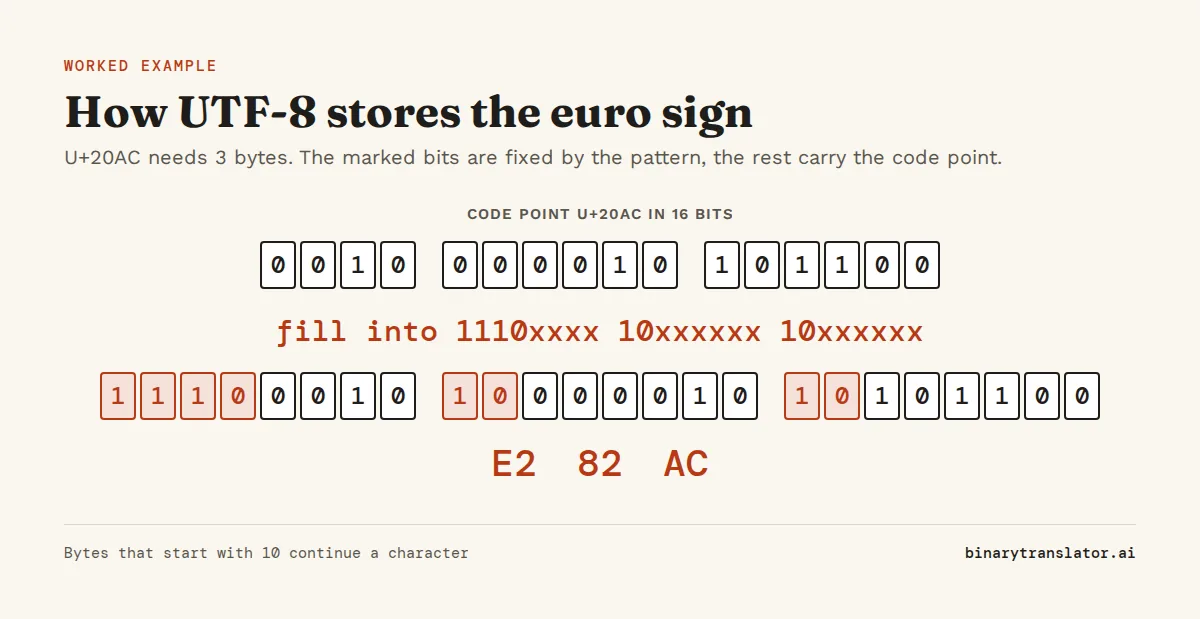
- The euro sign is U+20AC. In binary that is 0010 0000 1010 1100, 16 bits.
- U+20AC is between U+0800 and U+FFFF, so it needs 3 bytes with the pattern 1110xxxx 10xxxxxx 10xxxxxx.
- Split the 16 bits into groups of 4, 6 and 6: 0010, 000010, 101100.
- Fill them into the pattern: 11100010, 10000010, 10101100.
- In hex that is E2 82 AC, the three bytes every UTF-8 file uses for €. Type € into the tool above and you should see the same three bytes.
ASCII vs Unicode vs UTF-8
| ASCII | Unicode | UTF-8 | |
|---|---|---|---|
| What it is | a character set | a character set | an encoding of Unicode |
| Number of characters | 128 | over 150,000 assigned | all of Unicode |
| Size per character | 7 bits, usually stored in 1 byte | not defined, depends on the encoding | 1 to 4 bytes |
| Letter A | 65 | U+0041 | 41 |
| Euro sign | not included | U+20AC | E2 82 AC |
If you're choosing between ASCII and UTF-8, use UTF-8. It reads every ASCII file correctly, because the first 128 codes are identical, and it can also store any other character. Nearly every web page and most modern file formats use it.
UTF-8 vs UTF-16 vs UTF-32
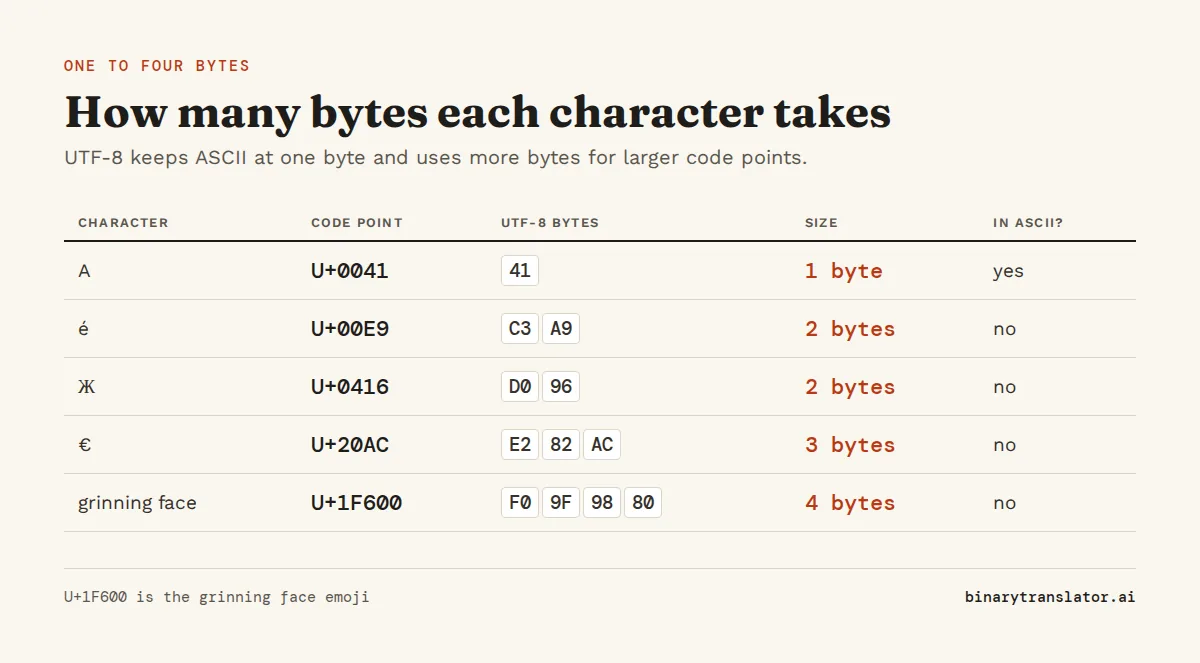
UTF-16 stores most characters in 2 bytes. Characters above U+FFFF, including emoji, take 4 bytes, written as a pair of 16-bit units called a surrogate pair. Windows, Java and JavaScript use UTF-16 for strings inside the program. UTF-32 stores every character in exactly 4 bytes. That makes it simple to index, but English text takes four times the space it would in UTF-8. The table shows the same five characters in UTF-8 and UTF-16:
| Character | Code point | UTF-8 bytes | UTF-8 size | UTF-16 (big endian) | In ASCII? |
|---|---|---|---|---|---|
| A (Latin capital A) | U+0041 | 41 | 1 | 00 41 | yes |
| é (e with acute accent) | U+00E9 | C3 A9 | 2 | 00 E9 | no |
| Ж (Cyrillic capital Zhe) | U+0416 | D0 96 | 2 | 04 16 | no |
| € (euro sign) | U+20AC | E2 82 AC | 3 | 20 AC | no |
| 😀 (grinning face emoji) | U+1F600 | F0 9F 98 80 | 4 | D8 3D DE 00 | no |
This explains a JavaScript result that surprises people: '😀'.length is 2, because the string length counts 16-bit units, not characters. In Python 3, len('é') is 1 but len('é'.encode('utf-8')) is 2, because a Python string and its bytes are separate types. UTF-16 and UTF-32 also come in big-endian and little-endian forms. That is why their files often start with a byte order mark (BOM), such as FE FF or FF FE, which tells the reader which byte comes first.
Why text turns into strange symbols
You open a file and "café" shows up as "café". That garbled text, sometimes called mojibake, appears when bytes written in one encoding are read as another. This case is UTF-8 read as Windows-1252. The letter é is stored in UTF-8 as the two bytes C3 A9. Windows-1252 reads each byte as its own character, C3 as à and A9 as ©. The fix is to open the file again with the encoding it was written in. Don't correct the letters by hand, because the bytes on disk are fine and only the reading is wrong.
If a file starts with a stray "", you're looking at the UTF-8 byte order mark, EF BB BF, read as Windows-1252. When you're not sure which encoding you have, look at the actual bytes with the text to hex converter or the text to binary converter.
Which encoding to use
- Web pages, APIs, JSON, source code and new files: UTF-8. HTML pages should say so with
<meta charset="utf-8">. - Old files from Windows programs: often Windows-1252 or another code page. Convert them to UTF-8 once and keep them that way.
- Programs that talk to Windows APIs, Java or JavaScript internals: UTF-16 in memory, but UTF-8 when the data is saved or sent.
The Unicode converter turns text into code points, UTF-8, UTF-16 and escape codes for HTML, CSS, JavaScript and Python, and the binary translator decodes UTF-8 binary back into text.
Questions people ask
What is the difference between Unicode and UTF-8?
Unicode assigns a number to each character. UTF-8 is one way to store those numbers as bytes, using 1 to 4 bytes per character.
Is ASCII the same as UTF-8?
For the first 128 characters, yes. Any ASCII text is valid UTF-8 with the same bytes. UTF-8 then goes much further, while ASCII stops at code 127.
How many characters does ASCII have?
128, numbered 0 to 127. 95 of them are printable and 33 are control codes.
How many bytes is a UTF-8 character?
Between 1 and 4. ASCII characters take 1 byte, most European and Middle Eastern letters take 2, Chinese, Japanese and Korean characters take 3, and emoji take 4.
Why does my text show é instead of é?
The text was saved as UTF-8 and opened as Windows-1252 or ISO-8859-1. Open it again with UTF-8 selected as the encoding.
Is UTF-8 better than UTF-16?
For files and anything sent over a network, UTF-8 is the usual choice because it is compatible with ASCII and has no byte order problems. UTF-16 is common inside Windows, Java and JavaScript programs.
About the authors

Uma Victor is a technical writer and software engineer with seven years of engineering work. He writes API documentation, integration guides and tutorials for developer tools, and his articles have run in Smashing Magazine, freeCodeCamp and LogRocket. He runs the code before he writes about it. On binarytranslator.ai he writes the guides on binary, hex and text encoding.

Khushboo Gupta is a PhD student in computer science at the University of Illinois Chicago, where she researches natural language processing. As a graduate teaching assistant she has taught Program Design, Data Structures, Introduction to Data Science and Natural Language Processing. Before her PhD she was a software development engineer at Amazon Web Services and a software engineer at Pacific Northwest National Laboratory, and she holds an MS in computer science from Syracuse University. On binarytranslator.ai she reviews the guides on text encoding, data structures and number systems.
Keep reading
All posts Binary basics
MSB and LSB: most and least significant bits, signed integers and overflow
The MSB is the leftmost, highest-value bit and the LSB the rightmost. See what each tells you, how signed integers use the MSB as a sign bit, and how integer overflow wraps values around.9 min read Binary basics
Floating point numbers explained: why 0.1 + 0.2 is not 0.3
A floating point number is scientific notation in binary. See why 0.1 + 0.2 is 0.30000000000000004, how precise floats are, float vs double, and how to compare floats and handle money.9 min read Binary basics