Python
Python bitwise operators and XOR
How &, |, ^, ~, << and >> work on the bits of an integer, with XOR tricks, flags, shifts and the bugs that trip people up.
If you typed 2 ^ 3 expecting 8 and got 1, you have met XOR. In Python ^ is bitwise XOR, not a power (that is **). It compares two integers one bit position at a time, so 12 ^ 10 is 6. XOR is one of six bitwise operators: & (AND), | (OR), ^ (XOR), ~ (NOT), << (left shift) and >> (right shift).
Key takeaways
| Python's XOR operator is ^, and 12 ^ 10 is 6 because the result has a 1 wherever the bits differ. | |
| Use & with a mask to test or clear bits, | to set them, and ^ to flip them. | |
| ~x equals -x - 1 because Python ints act like two's complement with unlimited width. | |
| x << n multiplies by 2 to the n and x >> n divides and rounds down, with no overflow. | |
| For logical XOR of non-boolean values, use bool(a) != bool(b). |
a, b = 12, 10
print(a & b, a | b, a ^ b, ~a, a << 2, a >> 2)
8 14 6 -13 48 3| Operator | Name | Result bit is 1 when | 12 op 10 |
|---|---|---|---|
& | AND | both bits are 1 | 8 |
| | OR | either bit is 1 | 14 |
^ | XOR | the bits are different | 6 |
~ | NOT | the bit is 0 (one operand only) | ~12 is -13 |
<< | left shift | bits move left, zeros fill in | 12 << 2 is 48 |
>> | right shift | bits move right, the low bits drop off | 12 >> 2 is 3 |
Try the operators
Enter two numbers to see every operator applied to them, with the bits lined up so you can check each column.
How the bits line up
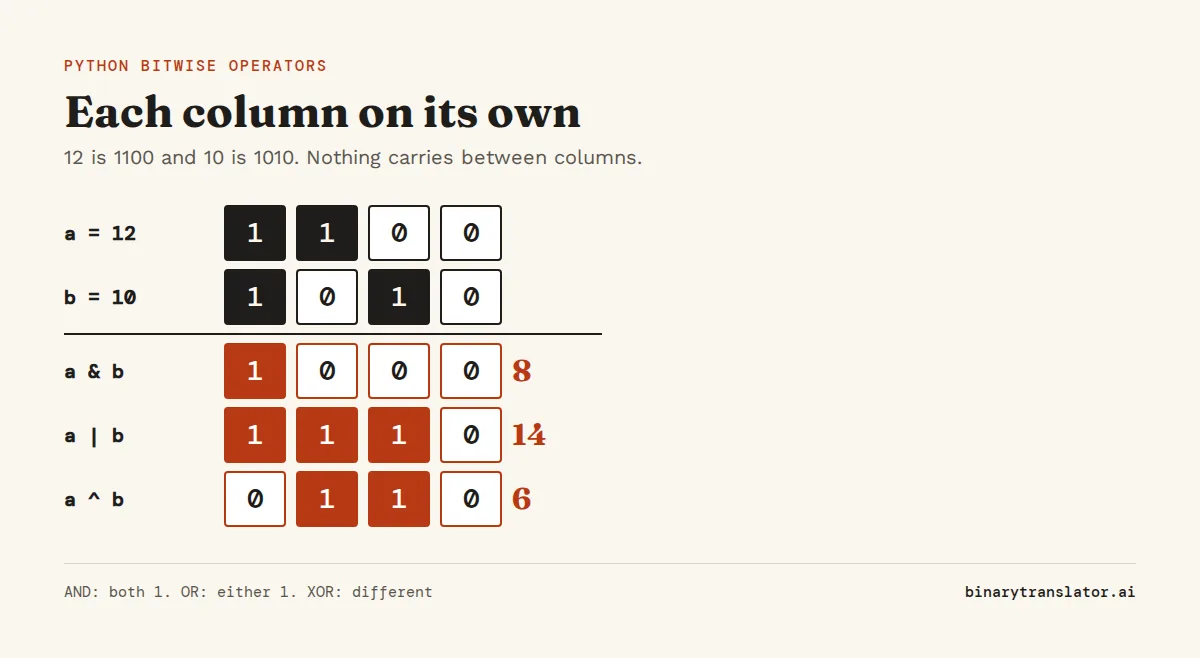
Write both numbers in binary, line them up on the right, and apply the rule to each column on its own. Nothing carries from one column to the next, which is the difference from addition. With 12 (1100) and 10 (1010):
a, b = 12, 10
for name, r in [('a', a), ('b', b), ('a & b', a & b), ('a | b', a | b), ('a ^ b', a ^ b)]:
    print(f'{name:6} {r:04b}  {r}')
a 1100 12
b 1010 10
a & b 1000 8
a | b 1110 14
a ^ b 0110 6The binary calculator and the XOR calculator do the same column work for longer numbers, and logic gates shows the circuits that do it in hardware.
AND (&): test and clear bits
& keeps a bit only where both numbers have a 1. That makes it the tool for masks. A mask is a number whose 1s mark the bits you care about, such as 0x0F for the low four bits. AND a value with it and those bits survive while the rest become 0.
n = 0b1011_0110
print(n & 1)
print(n & 0x0F, format(n & 0x0F, '04b'))
print(bool(n & 0b100))
for x in [4, 7]:
    print(x, 'even' if x & 1 == 0 else 'odd')
0
6 0110
True
4 even
7 oddThe first line reads the lowest bit, the least significant bit, which is 1 for odd numbers and 0 here. The second keeps the low four bits, and the third tests whether the bit worth 4 is set. In Python, x & 1 == 0 works as expected, because & binds tighter than ==. If you port the line to C, add parentheses, because C binds them the other way round.
OR (|): set bits and combine flags
| sets a bit wherever either number has a 1, so it turns bits on without touching the others. That is why flags use it. Give each flag its own bit (4, 2 and 1 below, like Unix permissions), and OR them together to store several in one number.
READ, WRITE, EXEC = 4, 2, 1
perm = READ | WRITE
print(perm, format(perm, '03b'))
perm |= EXEC
print(perm, format(perm, '03b'))
print(bool(perm & WRITE))
6 110
7 111
TrueOn sets, | means union and & means intersection, and on dictionaries | merges them (Python 3.9+). Those are different operations that reuse the same symbols.
XOR (^): flip bits, compare and encrypt
^ gives 1 where the bits differ and 0 where they match. XOR with 1 flips a bit and XOR with 0 leaves it alone, so a mask decides exactly which bits change.
n = 0b1010
print(format(n ^ 0b1111, '04b'))
print(format(n ^ 0b0010, '04b'))
print(n ^ n, n ^ 0)
0101
1000
0 10Two rules make XOR useful: x ^ x is 0 and x ^ 0 is x. So if you XOR data with a key and then XOR the result with the same key again, the key cancels out and you get the original back. The XOR cipher below works exactly that way.
key = 0x4B
data = 'Hi!'.encode()
scrambled = bytes(c ^ key for c in data)
print(scrambled.hex(' '))
print(bytes(c ^ key for c in scrambled).decode())
03 22 6a
Hi!Python has no XOR for whole bytes objects, so loop over them as above, or pair two byte strings with zip(). Do not use this to protect anything. With a one-byte key, anyone who guesses a single character recovers the key: 0x03 ^ ord('H') is 0x4b. For real secrets, use a library such as cryptography.
Logical XOR for True and False
On two booleans, ^ already works as a logical XOR and returns a bool. For other values, such as a non-empty string and None, convert them first. bool(a) != bool(b) is the clearest way to write "exactly one of these is true".
print(True ^ False, True ^ True)
a, b = 'text', None
print(bool(a) != bool(b))
import operator
print(operator.xor(5, 3))
True False
True
6Two XOR tricks you will see in interviews
Take a list where every value appears twice except one, and XOR all of it together. Order does not matter for XOR, and each pair gives x ^ x = 0, so only the single value is left. XOR can also swap two variables without a temporary. In Python, write a, b = b, a instead, because it is clearer and does the same job.
from functools import reduce
from operator import xor
print(reduce(xor, [4, 1, 2, 1, 2]))

a, b = 7, 3
a ^= b; b ^= a; a ^= b
print(a, b)
4
3 7NOT (~): why ~5 is -6
~x flips every bit (the one's complement of the number), and the result is always -x - 1. The reason, spelled out in Python's notes on bitwise operations, is that Python treats an int as if it had an endless row of sign bits on the left: 0s for a positive number, 1s for a negative one (in two's complement, all 1s is -1). 5 is ...00000101. Flip everything and you get ...11111010, which has 1s running off to the left, so it is negative: -6.
print(~5, ~0, ~-1)
print(format(~5 & 0xFF, '08b'))
print(format(5 ^ 0xFF, '08b'))
-6 -1 0
11111010
11111010To flip only the bits of a fixed-size value, such as one byte, mask the result with & 0xFF or XOR with 0xFF. Both lines give 11111010, which is 5 with its eight bits inverted. The two's complement calculator explains the negative values.
Shifts (<< and >>): multiply and divide by powers of 2
x << n moves the bits n places left and fills with zeros, which multiplies by 2 to the power of n. x >> n moves them right and drops the low bits, which divides by 2 to the power of n and rounds down. The powers of 2 table lists the factors.
print(1 << 10, 3 << 4)
print(1000 >> 3, 1000 // 8)
print(-13 >> 1, -13 // 2)
print((0xFF << 4) & 0xFF)
1024 48
125 125
-7 -7
240Python ints never overflow, so a left shift keeps growing instead of dropping bits off the top the way a 32-bit register in C or Java would. You notice this when you port a hash function and Python returns a huge number where the original returned a 32-bit one. Add a mask after the shift, & 0xFFFFFFFF for 32 bits, as the last line does with & 0xFF.
A right shift on a negative number rounds toward minus infinity, which is why -13 >> 1 is -7, the same as -13 // 2. Python has no >>> operator, because without a fixed width there is no top bit to fill with a zero. For an unsigned shift of a 32-bit value, mask first: (x & 0xFFFFFFFF) >> n.
Bitwise & vs logical and
and and or look at whether each side is true or false. They stop as soon as the answer is known and return one of the operands. & and | always evaluate both sides and combine the bits. On plain ints that often gives a different answer:
print(6 and 3, 6 & 3)
print(0 or 5, 0 | 5)
print(5 > 1 & 3 < 2, (5 > 1) & (3 < 2))
3 2
5 5
True FalseThe last line is a common bug in NumPy and pandas code, where & and | combine arrays of conditions. Because & binds tighter than >, 5 > 1 & 3 < 2 is read as 5 > (1 & 3) < 2. In pandas the same mistake usually stops with ValueError: The truth value of a Series is ambiguous. Put each comparison in its own parentheses: df[(df.a > 1) & (df.b < 2)].
Flags with enum.Flag
For named flags, enum.Flag wraps the same bit tricks in readable code. The members combine with | and you test them with in.
from enum import Flag, auto

class Perm(Flag):
    READ = auto()
    WRITE = auto()
    EXEC = auto()

p = Perm.READ | Perm.WRITE
print(p, Perm.WRITE in p, Perm.EXEC in p, p.value)
Perm.READ|WRITE True False 3Operator precedence
From highest to lowest, the bitwise operators sit between arithmetic and comparisons, as in Python's operator precedence table:
| Priority | Operators |
|---|---|
| 1 (highest) | ** |
| 2 | ~x, +x and -x |
| 3 | *, /, //, % |
| 4 | +, - |
| 5 | <<, >> |
| 6 | & |
| 7 | ^ |
| 8 | | |
| 9 | comparisons such as ==, <, in |
| 10 | not |
| 11 | and |
| 12 (lowest) | or |
So 1 + 2 << 3 is 24, not 17, because the addition happens before the shift. When an expression mixes shifts with arithmetic, add parentheses anyway, so the next person does not have to look this table up. Two int methods help when you work with bits: n.bit_length() returns how many bits n needs, and n.bit_count() (Python 3.10+) counts the 1 bits.
Questions people ask
What does ^ do in Python?
On integers, ^ is bitwise XOR: each result bit is 1 when the two input bits are different. 12 ^ 10 is 6. On booleans it acts as logical XOR, and on sets it returns the elements that are in one set but not both.
Is there a logical XOR operator in Python?
There is no xor keyword. For booleans, a ^ b works. For other values, use bool(a) != bool(b), which is True when exactly one of them is truthy.
Why does ~5 return -6 in Python?
~ flips every bit, and Python stores negative numbers as if in two's complement with unlimited width, so ~x always equals -x - 1. To flip only the low 8 bits, use ~x & 0xFF or x ^ 0xFF.
What is the difference between & and and in Python?
& is bitwise AND and always evaluates both sides. and is logical AND, stops early when the left side is false, and returns one of the operands. 6 & 3 is 2 while 6 and 3 is 3.
How do I XOR two strings or bytes in Python?
Encode the strings to bytes, then XOR the bytes pairwise: bytes(x ^ y for x, y in zip(a, b)). The ^ operator does not work on str or bytes objects directly.
Does Python have the >>> operator?
No. Python has only >>, which keeps the sign of negative numbers. For an unsigned shift of a 32-bit value, mask it first: (x & 0xFFFFFFFF) >> n.
About the authors

Uma Victor is a technical writer and software engineer with seven years of engineering work. He writes API documentation, integration guides and tutorials for developer tools, and his articles have run in Smashing Magazine, freeCodeCamp and LogRocket. He runs the code before he writes about it. On binarytranslator.ai he writes the guides on binary, hex and text encoding.

Mehran Mozaffari Kermani is a professor at the Bellini College of Artificial Intelligence, Cybersecurity and Computing at the University of South Florida. His research covers computer arithmetic, cryptographic hardware and fault detection in digital circuits, and he worked as an ASIC design engineer at AMD before he joined academia. He earned his PhD in electrical and computer engineering at the University of Western Ontario, was a postdoctoral fellow at Princeton and is a senior member of IEEE. On binarytranslator.ai he reviews the logic gate, binary arithmetic and floating-point tools.
Keep reading
All posts Programming
The xxd command: hex dumps on Linux and macOS
Use xxd to read the bytes in any file, get plain hex with -p, turn hex back into binary with -r, patch a byte, print bits, make C arrays and diff binary files.9 min read Programming
Base64 encode and decode in Python, JavaScript, Linux and PowerShell
Base64 one-liners for Python, the browser, Node.js, Linux, macOS and PowerShell, with a command builder and fixes for padding errors, echo newlines, line wrapping and UTF-16.13 min read Programming