Base converter
Type a number, choose the base it is in and the base you want. The result appears as you type, along with the same value in binary, octal, decimal and hex. Letters A to Z stand for digits 10 to 35.
Show the working
Same number in common bases


Runs in your browser. Nothing you type is uploaded.
How to use the base converter
- Type the number in the From box. Uppercase and lowercase letters both work.
- Pick its base from the menu next to it, from 2 to 36.
- Pick the base you want in the To menu. The quick picks set common pairs in one click.
- Click any value under the result to copy it, or press the swap button to go back the other way.
Open "Show the working" for the full steps and "Same number in common bases" for a table of the value in 14 bases. To add or multiply numbers instead of converting them, use the binary calculator or the hex calculator.
How base conversion works
Every base conversion has two halves. First turn the number into decimal by multiplying each digit by a power of the base and adding the results. For base 8, the octal to decimal converter does this half on its own. Then turn the decimal number into the new base by dividing by that base again and again and reading the remainders from the bottom up.
Example: 2101 in base 3 to base 5. In decimal it is 2 × 27 + 1 × 9 + 0 × 3 + 1 = 64. Then 64 ÷ 5 = 12 remainder 4, 12 ÷ 5 = 2 remainder 2, and 2 ÷ 5 = 0 remainder 2. Read up: 224 in base 5.
How to convert to base 10
This is the first half on its own. Write the place values of the base under the digits: for base 4 they are 1, 4, 16, 64. Multiply and add. So 1230 in base 4 is 1 × 64 + 2 × 16 + 3 × 4 + 0 = 108 in decimal. The binary to decimal converter works the same way with place values 1, 2, 4, 8 and so on.
Digits for bases above 10
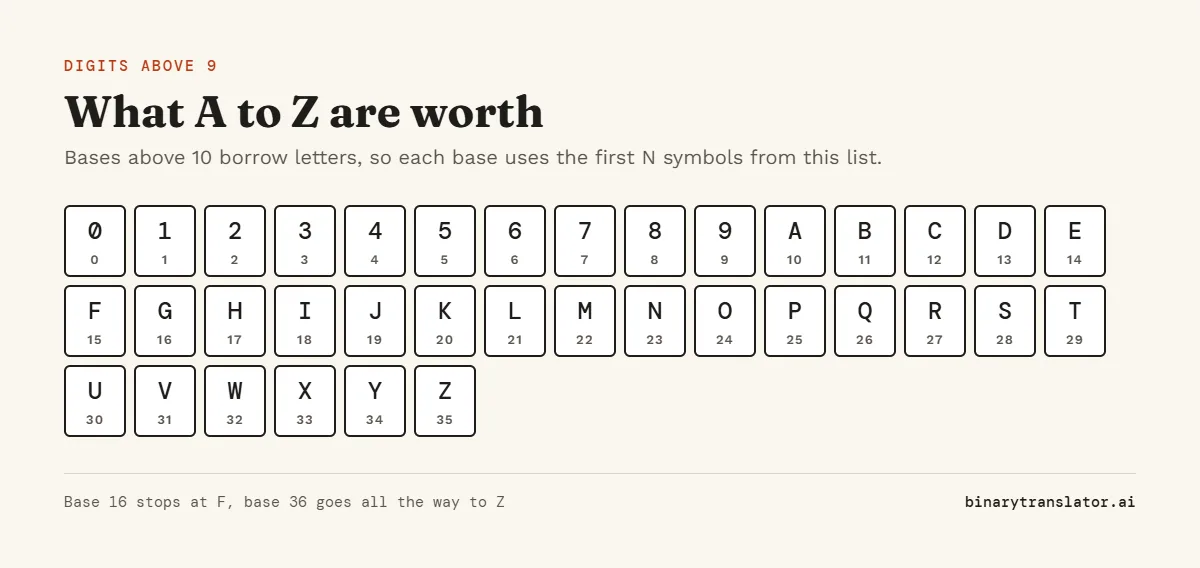
A base needs as many symbols as its number; Python's int() function, for one, reads A to Z as 10 to 35 for any base up to 36. Base 16 uses 0 to 9 and A to F, the digits the decimal to hex converter writes its answers in. Base 36 uses every digit and every letter, which is why short links and IDs often use it: 1,295 is only ZZ in base 36. If you type a digit that is too big for the base you picked, the tool tells you which digits are allowed.
Common bases
| Base | Name | Where it is used |
|---|---|---|
| 2 | Binary | How computers store everything |
| 3 | Ternary | Some math puzzles and balanced ternary |
| 8 | Octal | Unix file permissions |
| 10 | Decimal | Everyday numbers |
| 12 | Duodecimal | Dozens, hours and inches |
| 16 | Hexadecimal | Colors, memory addresses, bytes |
| 36 | Base 36 | Short codes and IDs |
Fractions
Numbers with a point work too, such as 10.5 or 0.1. Some fractions end in one base and repeat forever in another: 0.1 in decimal has no exact binary form. The converter stops after 32 digits and says when the digits repeat.
Frequently asked questions
What bases does the converter support?
Every base from 2 to 36, in both directions. Fractions and negative numbers work too.
How do I convert from one base to another?
Convert to decimal first by adding digit × baseposition, then divide the decimal number by the new base repeatedly and read the remainders backwards.
What is 255 in base 3?
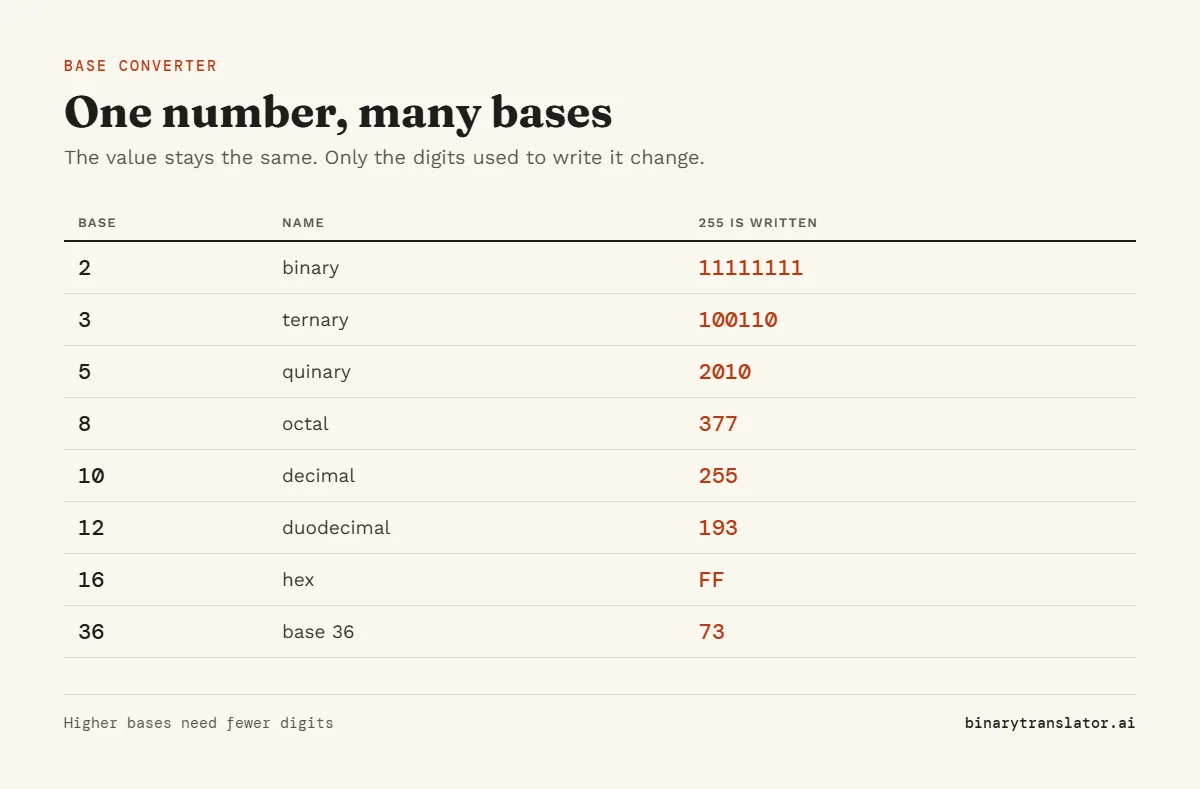
100110. You can check it: 243 + 9 + 3 = 255.
What is ZZ in base 36?
1295 in decimal, because Z is 35 and 35 × 36 + 35 = 1295.
Is a base converter the same as a base calculator?
People use both names. This one converts values. To add or multiply in a base, use the binary or hex calculator.