Download time calculator
Enter the file size and your download speed to see how long the download takes. A 50 GB game at 100 Mbps takes about 1 hour 7 minutes. Switch Find to "Speed needed" to work out the speed for a time you have in mind.
Show the working
Same file at common speeds


Runs in your browser. Nothing you type is uploaded.
How to use the download time calculator
- Type the file size and pick KB, MB, GB or TB, or click one of the examples above the boxes. If the size comes from Windows, the GiB to GB converter turns it into decimal GB.
- Type your speed. Plans are usually in Mbps. If your browser shows MB/s, pick MB/s instead.
- Set Overhead to 10% for a typical home connection, or 20% for busy Wi-Fi.
- Read the time, and open "Same file at common speeds" to compare plans.
Download time formula
Time = file size in bits ÷ speed in bits per second. Turn the file into bits first, by hand or with the byte converter: GB × 1,000 × 1,000 × 1,000 × 8. Then divide by the speed in bits per second.
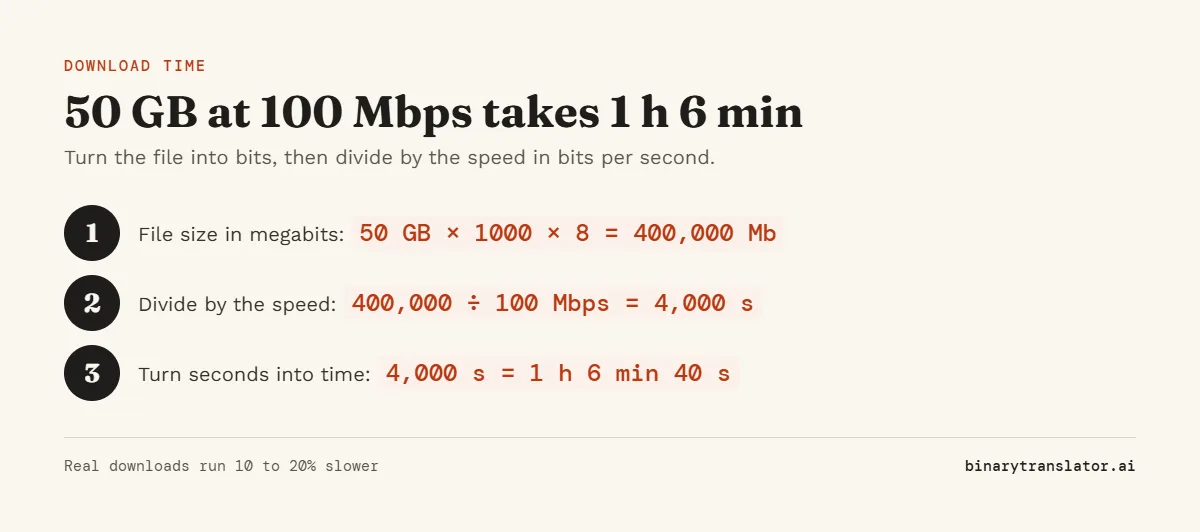
So 50 GB, which the GB to MB converter shows as 50,000 MB, is 400,000 megabits. At 100 Mbps that takes 4,000 seconds, which is 1 hour 6 minutes 40 seconds. "Show the working" lays out these steps for your own numbers.
How long common downloads take
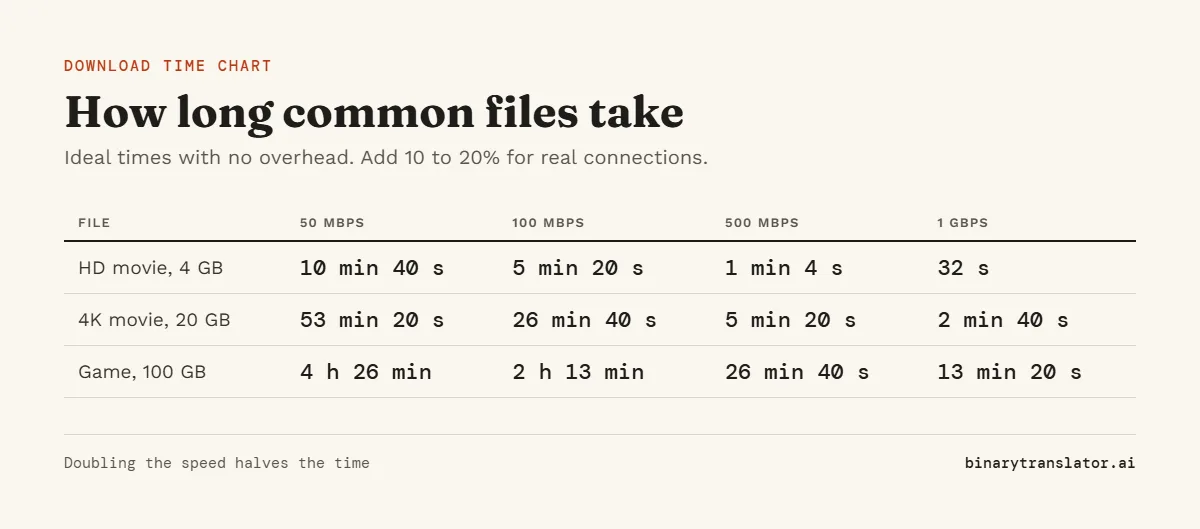
| File | Size | 100 Mbps | 300 Mbps | 1 Gbps |
|---|---|---|---|---|
| Song | 5 MB | 0.4 seconds | 0.1 seconds | 0.04 seconds |
| HD movie | 4 GB | 5 min 20 s | 1 min 47 s | 32 s |
| 4K movie | 20 GB | 26 min 40 s | 8 min 53 s | 2 min 40 s |
| Phone backup | 128 GB | 2 h 50 min | 56 min 53 s | 17 min 4 s |
| Large game | 100 GB | 2 h 13 min | 44 min 27 s | 13 min 20 s |
Mbps vs MB/s
Internet plans are sold in megabits per second (Mbps). Steam, browsers and phone stores show megabytes per second (MB/s). A byte is 8 bits, so 100 Mbps shows up as about 12.5 MB/s. Picking the wrong unit makes a download look 8 times faster or slower than it is. The Mbps to Gbps converter turns one into the other.
Why real downloads take longer
- Wi-Fi signal, walls and distance cut the speed that reaches your device.
- Other devices and apps on the same connection share the bandwidth.
- The server you download from may send slower than your plan allows.
- Network protocols add a few percent of extra data on top of the file.
That is what the Overhead setting is for. 10% fits most wired and good Wi-Fi connections.
Speed needed for a deadline
Set Find to "Speed needed", enter the file size and how long you have, such as 30 minutes or 1:30:00. To get 100 GB in one hour you need at least 222 Mbps with no overhead. The same math works for uploads and file transfers between computers, so use your upload speed for those.
Frequently asked questions
How long does it take to download 1 GB?
About 80 seconds at 100 Mbps, 27 seconds at 300 Mbps and 8 seconds at 1 Gbps, before overhead.
How long does it take to download a movie?
A 4 GB HD movie takes about 5 minutes at 100 Mbps. A 20 GB 4K movie takes about 27 minutes at the same speed.
How do I calculate download time?
Multiply the file size in GB by 8,000 to get megabits, then divide by your speed in Mbps. The answer is in seconds.
Does this work for upload time too?
Yes. Enter your upload speed instead of your download speed.
Should I use 1000 or 1024 for the file size?
Use 1000 for sizes from stores and websites. Use 1024 if the size comes from Windows File Explorer.