Text to binary converter
Type any text and get its binary code as you go. "Hi" becomes 01001000 01101001. Letters, numbers, spaces, accents and emoji all convert, using UTF-8 by default. To decode binary instead, use the binary translator.


Runs in your browser. Nothing you type is uploaded.
How to convert text to binary
- Type or paste your text in the left box.
- The binary shows up on the right as you type. Pick a separator (space, none, new line or comma) and a style: 8-bit, 7-bit, 4-bit groups or a 0b prefix.
- Copy the binary, download it as a .txt file, or press Share to send someone a link.
How text becomes binary
Every character has a number. In ASCII, capital A is 65, lowercase a is 97 and a space is 32. The converter writes that number in base 2 and pads it to 8 bits, so A becomes 01000001.
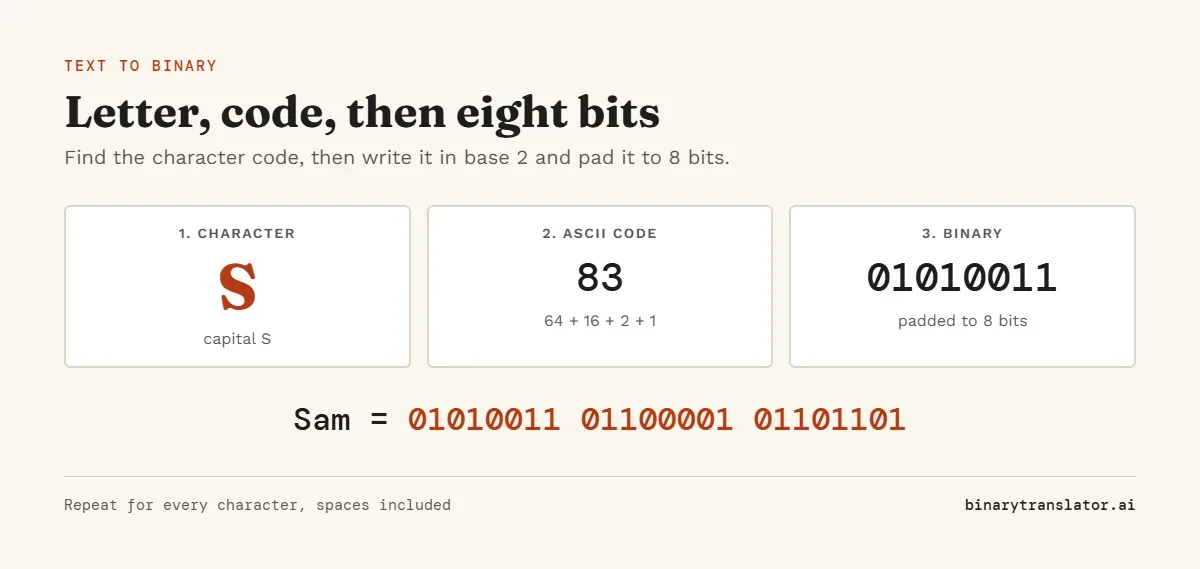
Take the letter H. Its code is 72, and 72 is 64 + 8. Turn on the bits worth 64 and 8 and leave the rest at 0, and you get 01001000.
Characters outside ASCII take 2 to 4 bytes in UTF-8. The letter é becomes 11000011 10101001, and the 😀 emoji takes four bytes: 11110000 10011111 10011000 10000000. Open "Show how each character converts" under the tool to see this for your own text.
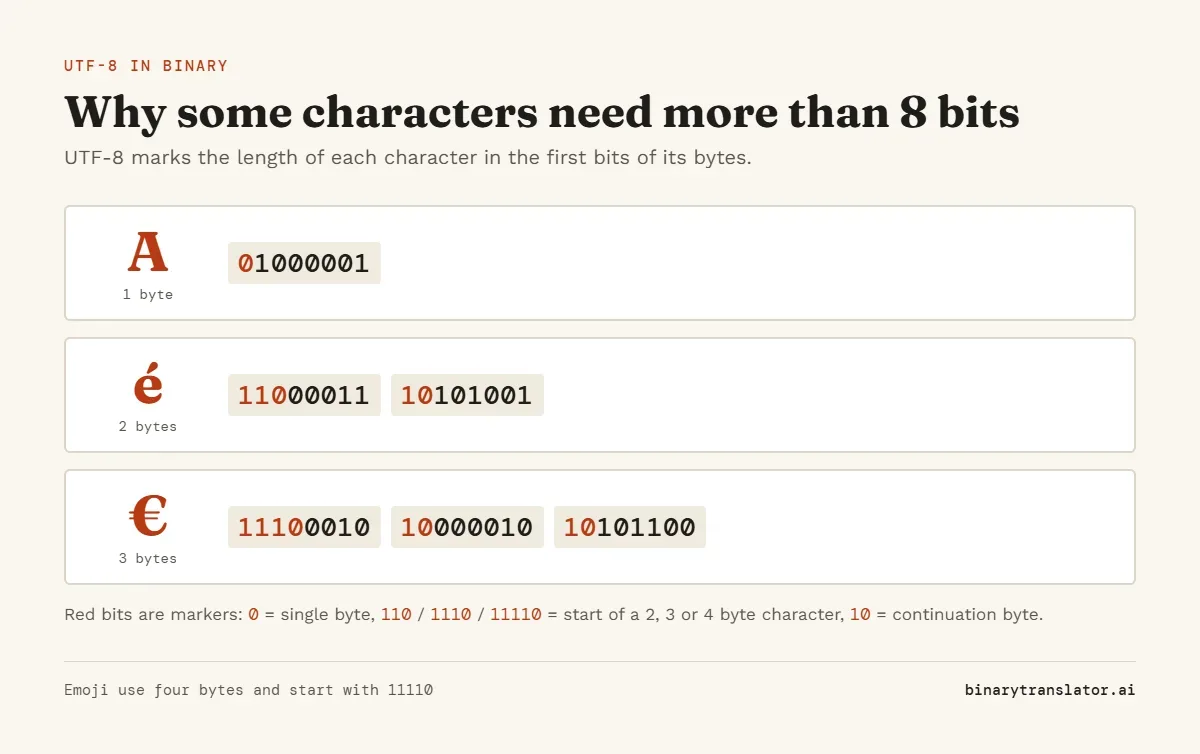
The red bits in each byte are length markers. A leading 0 means a one-byte ASCII character, 110 starts a two-byte character, 1110 a three-byte one and 11110 a four-byte one such as an emoji. Every byte after the first starts with 10.
Common words and phrases in binary
| Text | Binary |
|---|---|
| Hi | 01001000 01101001 |
| Hello | 01001000 01100101 01101100 01101100 01101111 |
| Hello world | 01001000 01100101 01101100 01101100 01101111 00100000 01110111 01101111 01110010 01101100 01100100 |
| Yes | 01011001 01100101 01110011 |
| No | 01001110 01101111 |
| Love | 01001100 01101111 01110110 01100101 |
| I love you | 01001001 00100000 01101100 01101111 01110110 01100101 00100000 01111001 01101111 01110101 |
| Thank you | 01010100 01101000 01100001 01101110 01101011 00100000 01111001 01101111 01110101 |
Numbers and punctuation in binary
Digits typed as text are not the same as numbers. The character 7 is ASCII code 55, so it becomes 00110111, not 111. For the binary value of a number, use the decimal to binary converter instead. The ASCII table lists the code for every character.
| Character | ASCII code | Binary |
|---|---|---|
| 0 | 48 | 00110000 |
| 1 | 49 | 00110001 |
| 2 | 50 | 00110010 |
| 3 | 51 | 00110011 |
| 4 | 52 | 00110100 |
| 5 | 53 | 00110101 |
| 6 | 54 | 00110110 |
| 7 | 55 | 00110111 |
| 8 | 56 | 00111000 |
| 9 | 57 | 00111001 |
| space | 32 | 00100000 |
| ! | 33 | 00100001 |
| , | 44 | 00101100 |
| . | 46 | 00101110 |
| ? | 63 | 00111111 |
7-bit vs 8-bit binary
ASCII only needs 7 bits, because its highest code is 127. Many textbooks and puzzles write letters in 7 bits, so H is 1001000. Computers store each character in a full 8-bit byte with the top bit set to 0, as RFC 20, the ASCII interchange standard describes, which is why the converter pads to 8 by default.
Pick 7-bit in the Style menu when an assignment asks for it. Accented letters and emoji need more than 7 bits, so the converter will tell you when a character does not fit.
Text to hex, decimal and octal
Set To to Hex, Decimal or Octal to get the same bytes in another base. "Hi" is 48 69 in hex, 72 105 in decimal and 110 151 in octal. Hex can also be written with a 0x or \x prefix for code.
Frequently asked questions
How do I write my name in binary?
Type your name in the box. Each letter becomes 8 bits, so "Sam" is 01010011 01100001 01101101. Capital and small letters give different codes.
Is text to binary the same as English to binary?
Yes. English letters are stored as ASCII codes, so converting English to binary means writing each letter's code in base 2.
How many bits is one letter?
8 bits in this converter. Plain ASCII needs only 7, while UTF-8 uses up to 4 bytes (32 bits) for emoji. To turn a long byte count into KB or MB, use the bytes to MB converter.
Why does my binary have spaces in it?
The spaces separate the bytes so they are easier to read. Choose None under Separator to get one continuous string.
How do I turn binary back into text?
Press the swap button next to From and To, or use the binary translator, which decodes binary to text.
Is my text sent to a server?
No. The conversion runs in your browser with JavaScript, and nothing you type is uploaded or stored.