Text to hex converter
Type or paste text and get its hex bytes as you type: Hello is 48 65 6C 6C 6F. Pick the encoding and output style, and open "Show each character" to see every letter as decimal, hex and binary.
Show each character


Runs in your browser. Nothing you type is uploaded.
How to use the converter
- Type or paste text in the left box. Each character turns into hex as you type.
- Leave Encoding on UTF-8 unless your data comes from an older system that uses Windows-1252, Latin-1 or another code page.
- Pick an output style: uppercase, lowercase, a
0xprefix for C arrays or a\xprefix for string escapes. The Separator menu under the box sets spaces, commas, new lines or nothing between bytes. - Copy, download or share the result.
Open file loads a .txt file, and you can drop a file on the input box. To go back the other way, click the Hex to text tab above the tool; it carries your hex across.
How to convert text to hex
A computer stores each character as a number called its character code. For English letters, digits and punctuation that code comes from the ASCII table. Text to hex just writes each code in base 16, which always takes two digits per byte.
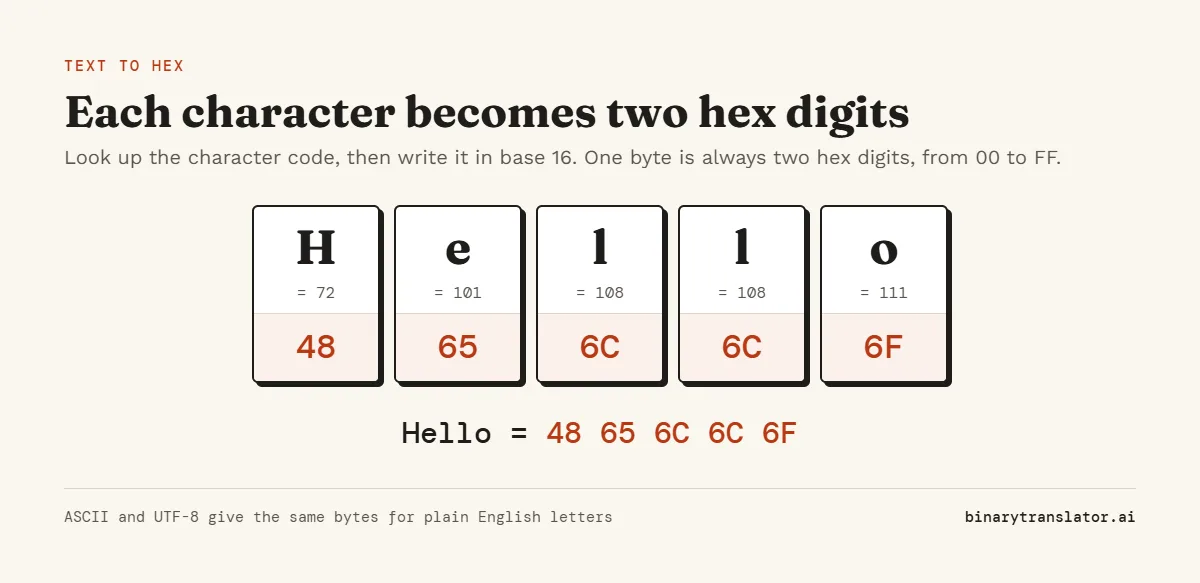
H is code 72, which is 48 in hex. e is 101, or 65. l is 108, or 6C, and o is 111, or 6F. Put them in order and Hello becomes 48 65 6C 6C 6F.
Converting one character by hand
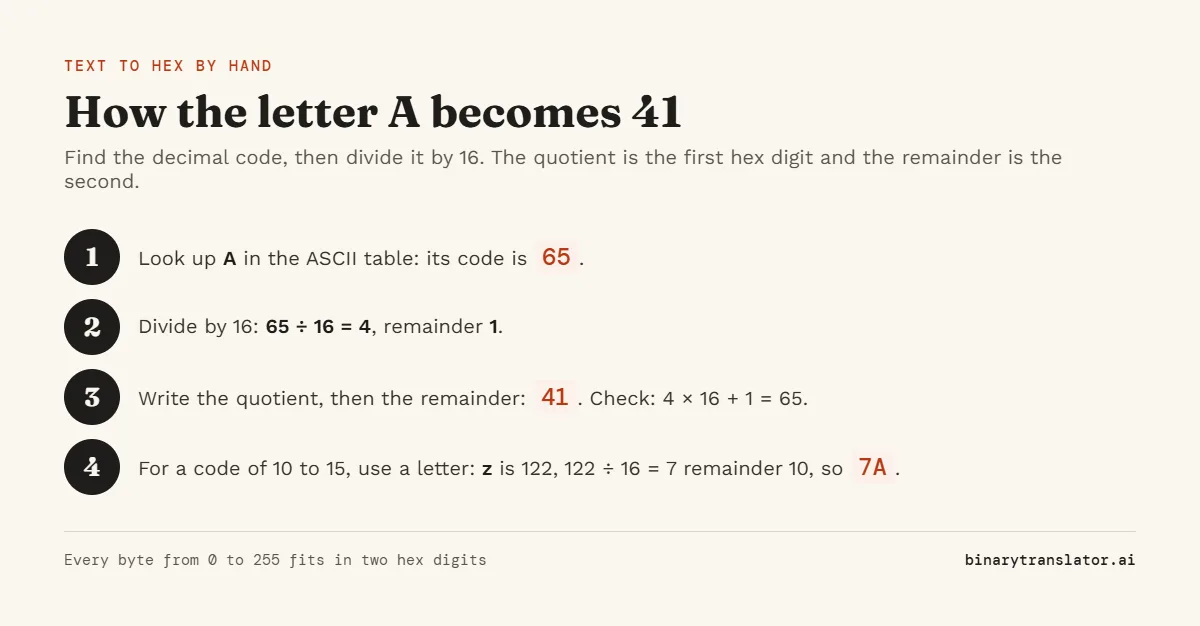
Divide the character code by 16. The whole-number answer is the first hex digit and the remainder is the second, with 10 to 15 written as A to F. A space is code 32, and 32 ÷ 16 = 2 remainder 0, so a space is 20. An exclamation mark is 33, which gives 21.
ASCII to hex table
| Character | Decimal | Hex | Binary |
|---|---|---|---|
| space | 32 | 20 | 00100000 |
| ! | 33 | 21 | 00100001 |
| # | 35 | 23 | 00100011 |
| . | 46 | 2E | 00101110 |
| 0 | 48 | 30 | 00110000 |
| 9 | 57 | 39 | 00111001 |
| @ | 64 | 40 | 01000000 |
| A | 65 | 41 | 01000001 |
| Z | 90 | 5A | 01011010 |
| a | 97 | 61 | 01100001 |
| z | 122 | 7A | 01111010 |
| new line | 10 | 0A | 00001010 |
Capital letters run from 41 to 5A and small letters from 61 to 7A, so the same letter in the two cases is always 20 apart in hex. All 128 codes are in the ASCII table.
Worked examples
| Text | Hex |
|---|---|
| Hi | 48 69 |
| OK! | 4F 4B 21 |
| ABC | 41 42 43 |
| 123 | 31 32 33 |
| binary | 62 69 6E 61 72 79 |
| Hello World | 48 65 6C 6C 6F 20 57 6F 72 6C 64 |
Notice that the text 123 becomes 31 32 33, one byte per digit. The number 123 is something else: it is 7B in hex, which is what the decimal to hex converter gives you.
Text to hex in UTF-8 and other encodings
For plain English, ASCII and UTF-8 produce exactly the same bytes. The difference shows up with accented letters, other alphabets and emoji. UTF-8 stores those in two to four bytes, following the rules in RFC 3629, the UTF-8 standard, while an older single-byte encoding such as Windows-1252 uses one byte but only covers a few hundred characters.
| Character | UTF-8 | UTF-16 (big endian) | Windows-1252 |
|---|---|---|---|
| é | C3 A9 | 00 E9 | E9 |
| ñ | C3 B1 | 00 F1 | F1 |
| € | E2 82 AC | 20 AC | 80 |
| 😀 | F0 9F 98 80 | D8 3D DE 00 | not available |
If the hex you need has to match another program, use the same encoding that program used. To see the Unicode code point behind each character instead of its bytes, try the Unicode converter.
Output formats
- Uppercase (
48 65 6C) is the usual way hex is printed. - Lowercase (
48 65 6c) matches what Python and most command-line tools print. - 0x prefix (
0x48, 0x65) with the Comma separator pastes straight into a C, Java or JavaScript array. - \x prefix (
\x48\x65) with no separator is an escaped string for Python, C or a shell. - No separator (
48656C6C6F) is the compact form used in URLs, hashes and many APIs.
Text to hex in Python, JavaScript and the command line
Python: "Hello".encode("utf-8").hex() returns '48656c6c6f', and .hex(" ") adds spaces (Python 3.8 and later). Encoding the string to bytes is the step that decides which hex you get for non-ASCII text. JavaScript: [...new TextEncoder().encode("Hello")].map(b => b.toString(16).padStart(2, "0")).join(" ") returns "48 65 6c 6c 6f". TextEncoder on MDN confirms that it always encodes to UTF-8.
On Linux and macOS, echo -n Hello | xxd -p prints 48656c6c6f. The -n matters: without it, echo adds a new line and you get an extra 0a at the end.
Frequently asked questions
How do I convert text to hex?
Find each character's code, then write the code as two hex digits. Paste the text into the converter above and it does every character at once.
What is "Hello" in hex?
48 65 6C 6C 6F. Written without spaces it is 48656C6C6F.
What is a space in hex?
20, which is 32 in decimal. A new line is 0A and a tab is 09.
Is ASCII to hex the same as text to hex?
For English letters, digits and common symbols, yes. ASCII only covers 128 characters, so text with accents or emoji needs an encoding such as UTF-8, which this tool uses by default.
Why does é turn into two bytes?
UTF-8 stores every character above code 127 in more than one byte. é is C3 A9 in UTF-8. Pick Windows-1252 or ISO-8859-1 under Encoding if you need the single byte E9.
How do I convert hex back to text?
Use the hex to text converter, or click its tab above the tool to take your result with you.
Is my text sent anywhere?
No. The conversion runs in your browser and nothing you type is uploaded.