Binary to decimal converter
Type a binary number and its decimal value appears as you type: 1101 is 13 and 11111111 is 255. Paste a whole list, one number per line, and open "Show the working" to see how each answer was worked out.
Show the working


Runs in your browser. Nothing you type is uploaded.
How to use the converter
- Type or paste binary in the left box. Separate several numbers with spaces or new lines.
- Read the decimal values on the right. Each line of output matches a line of input.
- Open "Show the working" for the place-value sum, then copy, download or share the result.
Width and Signed. Leave Width on Auto for a plain conversion, or pick 8, 16, 32 or 64 bits to check that a value fits. Tick Signed to read the bits as two's complement, so 11110110 gives -10 instead of 246. Under the boxes, the first number also appears in octal and hex; click either one to copy it. To convert a long list, press Open file to load a .txt or .csv file, or drop the file on the input box.
The tool accepts a 0b prefix (0b1010), underscores used as digit separators (1111_0000), a minus sign and a binary point such as 101.101. Numbers of any length work, so a 64-bit value converts exactly instead of being rounded the way a spreadsheet or phone calculator would round it.
How to convert binary to decimal
Binary is base 2, so every digit stands for a power of 2. The rightmost digit is worth 1, the next 2, then 4, 8, 16, 32 and so on, doubling each time you move left. To convert, add up the values of the positions that hold a 1 and skip the 0s.
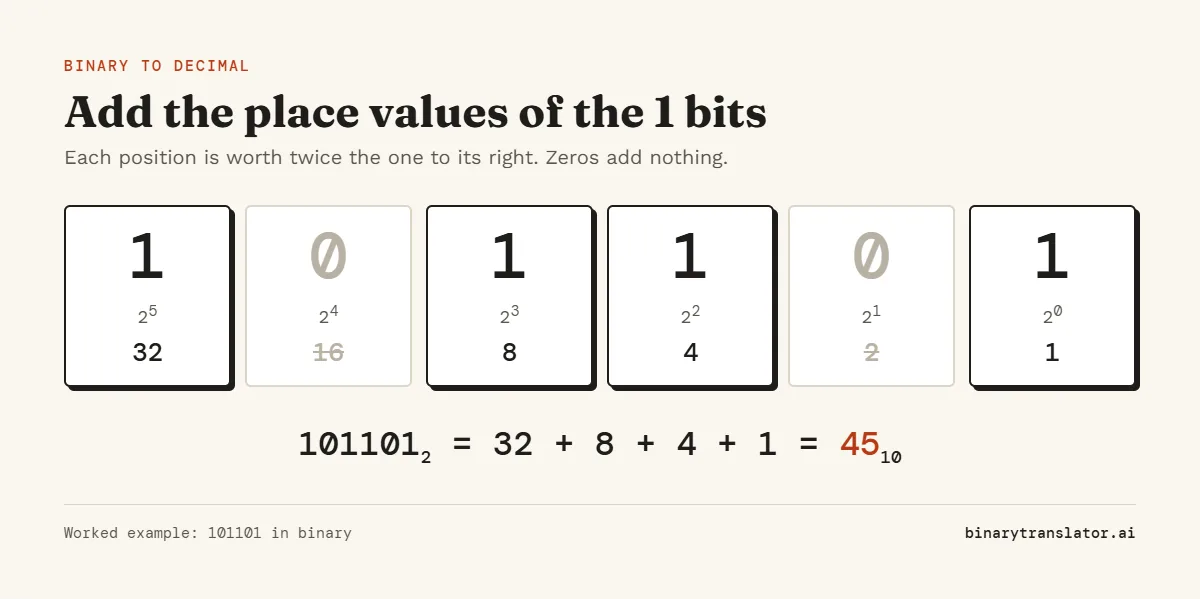
Here is 101101 step by step:
- Count the digits: there are six, so the leftmost one is worth 25 = 32.
- Write the place values under the digits: 32, 16, 8, 4, 2, 1.
- Keep the values that sit under a 1: 32, 8, 4 and 1.
- Add them: 32 + 8 + 4 + 1 = 45.
The binary to decimal formula
Written as a formula, a binary number with digits dn-1 ... d1 d0 has the decimal value
decimal = dn-1 × 2n-1 + ... + d1 × 21 + d0 × 20
Each d is 0 or 1, so every term is either the full power of 2 or nothing. That is why the shortcut of adding only the 1 positions works.
The doubling method
For long numbers there is a faster way that needs no table of powers. Work from left to right with a running total that starts at 0. For each bit, double the total and add the bit. The last total is the answer.
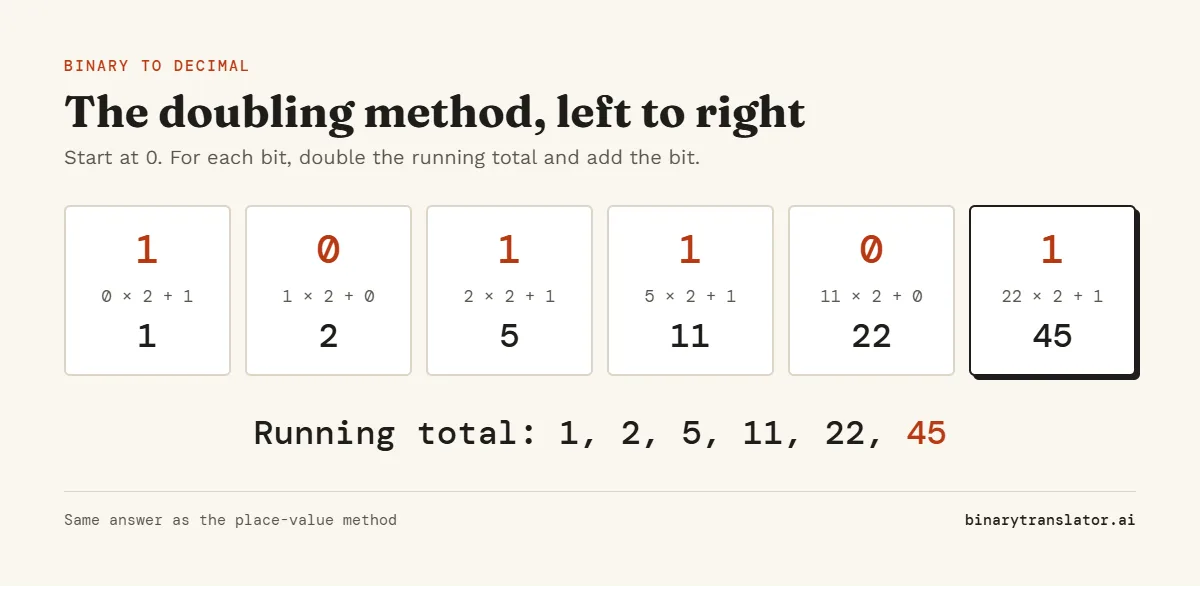
This is the same sum as the formula, just regrouped so you only ever multiply by 2. It is how most people convert in their head once they get used to it, and it is also how computers parse a string of digits.
Worked examples
These are the binary numbers people look up most often, with the place values that make up each answer. If a string such as 01001000 01101001 is meant to be text rather than a number, the binary translator reads it as letters instead.
| Binary | Working | Decimal |
|---|---|---|
101 | 4 + 1 | 5 |
1000 | 8 | 8 |
1001 | 8 + 1 | 9 |
1010 | 8 + 2 | 10 |
1011 | 8 + 2 + 1 | 11 |
1100 | 8 + 4 | 12 |
1111 | 8 + 4 + 2 + 1 | 15 |
10101 | 16 + 4 + 1 | 21 |
11000 | 16 + 8 | 24 |
11111 | 16 + 8 + 4 + 2 + 1 | 31 |
111001 | 32 + 16 + 8 + 1 | 57 |
11111111 | 128 + 64 + 32 + 16 + 8 + 4 + 2 + 1 | 255 |
110111101011 | 2048 + 1024 + 256 + 128 + 64 + 32 + 8 + 2 + 1 | 3563 |
A pattern worth noticing: a run of n ones is always 2n - 1. Four ones make 15, five make 31 and eight make 255. For practice with answers, the free binary to decimal worksheet has 10 numbers to convert each way, with a key on page 2.
Binary to decimal chart, 0 to 31
Five bits cover 0 to 31. The left column is also every 4-bit pattern with a leading 0, which is the table to memorize if you convert binary to hex.
| Binary | Decimal | Binary | Decimal |
|---|---|---|---|
00000 | 0 | 10000 | 16 |
00001 | 1 | 10001 | 17 |
00010 | 2 | 10010 | 18 |
00011 | 3 | 10011 | 19 |
00100 | 4 | 10100 | 20 |
00101 | 5 | 10101 | 21 |
00110 | 6 | 10110 | 22 |
00111 | 7 | 10111 | 23 |
01000 | 8 | 11000 | 24 |
01001 | 9 | 11001 | 25 |
01010 | 10 | 11010 | 26 |
01011 | 11 | 11011 | 27 |
01100 | 12 | 11100 | 28 |
01101 | 13 | 11101 | 29 |
01110 | 14 | 11110 | 30 |
01111 | 15 | 11111 | 31 |
Powers of 2
A 1 followed by n zeros is 2n. These are the place values you need for numbers up to 16 bits.
| Power | Binary | Decimal |
|---|---|---|
| 24 | 10000 | 16 |
| 25 | 100000 | 32 |
| 26 | 1000000 | 64 |
| 27 | 10000000 | 128 |
| 28 | 100000000 | 256 |
| 210 | 10000000000 | 1,024 |
| 212 | 1 and 12 zeros | 4,096 |
| 216 | 1 and 16 zeros | 65,536 |
Signed binary to decimal
With Signed unticked, the converter reads binary as an unsigned number, so 11110110 gives 246; tick Signed and it gives -10. If that byte came from a signed variable, it is stored in two's complement, and the same bits mean -10. In two's complement the leftmost bit carries a negative weight: for 8 bits it is worth -128 instead of +128. The two's complement calculator works through both ways of reading it, for any width from 4 to 64 bits.
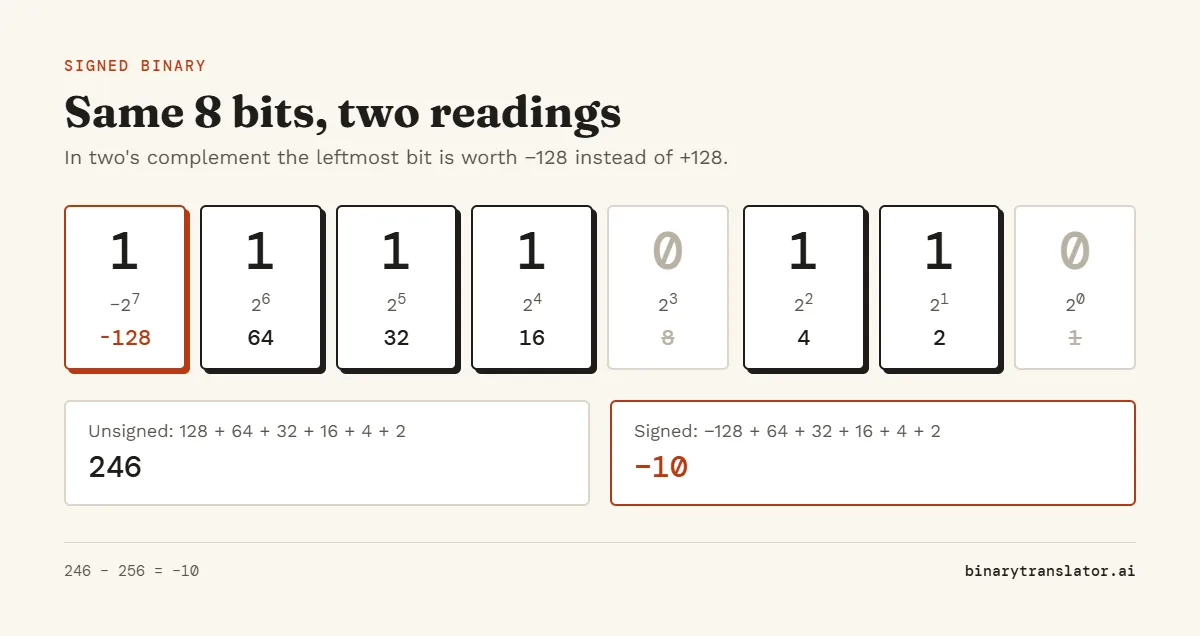
There are two quick ways to get the signed value. The first: if the leftmost bit is 1, take the unsigned result and subtract 2n, where n is the number of bits. 246 - 256 = -10. The second: flip every bit and add 1, then put a minus sign in front. Flipping 11110110 gives 00001001 (9), adding 1 gives 10, so the value is -10. The binary calculator can run both steps for you with NOT and then Add.
The bit width matters. 11110110 is -10 as an 8-bit number but 246 as a 16-bit number, because in 16 bits it would be written 0000000011110110 and the leading bit is 0. Always check how many bits the value was stored in.
| Width | Unsigned range | Signed range | Subtract for negatives |
|---|---|---|---|
| 8 bits | 0 to 255 | -128 to 127 | 256 |
| 16 bits | 0 to 65,535 | -32,768 to 32,767 | 65,536 |
| 32 bits | 0 to 4,294,967,295 | -2,147,483,648 to 2,147,483,647 | 4,294,967,296 |
If you just want a negative number in plain notation, type a minus sign: -1010 converts to -10.
Binary fractions
Digits after the binary point keep halving: 0.5, 0.25, 0.125, 0.0625. So 101.101 is 4 + 1 for the whole part and 0.5 + 0.125 for the fraction, which gives 5.625. Every binary fraction ends in decimal, but the reverse is not true: 0.1 in decimal repeats forever in binary, as Python's floating-point tutorial shows, which is why floating-point sums like 0.1 + 0.2 come out slightly off.
Binary to decimal in code
In Python, int('101101', 2) returns 45 (more binary, hex and int conversions in Python), and the int() documentation covers the base argument. Python integers have no size limit, so long strings are safe. For a signed 8-bit value, use v - 256 if v >= 128 else v.
In JavaScript, parseInt('101101', 2) returns 45 (see parseInt on MDN). Past 53 bits it loses precision, so use BigInt('0b' + bits) for longer values. In C, strtol(s, NULL, 2) does the same job.
Frequently asked questions
How do you convert 10101 to decimal?
The place values for five digits are 16, 8, 4, 2 and 1. The 1s sit under 16, 4 and 1, so 10101 is 16 + 4 + 1 = 21.
How much is 11111111 in binary?
255. That is every bit of a byte switched on: 128 + 64 + 32 + 16 + 8 + 4 + 2 + 1. Read as a signed 8-bit number, the same bits are -1.
What is 0010 in binary?
2. Leading zeros do not change the value, so 0010, 010 and 10 are all 2. The zeros only pad the number to a fixed width.
What is 1010 in decimal?
10. The 1s sit in the 8 and 2 places, and 8 + 2 = 10.
How do I write 32 in binary?
100000. 32 is 25, so it is a 1 followed by five zeros. The decimal to binary converter shows the division steps for any number.
Why do I get an error?
Binary only uses the digits 0 and 1. A 2, a letter or a stray symbol stops the conversion, and the message under the boxes points to the exact character. Press "Show me" to jump to it.
Is my input sent anywhere?
No. The conversion runs in your browser and nothing you type is uploaded or stored.