Decimal to binary converter
Enter a decimal number and get its binary form as you type: 13 is 1101 and 255 is 11111111. Choose plain output, 8-bit padding, 4-bit groups or a 0b prefix, and open "Show the working" for the full division table.
Show the working


Runs in your browser. Nothing you type is uploaded.
How to use the converter
- Type a decimal number, or paste a list with one number per line.
- Pick an output style from the Output menu above the boxes.
- Copy or download the binary, or press Share to send a link that opens with your numbers filled in.
Width and Signed. Pick 8, 16, 32 or 64 bits from Width to pad the binary with zeros to that size; the tool tells you if the number is too big for it. Tick Signed to write negative numbers in two's complement, so -10 at 16 bits becomes 1111111111110110. The first number also appears in octal and hex under the boxes, ready to copy, and Open file loads a list of numbers from a .txt or .csv file.
Negative numbers, decimals such as 5.625 and numbers with hundreds of digits all work. The converter does its math on whole numbers instead of floating point, so 18446744073709551615 comes out as sixty-four 1s with nothing lost to rounding.
What the converter does with different inputs
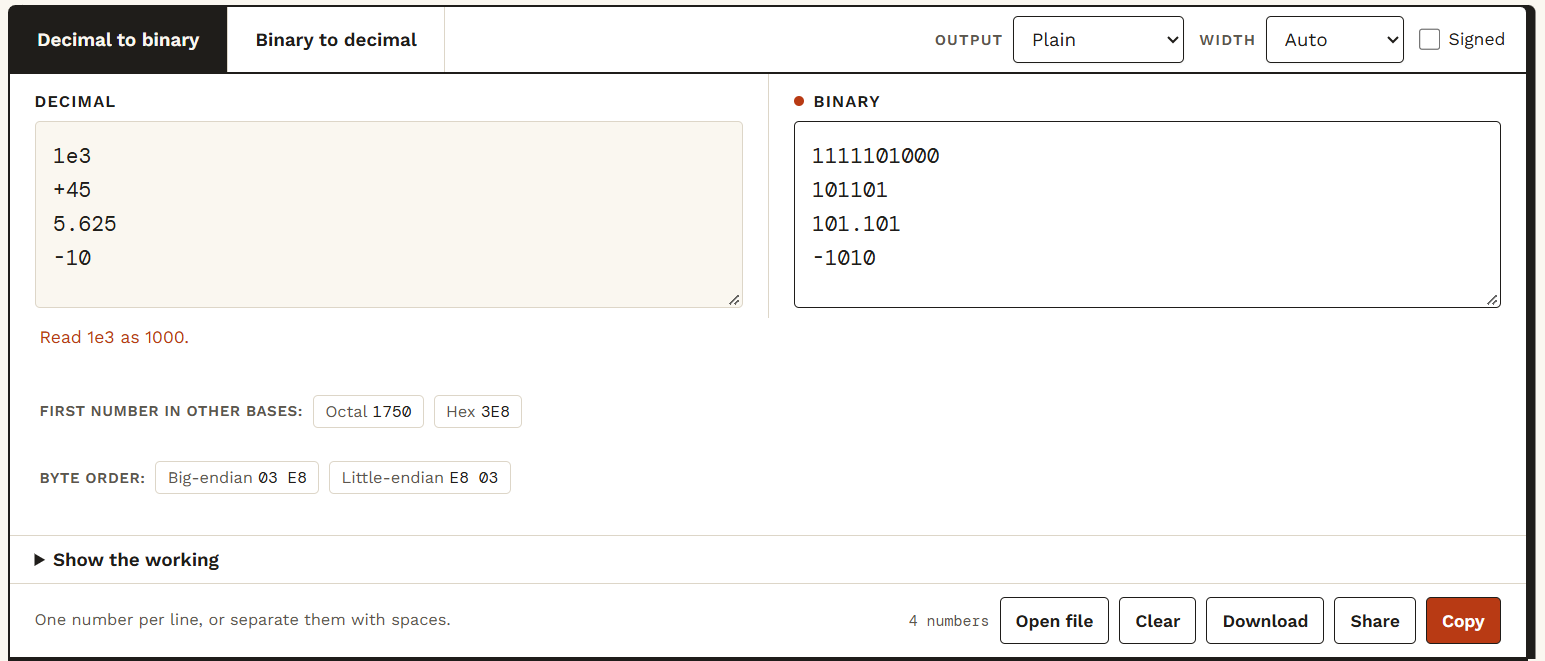
Numbers copied from a spreadsheet, a calculator or a homework sheet do not always arrive as plain digits. Each input below was typed into the converter on this page, with Output on Plain and Width on Auto unless the row says otherwise.
| Input | What you get |
|---|---|
1e3 (scientific notation) | 1111101000, with a note that 1e3 was read as 1000 |
+45 (plus sign) | 101101 |
00045 (leading zeros) | 101101 |
5.625 (a fraction that ends) | 101.101 |
0.1 (a fraction that repeats) | 0.00011001100110011001100110011001, cut off after 32 places with a note that the digits repeat |
-10 (minus sign, Signed unticked) | -1010 |
1,000 (comma as a thousands separator) | 1 0. The comma splits the number in two, so type 1000 without it. |
45 (Output set to Pad to 8 bits) | 00101101 |
300 (Output set to 4-bit groups) | 0001 0010 1100 |
300 (Output set to 8-bit groups) | 00000001 00101100 |
45 (Output set to 0b prefix) | 0b101101 |
| 1030, a 31-digit number | A 100-digit binary number, exact to the last bit |
0x10 (a hex value) | No result. The message says decimal can only use 0 to 9 and names the x. |
How to convert decimal to binary
The method taught in most classes is repeated division by 2. Divide the number by 2 and write down the remainder, which is always 0 or 1. Divide the quotient by 2 again, and keep going until the quotient is 0. The remainders, read from the last one back to the first, are the binary number.
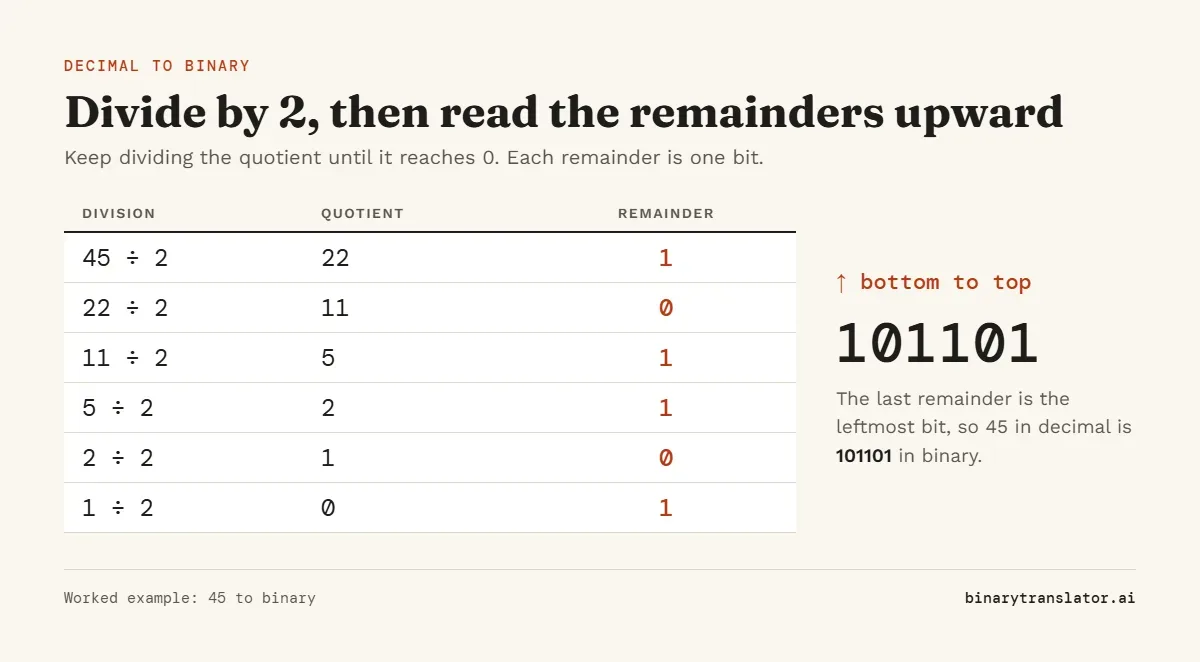
For 45 the remainders come out as 1, 0, 1, 1, 0, 1 from top to bottom. Read upward, that is 101101. You can check the answer by adding the place values, 32 + 8 + 4 + 1 = 45, or by pasting 101101 into the binary to decimal converter.
The usual mistake is reading the remainders top to bottom. 45 happens to read the same both ways, but 6 shows the problem: its remainders from the top are 0, 1, 1, and the correct answer is 110, not 011.
A longer example: 6854
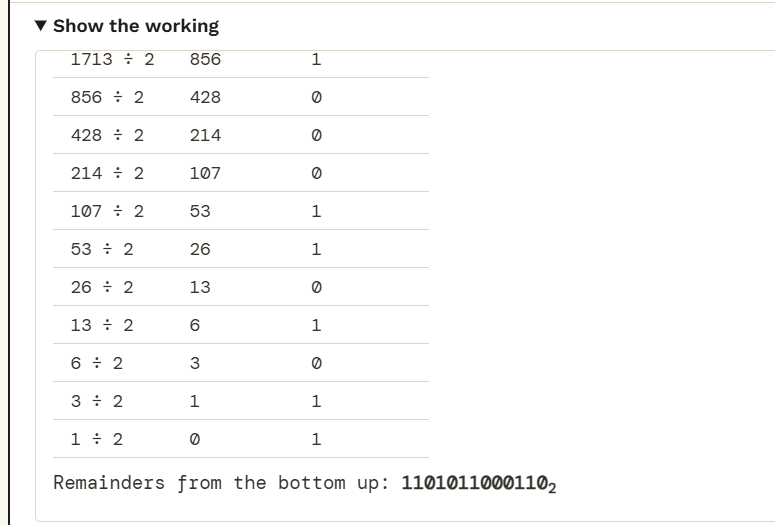
Thirteen divisions take 6854 down to 0. The remainders read from the bottom row up give the answer.
| Division | Quotient | Remainder |
|---|---|---|
| 6854 ÷ 2 | 3427 | 0 |
| 3427 ÷ 2 | 1713 | 1 |
| 1713 ÷ 2 | 856 | 1 |
| 856 ÷ 2 | 428 | 0 |
| 428 ÷ 2 | 214 | 0 |
| 214 ÷ 2 | 107 | 0 |
| 107 ÷ 2 | 53 | 1 |
| 53 ÷ 2 | 26 | 1 |
| 26 ÷ 2 | 13 | 0 |
| 13 ÷ 2 | 6 | 1 |
| 6 ÷ 2 | 3 | 0 |
| 3 ÷ 2 | 1 | 1 |
| 1 ÷ 2 | 0 | 1 |
Read upward, the remainders spell 1101011000110. As a check, 4096 + 2048 + 512 + 128 + 64 + 4 + 2 = 6854.
Why the division method works
Dividing by 2 and keeping the remainder tells you whether the number is odd or even, which is exactly the value of the last bit. Dividing again shifts every bit one place to the right, so the next remainder is the next bit along. That is why the first remainder you write is the rightmost bit and the last one is the leftmost.
The subtraction method
If you know the powers of 2, you can work from the largest one down instead. Find the biggest power of 2 that fits, mark a 1 for it and subtract it. Move to the next power and repeat. Any power that does not fit gets a 0.
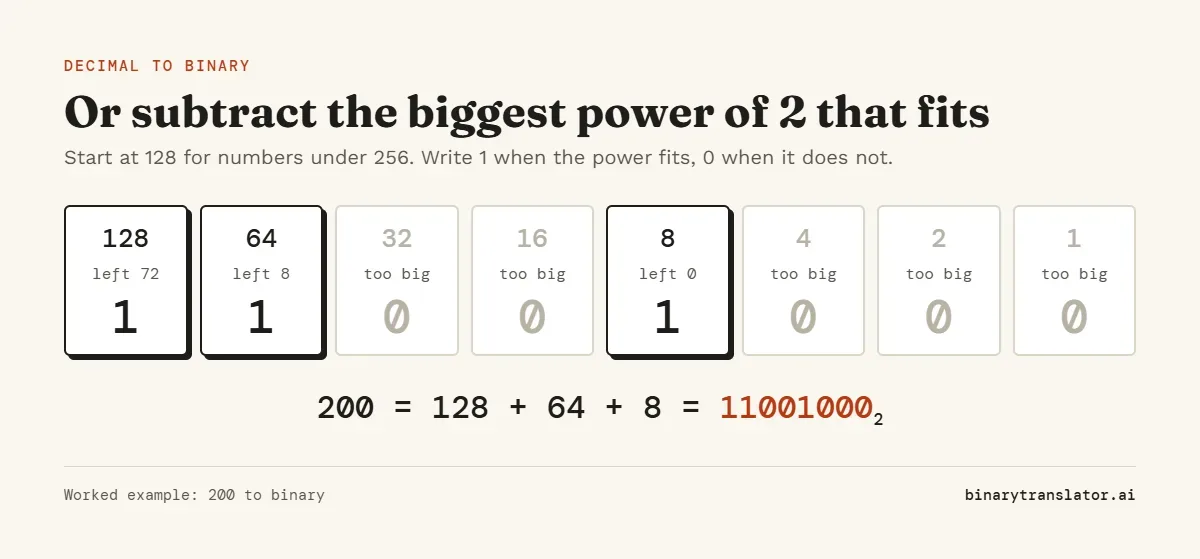
For 200: 128 fits and leaves 72, 64 fits and leaves 8, 32 and 16 are too big, 8 fits and leaves 0. Reading the 1s and 0s in order gives 11001000. This method is faster in your head for numbers under 256, and it gives you an 8-bit answer directly.
Numbers in binary
The binary form of 1 to 32, plus the larger values people look up most. Paste any of them into the converter to see the working. For letters and words instead of numbers, use text to binary.
| Decimal | Binary | Decimal | Binary |
|---|---|---|---|
| 1 | 1 | 17 | 10001 |
| 2 | 10 | 18 | 10010 |
| 3 | 11 | 19 | 10011 |
| 4 | 100 | 20 | 10100 |
| 5 | 101 | 21 | 10101 |
| 6 | 110 | 22 | 10110 |
| 7 | 111 | 23 | 10111 |
| 8 | 1000 | 24 | 11000 |
| 9 | 1001 | 25 | 11001 |
| 10 | 1010 | 26 | 11010 |
| 11 | 1011 | 27 | 11011 |
| 12 | 1100 | 28 | 11100 |
| 13 | 1101 | 29 | 11101 |
| 14 | 1110 | 30 | 11110 |
| 15 | 1111 | 31 | 11111 |
| 16 | 10000 | 32 | 100000 |
| Decimal | Binary | 8-bit form |
|---|---|---|
| 50 | 110010 | 00110010 |
| 64 | 1000000 | 01000000 |
| 67 | 1000011 | 01000011 |
| 100 | 1100100 | 01100100 |
| 115 | 1110011 | 01110011 |
| 127 | 1111111 | 01111111 |
| 128 | 10000000 | 10000000 |
| 200 | 11001000 | 11001000 |
| 255 | 11111111 | 11111111 |
| 256 | 100000000 | needs 9 bits |
| 500 | 111110100 | needs 9 bits |
| 1000 | 1111101000 | needs 10 bits |
| 1024 | 10000000000 | needs 11 bits |
Two shortcuts help you check answers. Every odd number ends in 1 and every even number ends in 0. And a power of 2 is always a single 1 followed by zeros: 64 is 26, so it is 1 and six 0s.
How many bits do you need?
n bits hold values from 0 to 2n - 1. That makes 8 bits enough for 0 to 255, 16 bits enough for 0 to 65,535 and 32 bits enough for 0 to 4,294,967,295. Computers store whole bytes, so 5 is held as 00000101. Choose "Pad to 8 bits" in the Output menu to get that form, or "8-bit groups" to split long values into bytes. Long binary is easier to read in base 16, and decimal to hex writes the same number in a quarter of the digits.
Converting decimal fractions to binary
For the part after the decimal point, multiply by 2 instead of dividing. Each time, the digit in front of the point is the next bit, and you carry on with the part after it. Stop when the fraction reaches 0.
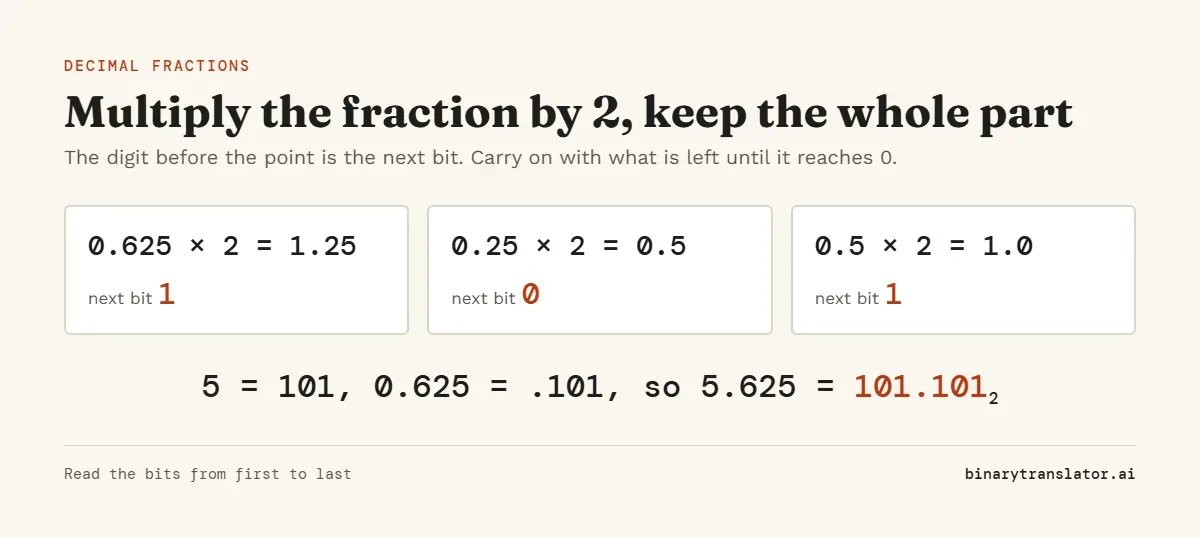
Unlike the division method, these bits are read from first to last. 0.75 is quicker still: 0.75 × 2 = 1.5 gives 1, then 0.5 × 2 = 1.0 gives 1, so 0.75 is 0.11.
0.7 shows what a repeating fraction looks like. 0.7 × 2 = 1.4 gives 1. 0.4 × 2 = 0.8 gives 0. 0.8 × 2 = 1.6 gives 1. 0.6 × 2 = 1.2 gives 1. 0.2 × 2 = 0.4 gives 0, and 0.4 has come up before, so the same four bits, 0110, repeat from here on. 0.7 is 0.1 0110 0110 0110… in binary.
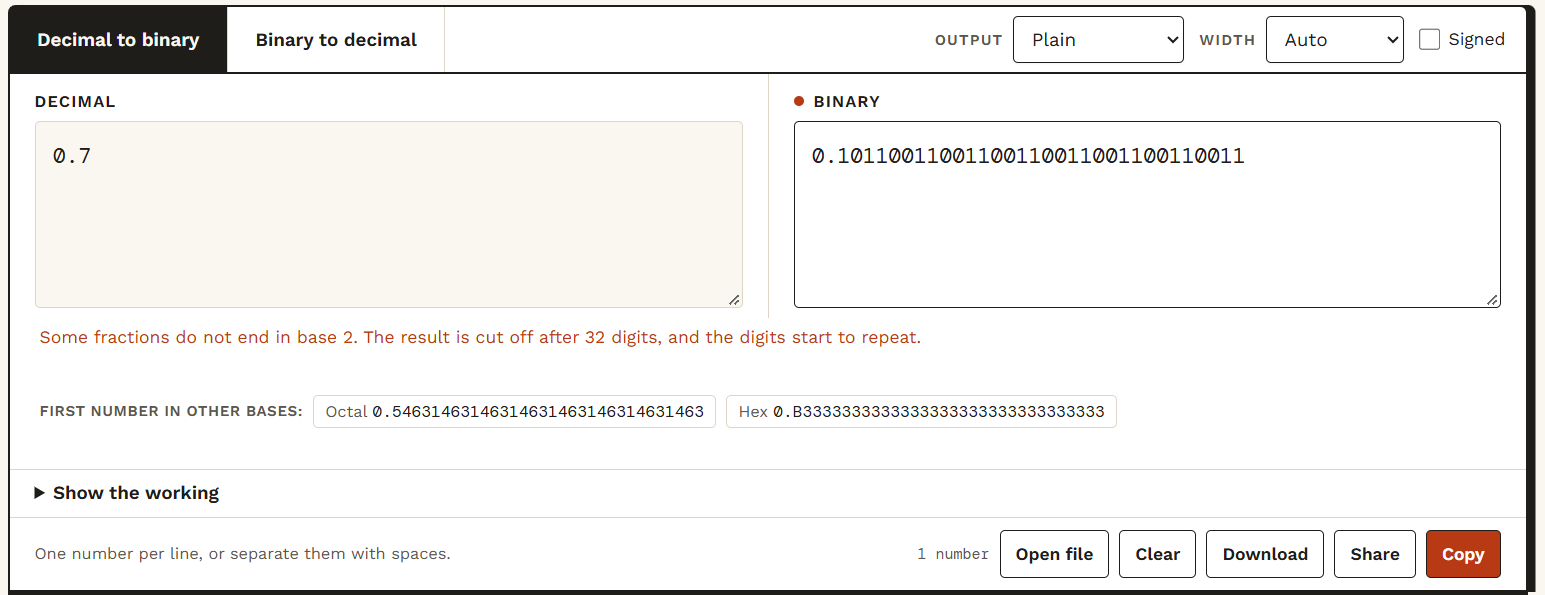
Many fractions never finish. 0.1 gives 0.000110011001100... with the 0011 block repeating forever, which is why 0.1 cannot be stored exactly in a computer's floating-point numbers, a limit the Python tutorial on floating-point arithmetic explains in detail. The converter stops at 32 binary places and tells you when the digits repeat, so you know the result is an approximation.
Negative numbers
Type -10 and you get -1010, the sign-and-magnitude form you would write on paper. Computers store negative integers in two's complement instead. Tick Signed above the converter to get that form directly. To find the 8-bit two's complement of -10:
- Write 10 in 8 bits:
00001010. - Flip every bit:
11110101. - Add 1:
11110110.
A quicker route for the same answer: add 256 to the negative number and convert the result. -10 + 256 = 246, and 246 is 11110110. For 16 bits add 65,536 instead. The same idea gives -1 as 11111111 and -128 as 10000000.
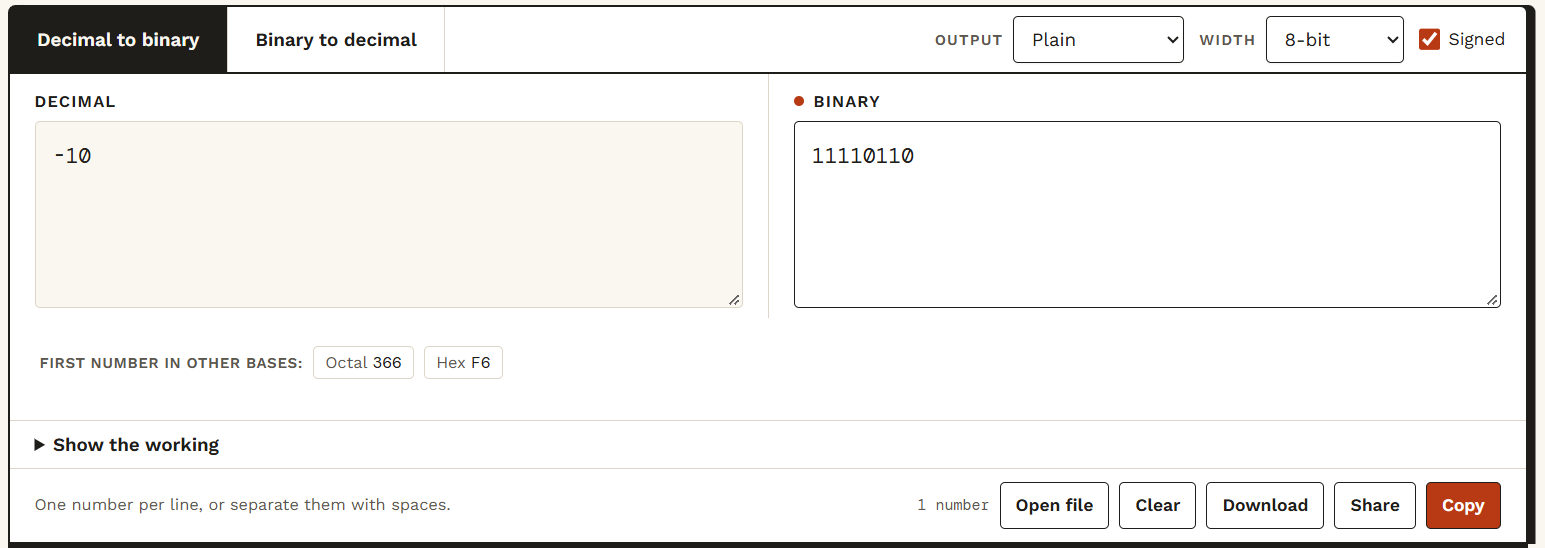
The converter also checks the range. With 8-bit and Signed, -129 and 128 give no result, and the message says the signed 8-bit range is -128 to 127.
Decimal to binary in code
Python: bin(45) returns '0b101101', and format(45, '08b') pads it to '00101101'. The guide to int, binary and hex in Python covers the reverse direction and more format specs. For a negative number in 8-bit two's complement, use format(-10 & 0xFF, '08b'). Python's format specification lists the other options.
JavaScript: (45).toString(2) returns "101101" (see Number.prototype.toString on MDN), and .padStart(8, '0') pads it. C++: std::bitset<8>(45).to_string() gives "00101101".
Frequently asked questions
What is 5 in binary?
101, which is 4 + 1. In 8 bits it is 00000101.
What is 10 in binary?
1010. That is one 8 and one 2.
How do I convert 2 to binary?
2 ÷ 2 = 1 remainder 0, then 1 ÷ 2 = 0 remainder 1. Reading the remainders upward gives 10.
How do I convert 115 to binary?
115 = 64 + 32 + 16 + 2 + 1, so the bits for 64, 32, 16, 2 and 1 are on: 1110011. With the division method the remainders come out as 1, 1, 0, 0, 1, 1, 1 from the top, and read upward they spell the same 1110011.
What is 255 in binary?
11111111, eight 1s. It is the largest number that fits in one byte, which is why 255 shows up in color codes and IP addresses.
How do you convert 0.75 to binary?
Multiply by 2: 0.75 × 2 = 1.5, so the first bit is 1. Then 0.5 × 2 = 1.0, so the second bit is 1 and nothing is left. 0.75 is 0.11 in binary.