Base64 decode and encode
Paste Base64 to turn it back into readable text, or switch to Encode to turn text into Base64. The decoder accepts standard and URL-safe Base64, fixes missing padding and works on whole files.
Show how it works


Runs in your browser. Nothing you type is uploaded.
How to decode Base64
- Paste the Base64 string into the left box. Spaces and line breaks are ignored, so text copied from an email or a PEM file works as it is.
- Read the decoded text on the right. If the bytes are not valid UTF-8 text, the tool says so and you can download them as a file.
- Pick Encode in the Mode menu to go the other way. Choose URL-safe or No padding if the string is going into a URL or a JSON Web Token.
- Use Swap to send the result back to the input, or Share to copy a link with your text in it.
Open file encodes any file on your computer. The file is read inside your browser and never uploaded.
What Base64 is
Base64 writes binary data using only 64 safe characters: A to Z, a to z, 0 to 9, plus + and /. The alphabet, the padding rule and the URL-safe variant are all defined in RFC 4648, the Base64 standard. It exists because email, JSON, XML and URLs were built for text and can break on raw bytes, which our guide to what Base64 is and how it works walks through bit by bit. Base64 is an encoding, not encryption. Anyone can decode it, so it should never be used to hide a password.
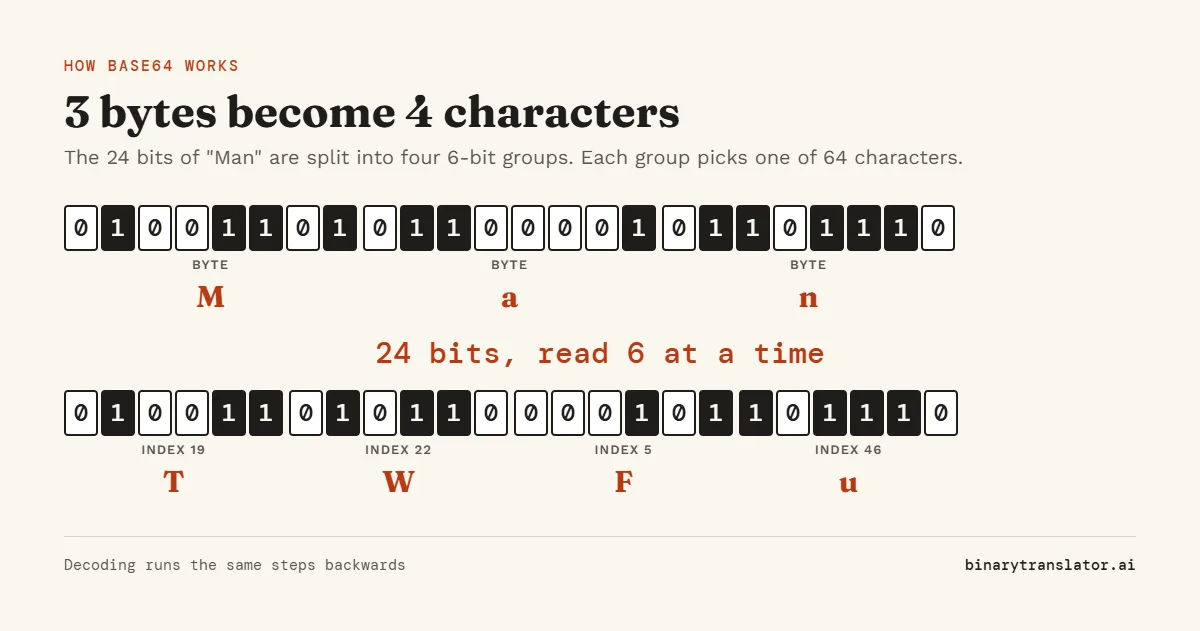
The trick is to read the data 24 bits at a time. Three bytes make 24 bits, which split into four groups of 6 bits. Each 6-bit group is a number from 0 to 63, and that number picks one character from the alphabet. That is why Base64 output is always about a third larger than the input: every 3 bytes become 4 characters.
Worked example: decode TWFu
| Step | T | W | F | u |
|---|---|---|---|---|
| Index in the alphabet | 19 | 22 | 5 | 46 |
| 6-bit value | 010011 | 010110 | 000101 | 101110 |
Join the four groups to get 24 bits: 010011010110000101101110. Split them into bytes: 01001101 = 77, 01100001 = 97, 01101110 = 110. In ASCII those are M, a and n, so TWFu decodes to Man. The "Show how it works" panel under the tool does this for the first characters of whatever you paste.
The equals sign at the end
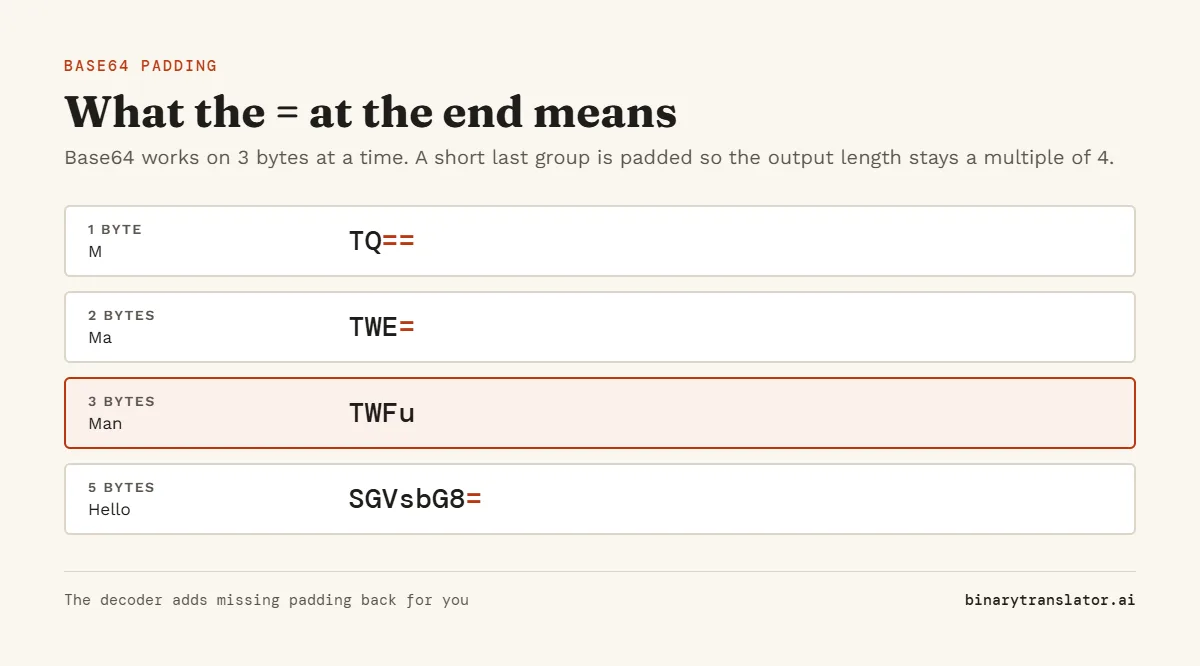
When the input length is not a multiple of 3, the last group is short. Base64 pads the output with = so the length stays a multiple of 4. One leftover byte gives two characters and ==. Two leftover bytes give three characters and one =. For example, Hello is 5 bytes and encodes to SGVsbG8=.
Many systems drop the padding to save space. This decoder adds it back for you, and the Base64 guide for Python, JavaScript, Linux and PowerShell shows how to do the same in code. A string whose length leaves a remainder of 1 when divided by 4 cannot be valid Base64, which usually means it was cut off while copying.
Base64 variants
| Variant | Characters 62 and 63 | Padding | Used in |
|---|---|---|---|
| Standard (RFC 4648) | + and / | Yes | Email attachments, data URIs, most APIs |
| URL-safe | - and _ | Often dropped | URLs, file names, JSON Web Tokens |
| MIME | + and / | Yes, lines of 76 | Email bodies |
| PEM | + and / | Yes, lines of 64 | Certificates and keys |
The decoder reads all of these without a setting change. The Variant and Line breaks menus only matter when you encode.
Spotting what is inside
The first few characters often give the file type away. iVBORw0KGgo is a PNG image, /9j/ is a JPEG and JVBERi0 is a PDF. For those, the Base64 to image and Base64 to PDF tools show a preview and let you save the file. To see the raw bytes instead of text, use Base64 to hex.
Frequently asked questions
Is Base64 encryption?
No. It is a reversible encoding with no key. Anyone with a decoder can read it.
Why does my decoded text show strange symbols?
The Base64 probably holds binary data such as an image or a compressed file, not text. Try the image or PDF decoder, or view the bytes in hex.
How much bigger does Base64 make data?
About 33%. Every 3 bytes become 4 characters, plus line breaks if the format adds them.
What does == mean at the end of Base64?
It is padding. Two equals signs mean the last group held only one byte of real data.
Is my data sent to a server?
No. Encoding and decoding run in your browser, and files you open stay on your device.