Number systems
What is hexadecimal?
How base 16 works, why every hex digit is 4 bits, where you see hex every day, and how octal compares.
Hexadecimal, or hex, is a way of writing numbers in base 16. It uses sixteen digits: 0 to 9, then A, B, C, D, E and F for ten to fifteen. So FF is 255, 10 is 16 and 2A is 42. You meet it in web colors such as #B83A14, in MAC addresses, in error codes and in memory addresses. Programmers use it because one hex digit stands for exactly 4 bits, so two hex digits show one byte, and long binary numbers become short and readable.
Key takeaways
| Hexadecimal is base 16: the digits 0 to 9, then A to F for ten to fifteen. | |
| Each place is worth 16 times the one to its right, so 2F3 is 2 x 256 + 15 x 16 + 3 = 755. | |
| One hex digit is exactly 4 bits, so a byte is always two hex digits, from 00 to FF. | |
| Colors, MAC and IPv6 addresses, hashes, Unicode code points and error codes are all written in hex. | |
| Octal is base 8 with 3 bits per digit, and today it mostly appears in Unix permissions like chmod 755. |
Type a hex number below to see what each digit is worth and how the same number looks in decimal and binary.
The 16 hexadecimal digits
Decimal runs out of single digits at 9. Hex needs six more, so it borrows the first six letters of the alphabet. The letters are only digits here, so A and a mean the same thing, ten.
| Hex | Decimal | Binary | Hex | Decimal | Binary |
|---|---|---|---|---|---|
| 0 | 0 | 0000 | 8 | 8 | 1000 |
| 1 | 1 | 0001 | 9 | 9 | 1001 |
| 2 | 2 | 0010 | A | 10 | 1010 |
| 3 | 3 | 0011 | B | 11 | 1011 |
| 4 | 4 | 0100 | C | 12 | 1100 |
| 5 | 5 | 0101 | D | 13 | 1101 |
| 6 | 6 | 0110 | E | 14 | 1110 |
| 7 | 7 | 0111 | F | 15 | 1111 |
The name mixes the Greek hexa, six, with the Latin decimal, ten. The full hexadecimal table carries on from 00 to FF with the decimal and binary value of each.
How hexadecimal works: place values
Hex works like the decimal numbers you already use, with a bigger step between places. In decimal each place is worth ten times the one to its right: 1, 10, 100. In hex each place is worth sixteen times: 1, 16, 256, 4096.
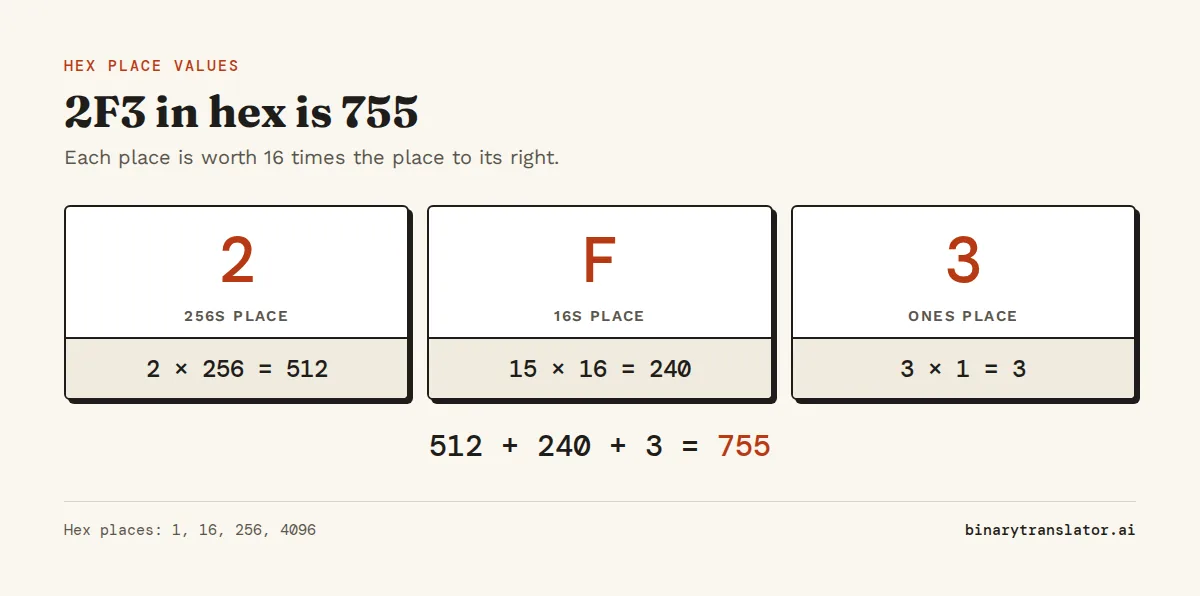
Take 2F3. Read it from the right:
- 3 is in the ones place: 3 × 1 = 3.
- F is fifteen, in the sixteens place: 15 × 16 = 240.
- 2 is in the 256s place: 2 × 256 = 512.
- Add them: 512 + 240 + 3 = 755.
So 2F3 in hex is 755 in decimal. The hex to decimal converter shows this sum for any number, and the decimal to hex converter goes the other way by dividing by 16 and reading the remainders.
Counting in hex
Counting follows the same rule as an odometer, only each place rolls over after F instead of after 9. After 9 come A, B, C, D, E and F, and then 10, which in hex means sixteen. After 1F comes 20, after FF comes 100, which is 256. A common slip is reading 10 as ten. In hex it is always sixteen, which is why code writes hex numbers with a 0x prefix, as in 0x10, so nobody mixes them up.
Why programmers use hexadecimal
Computers store everything in binary, but long rows of 0s and 1s are hard for people to read and easy to copy wrong. Hex fixes that without hiding the bits. Because 16 is 2 to the power of 4, every hex digit is exactly 4 bits, so you can convert between hex and binary one digit at a time with no arithmetic at all.
| Binary | Split into 4-bit groups | Hex |
|---|---|---|
11111111 | 1111 1111 | FF |
10111000 | 1011 1000 | B8 |
1101111010101101 | 1101 1110 1010 1101 | DEAD |
A byte is 8 bits, so it is always exactly two hex digits, from 00 to FF. A 32-bit number is always eight hex digits. Decimal has no such fit: 255 and 256 need the same number of digits but one fits in a byte and the other does not. That is why hex is the normal way to show bytes in debuggers, network tools and file viewers such as the xxd command. The binary to hex and hex to binary converters do the grouping for you.
n = 0b10111000
print(hex(n), int('B8', 16), format(0xB8, '08b'))
0xb8 184 10111000Python, JavaScript and C all read 0xB8 as a hex number. Our guide to converting numbers to binary and hex in Python covers padding and the other format options.
Where you will see hexadecimal
- Web colors.
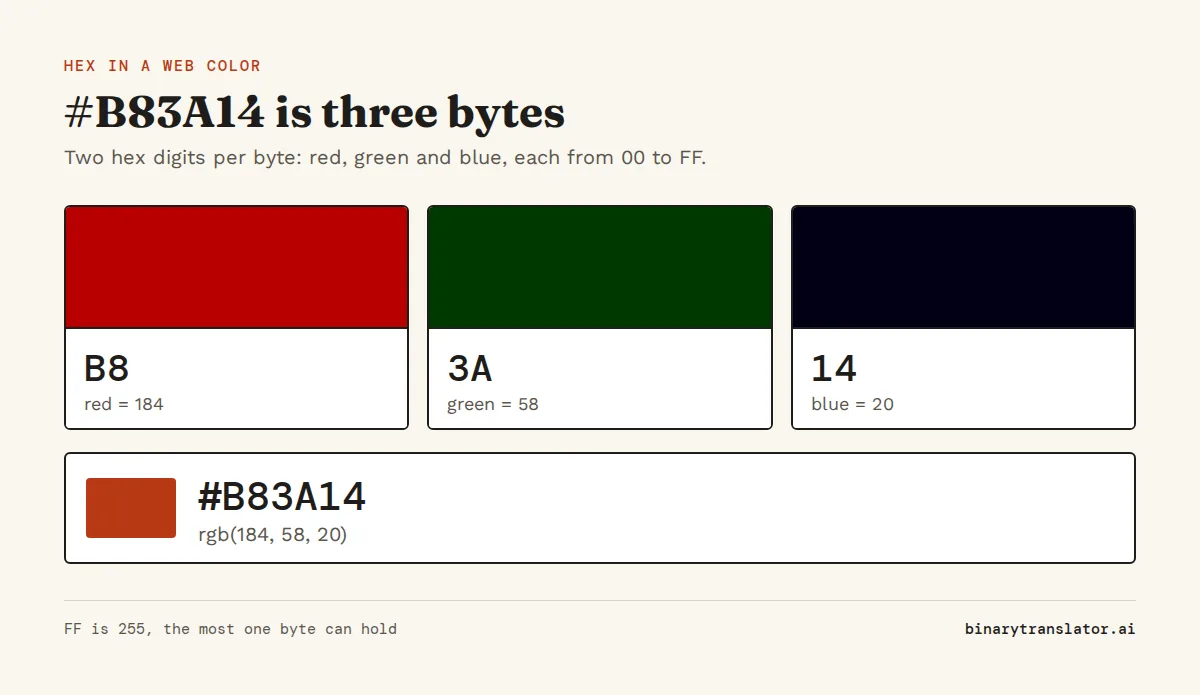
#B83A14is three bytes:B8red (184),3Agreen (58) and14blue (20). The hex to RGB converter splits any color this way. - MAC addresses. A network card's address such as
3C:22:FB:9A:41:07is six bytes written as six hex pairs. - IPv6 addresses.
2001:db8::8a2e:370:7334is written in groups of up to four hex digits, the form set out in RFC 4291, the IPv6 addressing standard. - Unicode code points.
U+00E9is the character é, number 233. The Unicode converter shows the code point of any character. - Hashes. A SHA-256 checksum is 64 hex digits, which is 32 bytes.
- Error codes and memory addresses. Windows errors like
0x80070005and addresses like0x7ffd5e3care hex because they are really bit patterns. - Encoded text.
48 65 6C 6C 6Fis Hello in ASCII, one hex pair per letter, and the hex to text converter decodes strings like it.
Hexadecimal values worth knowing
A few hex values come up so often that it helps to recognize them on sight.
| Hex | Decimal | Why it matters |
|---|---|---|
FF | 255 | largest value in one byte |
7F | 127 | largest ASCII code, largest signed byte |
80 | 128 | first byte value with the top bit set |
100 | 256 | number of values one byte can hold |
FFFF | 65,535 | largest 16-bit value |
FFFFFFFF | 4,294,967,295 | largest 32-bit value, and -1 as a signed 32-bit number |
20 | 32 | space in ASCII |
41 | 65 | capital A in ASCII |
To add or subtract numbers like these without converting them first, use the hex calculator, which shows the carries column by column.
What is octal?
Octal is base 8. It uses only the digits 0 to 7, and each place is worth eight times the one to its right: 1, 8, 64, 512. So octal 17 is 1 × 8 + 7 = 15. Where one hex digit is 4 bits, one octal digit is 3 bits, so binary 111 101 101 is octal 755.
Octal was popular on older computers with 12-, 24- and 36-bit words, which split evenly into 3-bit groups. Once 8-bit bytes became standard, hex took over, because 8 bits are two hex digits but do not divide into 3. The place you still meet octal is Unix file permissions: in chmod 755, each digit is 3 bits for read, write and execute. The binary to octal and octal to decimal converters show the steps.
| Binary | Octal | Decimal | Hex | |
|---|---|---|---|---|
| Base | 2 | 8 | 10 | 16 |
| Digits | 0, 1 | 0 to 7 | 0 to 9 | 0 to 9, A to F |
| Bits per digit | 1 | 3 | not a whole number | 4 |
| 255 is written | 11111111 | 377 | 255 | FF |
| Prefix in code | 0b | 0o | none | 0x |
To move a number between any of these, the base converter handles every base from 2 to 36.
Questions people ask
What is hexadecimal in simple terms?
It is a way of writing numbers with sixteen digits, 0 to 9 and A to F, instead of ten. Each hex digit stands for four bits, so computers' binary data is shorter and easier to read in hex.
Why does hexadecimal use letters?
Base 16 needs sixteen single digits, and 0 to 9 only gives ten. The letters A to F stand for the values ten to fifteen.
What is FF in hexadecimal?
FF is 255 in decimal and 11111111 in binary, the largest value one byte can hold.
Is hexadecimal case sensitive?
No. 2f and 2F are the same number. Most tools print uppercase, and some, such as Python's hex(), print lowercase.
What is the difference between hex and octal?
Hex is base 16 and each digit is 4 bits. Octal is base 8 and each digit is 3 bits. Hex is used for bytes and memory, octal mainly for Unix file permissions.
What does 0x mean before a number?
It marks the number as hexadecimal, so 0x10 is sixteen, not ten. Most programming languages use it.
About the authors

Zachary Painter is a technical writer at GitLab, where he writes developer documentation and UI text. He has written API documentation for REST and GraphQL APIs and reference docs for Kubernetes, Docker and command-line tools, earlier as a technical writer at Pomerium and a senior technical content writer at Stream. He holds a BA in English and German studies from the University of North Carolina at Greensboro. On binarytranslator.ai he writes guides and the how-to sections on tool pages.

Sam Siewert is the O'Connell Endowed Professor of computer science at California State University, Chico, where he teaches numeric and parallel computing, computer vision and machine learning. He has taught real-time embedded systems at the University of Colorado Boulder since 2000 and co-founded its Embedded Systems Engineering program. Both fields depend on how computers store numbers in binary, from fixed-width integers to floating point. He earned his PhD and MS in computer science at the University of Colorado Boulder and is a senior member of IEEE. On binarytranslator.ai he reviews the math behind the converters and the number system guides.
Keep reading
All posts Binary basics
MSB and LSB: most and least significant bits, signed integers and overflow
The MSB is the leftmost, highest-value bit and the LSB the rightmost. See what each tells you, how signed integers use the MSB as a sign bit, and how integer overflow wraps values around.9 min read Binary basics
Floating point numbers explained: why 0.1 + 0.2 is not 0.3
A floating point number is scientific notation in binary. See why 0.1 + 0.2 is 0.30000000000000004, how precise floats are, float vs double, and how to compare floats and handle money.9 min read Binary basics