Error detection
What is a checksum?
How a checksum tells you data changed, from a one-byte sum and a parity bit to CRC, Hamming codes and SHA-256, with each one worked through by hand.
You download an installer and the page lists a long string next to it, labeled SHA-256. Or an archive refuses to open with "checksum error". Both are checksums at work. A checksum is a short value calculated from a block of data. Store or send it with the data, calculate it again later, and if the two values differ, something in the data changed on the way.
Key takeaways
| A checksum is a short value calculated from data. Recalculate it later and compare: a different value means the data changed. | |
| A simple byte sum catches one flipped bit but misses swapped bytes. Hi! and iH! both add up to 210. | |
| A parity bit catches any odd number of flipped bits and misses any even number. | |
| CRC divides the data by a fixed binary number with XOR and keeps the remainder. CRC-32 protects Ethernet, ZIP and PNG. | |
| A Hamming code goes further: the failed checks point at the bad bit so it can be fixed. | |
| To check a download, compare its SHA-256 with the published value using sha256sum, shasum -a 256 or certutil. |
Checksums are how computers check data integrity, meaning the data arrived and stayed exactly as it was. Every one, from a single parity bit to SHA-256, works the same way. Most only detect errors, and a few, called error-correcting codes, can also fix them. Try it below: flip any bit of the message and see which checks catch the change.
How a checksum works, step by step
Take the three characters Hi!. In ASCII they are the bytes 72, 105 and 33. The simplest checksum adds them up and keeps the last byte of the total.
- The sender adds the bytes: 72 + 105 + 33 = 210. That fits in one byte, so the checksum is 210, or
D2in hex. - The message travels with its checksum:
Hi!plusD2. - One bit gets flipped on the way, so
!(00100001, 33) arrives as#(00100011, 35). - The receiver adds the bytes it got: 72 + 105 + 35 = 212, which is
D4. That does not matchD2, so the receiver knows the message is wrong and asks for it again.
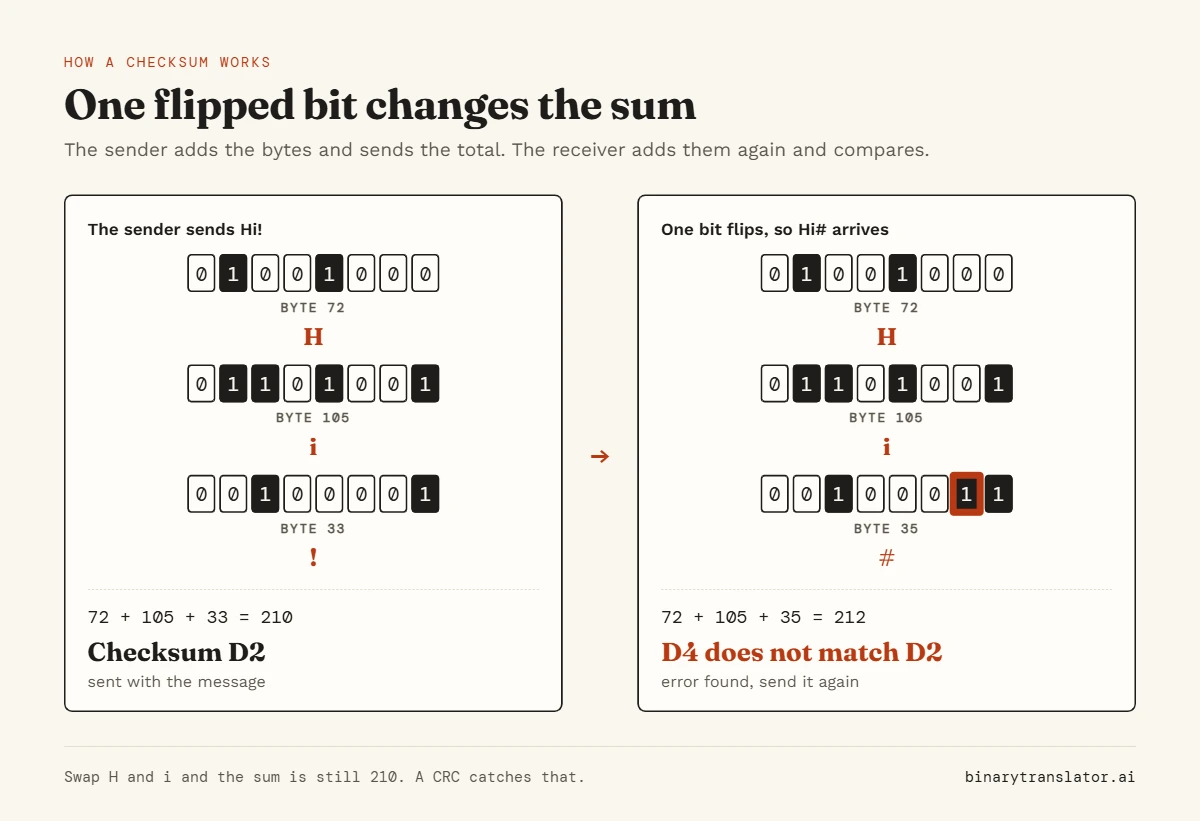
If the total goes past 255, a byte-sized checksum keeps only the remainder after dividing by 256, so the checksum is always one byte however long the message is. The text to binary converter shows the byte values of any text if you want to work a sum yourself.
A plain sum has a blind spot. Swap two letters and send iH! instead, and the total is still 210. The bytes are all there, just in the wrong order, and addition does not care about order. Most of what follows is about checksums built to catch the changes a sum misses.
Parity bit: the smallest checksum
A parity bit is a checksum one bit long. It records whether the number of 1s in the data is even or odd. The letter H is 01001000, which has two 1s.
- With even parity, the extra bit makes the total count of 1s even. Two is already even, so the parity bit is 0.
- With odd parity, the extra bit makes the count odd, so the parity bit is 1.
To check, the receiver counts the 1s again, parity bit included. If one bit flipped, the count changes from even to odd and the error shows. If two bits flipped, the count is even again and the error slips through. So parity catches any single flipped bit, misses any even number of flips, and cannot tell you which bit was wrong.
Working out a parity bit is the same as XOR-ing all the bits together, because XOR gives 1 when it has seen an odd number of 1s. You can check that with the XOR calculator. Parity is still in use. Serial links that use a UART, the circuit behind most serial ports and built into nearly every microcontroller, can add a parity bit to every byte with settings such as 8E1 (8 data bits, even parity, 1 stop bit), and RAID 5 storage keeps an XOR parity block so it can rebuild a failed disk from the others.
The internet checksum: a one's complement sum
Every IPv4 packet header and every TCP segment carries a 16-bit checksum built from a slightly smarter sum. UDP carries one too, although over IPv4 a sender may leave it at zero. RFC 1071 describes it: split the data into 16-bit words, add them, and whenever the total overflows 16 bits, add the carry back onto the right end. Then flip every bit of the result.
With two words, 8F2A and 9C11, the plain total is 12B3B. The carry of 1 is added back to give 2B3C, and flipping the bits gives the checksum D4C3. The receiver adds all the words plus the checksum, and an undamaged packet always comes to FFFF. Paste your own words into the one's complement calculator with Mode set to Add words and it shows every carry.
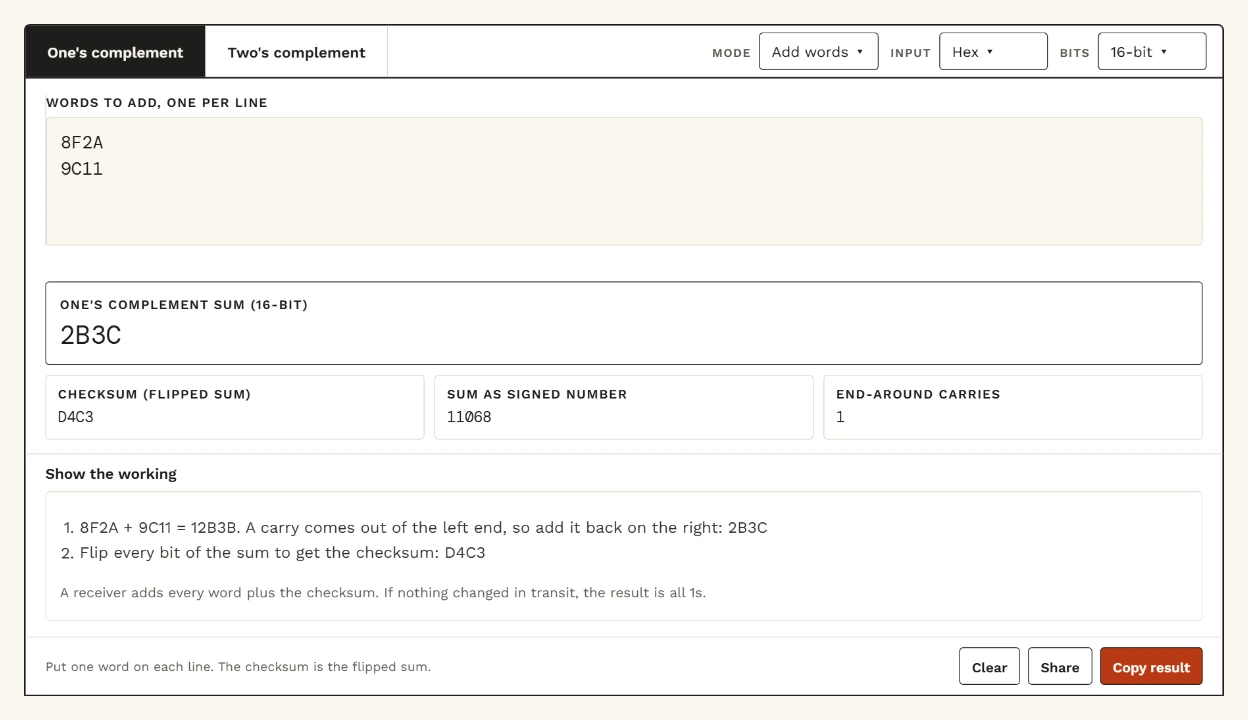
This sum is fast enough for routers to update on every packet, but it shares the blind spot of the plain sum: swap two 16-bit words and the checksum does not change. IPv6 dropped the header checksum altogether and relies on the Ethernet CRC below it and the TCP or UDP checksum above it, which IPv6 makes mandatory for UDP.
CRC: cyclic redundancy check
A CRC treats the data as one long binary number and divides it by a fixed binary number, called the generator. The remainder of that division is the checksum. The division uses XOR instead of subtraction, so there are no borrows, which is what makes CRC cheap to build in hardware.
Here is a small one. The data is 110101 and the generator is 1011, which gives a 3-bit CRC.
- Add three 0s to the data, one for each bit of the CRC:
110101000. - Line the generator up under the leftmost 1 and XOR. Repeat from the next leftmost 1 until fewer than 4 bits are left. The working takes five XORs and leaves
111. - Send the data with the remainder in place of the three 0s:
110101111. - The receiver divides what it got by the same generator. A remainder of
000means the data arrived intact. Anything else means it was damaged.

Because each bit's position changes how it affects the remainder, swapped bytes change a CRC even though they do not change a sum. A CRC with an n-bit remainder also catches every burst of errors up to n bits long, which matters on wires and disks where damage tends to hit neighboring bits. W. Wesley Peterson described CRCs in a 1961 paper. Today CRC-32 protects every Ethernet frame, where it travels as the frame check sequence at the end of the frame. It also guards each file in a ZIP or gzip archive and each chunk of a PNG image. A "CRC error" from a disk or an archive means the stored remainder no longer matches the data.
Between a plain sum and a CRC sit position-weighted sums such as Fletcher's checksum and Adler-32. They keep a second running total that adds up the first one, so swapped bytes change the result. The zlib compression format uses Adler-32 because it is faster than CRC-32 in software.
Hamming code: find the bad bit and fix it
Everything so far only says that something is wrong. A Hamming code says which bit is wrong, so the receiver can flip it back without asking for the data again. Richard Hamming published the idea in 1950, after losing too many weekend computer runs to single-bit errors.
The common version, Hamming(7,4), sends 4 data bits with 3 parity bits. The parity bits sit at positions 1, 2 and 4, and each one checks a different set of positions:
- p1 checks positions 1, 3, 5 and 7.
- p2 checks positions 2, 3, 6 and 7.
- p4 checks positions 4, 5, 6 and 7.
The data 1011 goes into positions 3, 5, 6 and 7, and even parity fills in the rest, so the codeword is 0110011. Now say bit 5 flips and 0110111 arrives. The receiver reruns the three checks. p1 fails, p2 passes and p4 fails. Read the failures as a binary number, p4 p2 p1 = 101, and you get 5, the position of the bad bit. Flip it back and the data is 1011 again.
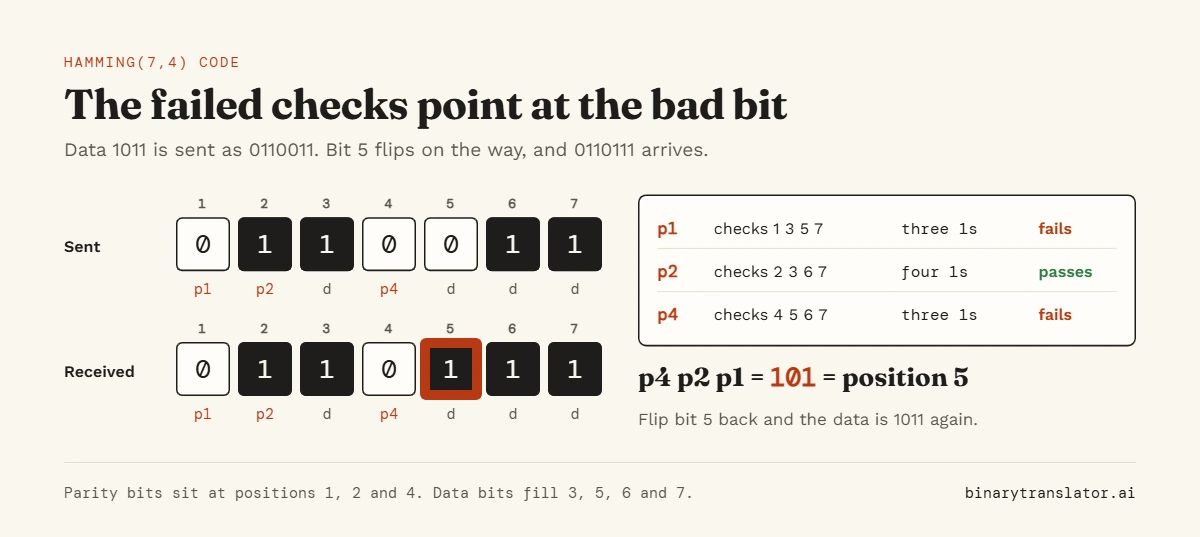
Each position from 1 to 7 is covered by a different combination of checks, which is why the failures spell out its address. ECC memory in servers uses an extended Hamming code that corrects any single flipped bit in a 64-bit word and detects two. Stronger correcting codes work on whole bytes instead of single bits. Reed-Solomon codes let a QR code still scan when part of it is torn, and let a scratched CD still play.
Check digits: ISBNs and credit card numbers
A check digit is a one-digit checksum for numbers people type by hand. The last digit of an ISBN-13 is one. For 978-0-306-40615-?, multiply the first 12 digits by 1 and 3 in turn and add them up: the total is 93. The check digit is whatever brings that up to the next multiple of 10, so it is 7, and the full ISBN is 978-0-306-40615-7.
Credit card numbers, which follow ISO/IEC 7812, end in a check digit worked out with the Luhn algorithm, patented in 1960 by IBM engineer Hans Peter Luhn. The algorithm doubles every second digit from the right. It catches any single mistyped digit and most swaps of two neighboring digits, so a payment form can reject a typo before it contacts the bank. It says nothing about whether the card is real.
File checksums: MD5 and SHA-256
When a download page lists a SHA-256 value, it is a checksum for the whole file. Run the same calculation on the file you downloaded. If your result matches the published one, you have the same bytes the publisher had. If not, the download was cut short or damaged, or the file is not the one the page describes.
Every major system can do this without extra software. On Linux:
printf 'Hi!' > hi.txt
sha256sum hi.txt
md5sum hi.txt
ca51ce1fb15acc6d69b8a5700256172fcc507e02073e6f19592e341bd6508ab8 hi.txt
5360706c803a759e3a9f2ca54a651950 hi.txt- Windows Command Prompt:
certutil -hashfile hi.txt SHA256 - Windows PowerShell:
Get-FileHash hi.txt(SHA-256 is the default) - macOS Terminal:
shasum -a 256 hi.txt
All of them print the same 64 hex digits for the same file. PowerShell prints them in uppercase, which does not matter: CA51 and ca51 are the same number, as the guide to hexadecimal explains. Compare the whole string rather than glancing at the start, or let the tool compare for you: sha256sum -c SHA256SUMS reads a file of published values and prints OK or FAILED for each download.
MD5 and SHA-256 are cryptographic hash functions, a much stronger kind of checksum: change one bit of a 4 GB file and about half the bits of the result change, which is called the avalanche effect. MD5 still catches accidental damage, but since 2004 researchers have been able to build two different files with the same MD5 on purpose, so RFC 6151 warns against relying on it where an attacker is involved. SHA-1 followed in 2017, when researchers at Google and CWI Amsterdam published two different PDF files with the same SHA-1. Git still names its commits with SHA-1 and has added SHA-256 as an option. Use SHA-256 when someone might change the file on purpose.
One limit is worth knowing. A checksum published on the same page as the download proves only that the file matches what that page offers. If someone can replace the file, they can usually replace the checksum too. Linux distributions such as Ubuntu publish a SHA256SUMS file next to each ISO image and sign that file with GPG, which closes that gap.
Checksum vs hash vs CRC
All of these turn data into a short value. They differ in what they catch and what they cost.
| Method | Size | Catches | Misses | Typical use |
|---|---|---|---|---|
| Parity bit | 1 bit | Any single flipped bit | Any even number of flips | Serial links, RAID 5 |
| Byte sum | 8 bits | Any single changed byte | Reordered bytes, changes that cancel out | Simple file formats, firmware |
| One's complement sum | 16 bits | Any single flipped bit | Swapped 16-bit words | IPv4, TCP, UDP |
| CRC-32 | 32 bits | Every burst up to 32 bits, most reordering | Deliberate changes, which are easy to fake | Ethernet, ZIP, PNG, gzip |
| Hamming code | 3 bits per 4 data bits | Finds and fixes one flipped bit | Two or more flips, which it can mistake for one | ECC memory (extended version) |
| MD5 | 128 bits | Any accidental change | Deliberate collisions | Old download pages, deduplication |
| SHA-256 | 256 bits | Any change, accidental or deliberate | No known practical weakness | Downloads, package managers, Bitcoin |
The rule of thumb: use a CRC to catch noise and broken disks, where speed matters and nobody is attacking you, and a cryptographic hash such as SHA-256 when you need to know a file was not changed on purpose. For speed on very large files, xxHash (not cryptographic) and BLAKE3 (cryptographic) are both much faster than SHA-256. When only someone holding a secret key should be able to produce a matching value, systems use an HMAC, a hash mixed with that key.
What a checksum error means and how to fix it
A checksum error always means the same thing: the value calculated now does not match the value stored earlier. Where you see it tells you where to look.
- A download whose SHA-256 does not match. Download it again, from the official site or another mirror. If it keeps failing on one machine, test that disk or that network connection.
- WinRAR or 7-Zip reports a "checksum error" or "CRC failed". The archive itself is damaged, usually from an incomplete download. Get a fresh copy. For a multi-part archive, check that every part downloaded completely.
- "CMOS checksum error" when a PC starts. The BIOS settings stored on the motherboard no longer match their checksum, most often because the small coin battery that keeps them is running out. Replace the battery, then load the default BIOS settings and set the date and time again.
- CRC errors in network or disk statistics. A handful over months can be harmless. A steadily rising count points at a bad cable, a loose connector or a failing drive.
- Silent data corruption, sometimes called bit rot. File systems such as ZFS and Btrfs store a checksum for every block and check it on every read, so they notice a damaged block instead of returning it. With a mirror, or RAID-Z on ZFS, the file system then repairs the block from the good copy.
Checksums in code
Python has all three kinds built in. The byte sum needs no import, CRC-32 is in zlib and SHA-256 is in hashlib:
import zlib, hashlib

data = b'Hi!'
print(sum(data) % 256)
print(hex(zlib.crc32(data)))
print(hashlib.sha256(data).hexdigest())
210
0x799ec5da
ca51ce1fb15acc6d69b8a5700256172fcc507e02073e6f19592e341bd6508ab8Swap the first two letters and run it again with b'iH!'. The sum is still 210, but the CRC becomes 0xcc8efcee. That is the blind spot from the first example, caught. Note that data is bytes, not a string. A checksum works on bytes, so text has to be encoded first, as the guide to Python bytes and strings explains.
In the browser, the Web Crypto API calculates SHA-256 without any library:
const bytes = new TextEncoder().encode('Hi!');
const hash = await crypto.subtle.digest('SHA-256', bytes);
console.log([...new Uint8Array(hash)].map(b => b.toString(16).padStart(2, '0')).join(''));ca51ce1fb15acc6d69b8a5700256172fcc507e02073e6f19592e341bd6508ab8Questions people ask
What is a checksum in simple terms?
A short value calculated from some data and kept with it. Calculate it again later. If the new value matches the stored one, the data is almost certainly unchanged. If not, it was damaged or altered.
Is SHA-256 a checksum?
Yes. It is a cryptographic hash function, which is the strongest kind of checksum in common use. People often call any hash used to verify a file its checksum.
How do you calculate a checksum?
For a file, run sha256sum on Linux, shasum -a 256 on macOS or certutil -hashfile file SHA256 on Windows. By hand, the simplest checksum adds the byte values and keeps the remainder after dividing by 256: Hi! is 72 + 105 + 33 = 210.
What is the difference between a checksum and a CRC?
A CRC is one kind of checksum. A plain checksum adds the data up, while a CRC divides it by a fixed binary number and keeps the remainder. That catches reordered bytes and bursts of errors that a sum misses.
Is the parity bit still used today?
Yes, in serial links set to even or odd parity, in RAID 5 storage and inside error-correcting memory. On its own it is weak, because two flipped bits cancel out.
Can two different files have the same checksum?
Yes, because a short value cannot be unique for every possible file. With an 8-bit sum it happens all the time. With CRC-32 it is unlikely by accident but easy on purpose. With SHA-256 nobody has found two files that match.
What causes a checksum error?
Data that changed after its checksum was calculated. The usual causes are an incomplete download, a damaged archive, a failing disk, a bad network cable or, for a CMOS checksum error, a weak motherboard battery.
About the authors

Uma Victor is a technical writer and software engineer with seven years of engineering work. He writes API documentation, integration guides and tutorials for developer tools, and his articles have run in Smashing Magazine, freeCodeCamp and LogRocket. He runs the code before he writes about it. On binarytranslator.ai he writes the guides on binary, hex and text encoding.

Mehran Mozaffari Kermani is a professor at the Bellini College of Artificial Intelligence, Cybersecurity and Computing at the University of South Florida. His research covers computer arithmetic, cryptographic hardware and fault detection in digital circuits, and he worked as an ASIC design engineer at AMD before he joined academia. He earned his PhD in electrical and computer engineering at the University of Western Ontario, was a postdoctoral fellow at Princeton and is a senior member of IEEE. On binarytranslator.ai he reviews the logic gate, binary arithmetic and floating-point tools.
Keep reading
All posts Binary basics
Flip-flops and latches: SR, D, JK and T explained
How SR latches and D, JK and T flip-flops store a bit, with a simulator, truth tables, timing diagrams, excitation tables and conversions.18 min read Binary basics
MSB and LSB: most and least significant bits, signed integers and overflow
The MSB is the leftmost, highest-value bit and the LSB the rightmost. See what each tells you, how signed integers use the MSB as a sign bit, and how integer overflow wraps values around.9 min read Binary basics