IEEE 754 floating point converter
Type a decimal number to see how a computer stores it as a 32-bit float or 64-bit double: the bit pattern in binary and hex, the exact value that gets stored and how far it is from what you typed. You can also paste hex or binary bits to decode them.
Show the working


Runs in your browser. Nothing you type is uploaded.
How to use the IEEE 754 converter
- Pick 32-bit (float) or 64-bit (double) in Precision.
- Type a number such as
0.1,-2.5or6.02e23. Infinity and NaN work too. - Read the colored bits: one sign bit, then the exponent, then the mantissa. Click any bit to flip it and see the new value.
- To decode, set Input to Hex bits or Binary bits and paste a pattern such as
3DCCCCCD. Inside a file, the hex editor reads 4 selected bytes as a float too.
"Value actually stored" is the exact decimal value of the bits, with every digit. The rounding error card shows the gap between that and what you typed.
How IEEE 754 stores a number
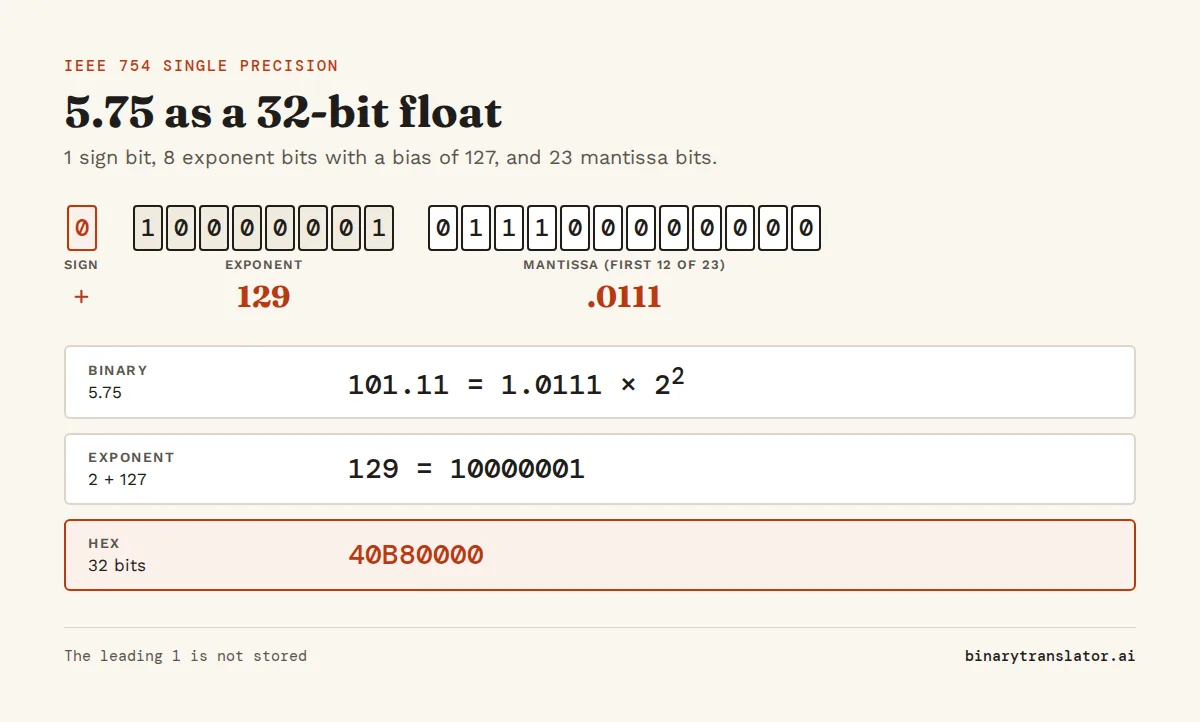
IEEE 754, the floating-point standard, writes a number in binary scientific notation, like 1.0111 × 22, and stores three parts of it:
| Part | 32-bit float | 64-bit double | Holds |
|---|---|---|---|
| Sign | 1 bit | 1 bit | 0 for positive, 1 for negative |
| Exponent | 8 bits, bias 127 | 11 bits, bias 1023 | The power of 2, plus the bias |
| Mantissa | 23 bits | 52 bits | The digits after the leading 1 |
| Precision | about 7 decimal digits | about 15 to 17 digits |
The leading 1 is never stored because a normal binary number in this form always starts with 1. That free bit is why a float has 24 bits of precision from 23 stored bits.
Worked example: 5.75 to 32-bit
- 5.75 is positive, so the sign bit is 0. A negative float only flips this bit, while whole numbers use two's complement instead.
- In binary, 5 is 101 and 0.75 is .11, so 5.75 is 101.11.
- Move the point two places left: 1.0111 × 22.
- Add the bias: 2 + 127 = 129, which is
10000001in 8 bits. - Drop the leading 1 and pad the rest to 23 bits:
01110000000000000000000.
Put together: 0 10000001 01110000000000000000000, which is 40B80000 in hex, as hex to binary confirms digit by digit. 5.75 fits exactly, so the rounding error is 0.
Why 0.1 is not exact
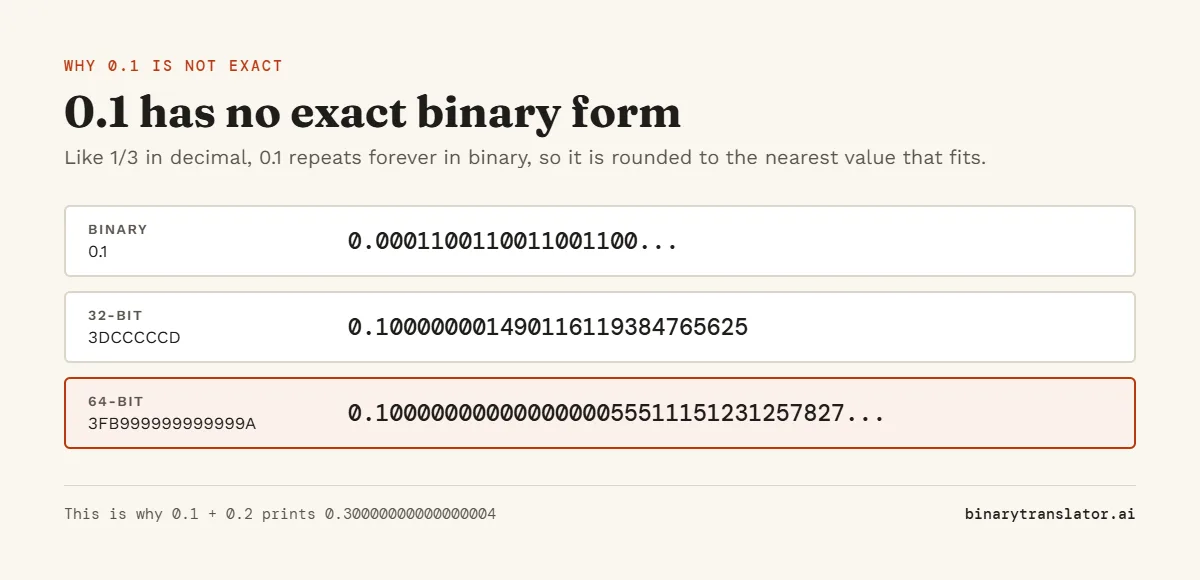
In binary, 0.1 repeats forever (0.000110011001100...), the way 1/3 repeats in decimal, as Python's floating-point tutorial shows. A float has to cut it off. The nearest 32-bit value is 3DCCCCCD, which is exactly 0.100000001490116119384765625. In Python, struct.pack('>f', 0.1).hex() returns '3dcccccd', as the Python struct guide explains. As a double it is 3FB999999999999A, a bit closer but still not 0.1. This is why 0.1 + 0.2 prints 0.30000000000000004 in JavaScript and Python, which our guide to floating point numbers explains along with float vs double.
Special values
| Exponent bits | Mantissa | Meaning | 32-bit hex |
|---|---|---|---|
| All 0 | All 0 | Zero (sign bit gives +0 or -0) | 00000000 / 80000000 |
| All 0 | Not 0 | Subnormal, very small numbers with no hidden 1 | 00000001 is about 1.4e-45 |
| All 1 | All 0 | Infinity | 7F800000 / FF800000 |
| All 1 | Not 0 | NaN, not a number | 7FC00000 |
The largest 32-bit float is about 3.4 × 1038 and the largest double is about 1.8 × 10308. Anything bigger becomes infinity.
Frequently asked questions
What is IEEE 754?
It is the standard for storing decimal numbers in binary, used by almost every processor and programming language. It was first published in 1985.
What is the difference between single and double precision?
Single (float) uses 32 bits and keeps about 7 digits. Double uses 64 bits and keeps about 15 to 17 digits, with a far larger range.
How do I convert hex to float?
Set Input to Hex bits and paste the 8 hex digits for a float or 16 for a double. The decimal value appears at once.
Why is the exponent biased?
The bias lets the exponent be stored as a plain unsigned number, so negative powers need no sign bit and floats can be compared like integers.