ASCII table
All 128 ASCII characters with their decimal, hex, octal, binary and HTML codes. Search by character or by any code (A, 65, 0x41 or 01000001 all find the same row), click a row to copy the character, and tick the box to add codes 128 to 255. The buttons under the search box narrow the table to control codes, digits, uppercase, lowercase, punctuation or the extended set, and Print or save as PDF gives a clean copy of whatever is showing.
| Dec | Hex | Oct | Binary | Character | HTML code |
|---|---|---|---|---|---|
| 0 | 00 | 000 | 00000000 | NUL Null | � |
| 1 | 01 | 001 | 00000001 | SOH Start of heading |  |
| 2 | 02 | 002 | 00000010 | STX Start of text |  |
| 3 | 03 | 003 | 00000011 | ETX End of text |  |
| 4 | 04 | 004 | 00000100 | EOT End of transmission |  |
| 5 | 05 | 005 | 00000101 | ENQ Enquiry |  |
| 6 | 06 | 006 | 00000110 | ACK Acknowledge |  |
| 7 | 07 | 007 | 00000111 | BEL Bell |  |
| 8 | 08 | 010 | 00001000 | BS Backspace |  |
| 9 | 09 | 011 | 00001001 | TAB Horizontal tab | 	 |
| 10 | 0A | 012 | 00001010 | LF Line feed (new line) | |
| 11 | 0B | 013 | 00001011 | VT Vertical tab |  |
| 12 | 0C | 014 | 00001100 | FF Form feed |  |
| 13 | 0D | 015 | 00001101 | CR Carriage return | |
| 14 | 0E | 016 | 00001110 | SO Shift out |  |
| 15 | 0F | 017 | 00001111 | SI Shift in |  |
| 16 | 10 | 020 | 00010000 | DLE Data link escape |  |
| 17 | 11 | 021 | 00010001 | DC1 Device control 1 |  |
| 18 | 12 | 022 | 00010010 | DC2 Device control 2 |  |
| 19 | 13 | 023 | 00010011 | DC3 Device control 3 |  |
| 20 | 14 | 024 | 00010100 | DC4 Device control 4 |  |
| 21 | 15 | 025 | 00010101 | NAK Negative acknowledge |  |
| 22 | 16 | 026 | 00010110 | SYN Synchronous idle |  |
| 23 | 17 | 027 | 00010111 | ETB End of block |  |
| 24 | 18 | 030 | 00011000 | CAN Cancel |  |
| 25 | 19 | 031 | 00011001 | EM End of medium |  |
| 26 | 1A | 032 | 00011010 | SUB Substitute |  |
| 27 | 1B | 033 | 00011011 | ESC Escape |  |
| 28 | 1C | 034 | 00011100 | FS File separator |  |
| 29 | 1D | 035 | 00011101 | GS Group separator |  |
| 30 | 1E | 036 | 00011110 | RS Record separator |  |
| 31 | 1F | 037 | 00011111 | US Unit separator |  |
| 32 | 20 | 040 | 00100000 | space |   |
| 33 | 21 | 041 | 00100001 | ! | ! |
| 34 | 22 | 042 | 00100010 | " | " |
| 35 | 23 | 043 | 00100011 | # | # |
| 36 | 24 | 044 | 00100100 | $ | $ |
| 37 | 25 | 045 | 00100101 | % | % |
| 38 | 26 | 046 | 00100110 | & | & |
| 39 | 27 | 047 | 00100111 | ' | ' |
| 40 | 28 | 050 | 00101000 | ( | ( |
| 41 | 29 | 051 | 00101001 | ) | ) |
| 42 | 2A | 052 | 00101010 | * | * |
| 43 | 2B | 053 | 00101011 | + | + |
| 44 | 2C | 054 | 00101100 | , | , |
| 45 | 2D | 055 | 00101101 | - | - |
| 46 | 2E | 056 | 00101110 | . | . |
| 47 | 2F | 057 | 00101111 | / | / |
| 48 | 30 | 060 | 00110000 | 0 | 0 |
| 49 | 31 | 061 | 00110001 | 1 | 1 |
| 50 | 32 | 062 | 00110010 | 2 | 2 |
| 51 | 33 | 063 | 00110011 | 3 | 3 |
| 52 | 34 | 064 | 00110100 | 4 | 4 |
| 53 | 35 | 065 | 00110101 | 5 | 5 |
| 54 | 36 | 066 | 00110110 | 6 | 6 |
| 55 | 37 | 067 | 00110111 | 7 | 7 |
| 56 | 38 | 070 | 00111000 | 8 | 8 |
| 57 | 39 | 071 | 00111001 | 9 | 9 |
| 58 | 3A | 072 | 00111010 | : | : |
| 59 | 3B | 073 | 00111011 | ; | ; |
| 60 | 3C | 074 | 00111100 | < | < |
| 61 | 3D | 075 | 00111101 | = | = |
| 62 | 3E | 076 | 00111110 | > | > |
| 63 | 3F | 077 | 00111111 | ? | ? |
| 64 | 40 | 100 | 01000000 | @ | @ |
| 65 | 41 | 101 | 01000001 | A | A |
| 66 | 42 | 102 | 01000010 | B | B |
| 67 | 43 | 103 | 01000011 | C | C |
| 68 | 44 | 104 | 01000100 | D | D |
| 69 | 45 | 105 | 01000101 | E | E |
| 70 | 46 | 106 | 01000110 | F | F |
| 71 | 47 | 107 | 01000111 | G | G |
| 72 | 48 | 110 | 01001000 | H | H |
| 73 | 49 | 111 | 01001001 | I | I |
| 74 | 4A | 112 | 01001010 | J | J |
| 75 | 4B | 113 | 01001011 | K | K |
| 76 | 4C | 114 | 01001100 | L | L |
| 77 | 4D | 115 | 01001101 | M | M |
| 78 | 4E | 116 | 01001110 | N | N |
| 79 | 4F | 117 | 01001111 | O | O |
| 80 | 50 | 120 | 01010000 | P | P |
| 81 | 51 | 121 | 01010001 | Q | Q |
| 82 | 52 | 122 | 01010010 | R | R |
| 83 | 53 | 123 | 01010011 | S | S |
| 84 | 54 | 124 | 01010100 | T | T |
| 85 | 55 | 125 | 01010101 | U | U |
| 86 | 56 | 126 | 01010110 | V | V |
| 87 | 57 | 127 | 01010111 | W | W |
| 88 | 58 | 130 | 01011000 | X | X |
| 89 | 59 | 131 | 01011001 | Y | Y |
| 90 | 5A | 132 | 01011010 | Z | Z |
| 91 | 5B | 133 | 01011011 | [ | [ |
| 92 | 5C | 134 | 01011100 | \ | \ |
| 93 | 5D | 135 | 01011101 | ] | ] |
| 94 | 5E | 136 | 01011110 | ^ | ^ |
| 95 | 5F | 137 | 01011111 | _ | _ |
| 96 | 60 | 140 | 01100000 | ` | ` |
| 97 | 61 | 141 | 01100001 | a | a |
| 98 | 62 | 142 | 01100010 | b | b |
| 99 | 63 | 143 | 01100011 | c | c |
| 100 | 64 | 144 | 01100100 | d | d |
| 101 | 65 | 145 | 01100101 | e | e |
| 102 | 66 | 146 | 01100110 | f | f |
| 103 | 67 | 147 | 01100111 | g | g |
| 104 | 68 | 150 | 01101000 | h | h |
| 105 | 69 | 151 | 01101001 | i | i |
| 106 | 6A | 152 | 01101010 | j | j |
| 107 | 6B | 153 | 01101011 | k | k |
| 108 | 6C | 154 | 01101100 | l | l |
| 109 | 6D | 155 | 01101101 | m | m |
| 110 | 6E | 156 | 01101110 | n | n |
| 111 | 6F | 157 | 01101111 | o | o |
| 112 | 70 | 160 | 01110000 | p | p |
| 113 | 71 | 161 | 01110001 | q | q |
| 114 | 72 | 162 | 01110010 | r | r |
| 115 | 73 | 163 | 01110011 | s | s |
| 116 | 74 | 164 | 01110100 | t | t |
| 117 | 75 | 165 | 01110101 | u | u |
| 118 | 76 | 166 | 01110110 | v | v |
| 119 | 77 | 167 | 01110111 | w | w |
| 120 | 78 | 170 | 01111000 | x | x |
| 121 | 79 | 171 | 01111001 | y | y |
| 122 | 7A | 172 | 01111010 | z | z |
| 123 | 7B | 173 | 01111011 | { | { |
| 124 | 7C | 174 | 01111100 | | | | |
| 125 | 7D | 175 | 01111101 | } | } |
| 126 | 7E | 176 | 01111110 | ~ | ~ |
| 127 | 7F | 177 | 01111111 | DEL Delete |  |


Runs in your browser. Nothing you type is uploaded.
What is ASCII?
ASCII, the American Standard Code for Information Interchange, is a 7-bit character code first published in 1963. It gives each of 128 characters a number from 0 to 127: the English letters, the digits, common punctuation, the space and 33 control codes. When a computer stores the letter A, it stores the number 65.
Nearly every modern text format still starts from ASCII. UTF-8, the encoding used by almost every web page, keeps codes 0 to 127 exactly as ASCII defines them, which is why plain English text is the same in both.
ASCII chart
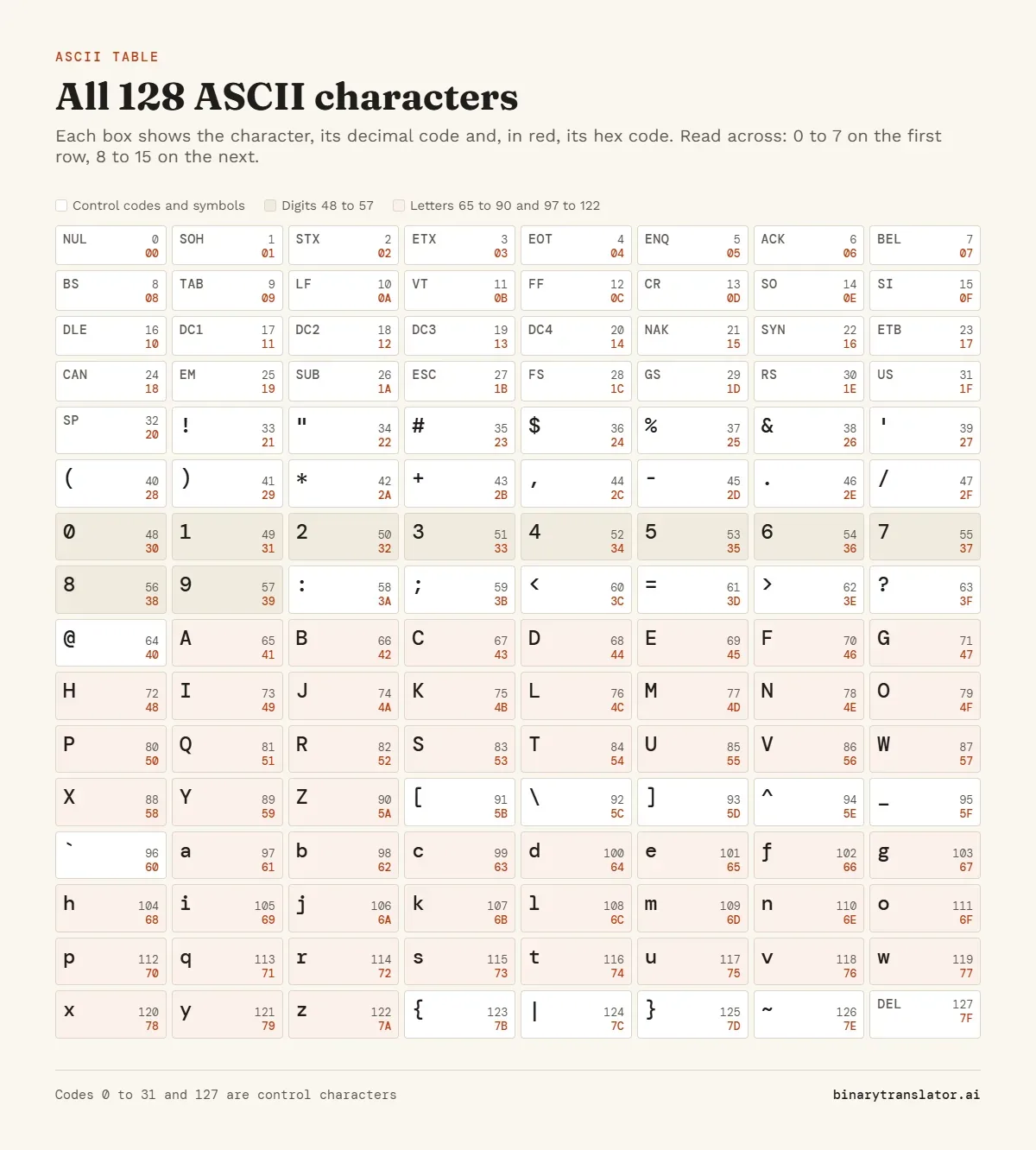
The whole set on one page, eight characters to a row. Each box gives the decimal code and, in red, the hex code.
How the ASCII table is laid out
| Decimal | Hex | What is there |
|---|---|---|
| 0 to 31 | 00 to 1F | Control codes such as tab (9), line feed (10) and carriage return (13) |
| 32 | 20 | Space |
| 33 to 47 | 21 to 2F | Punctuation and symbols: ! " # $ % & ' ( ) * + , - . / |
| 48 to 57 | 30 to 39 | Digits 0 to 9 |
| 58 to 64 | 3A to 40 | : ; < = > ? @ |
| 65 to 90 | 41 to 5A | Capital letters A to Z |
| 91 to 96 | 5B to 60 | [ \ ] ^ _ ` |
| 97 to 122 | 61 to 7A | Small letters a to z |
| 123 to 126 | 7B to 7E | { | } ~ |
| 127 | 7F | DEL (delete) |
That gives 95 printable characters (32 to 126, counting the space) and 33 control characters (0 to 31 plus 127). The printable set is what people usually mean by "ASCII characters": everything you can type on a US keyboard without special keys.
Patterns that make ASCII easy to work with
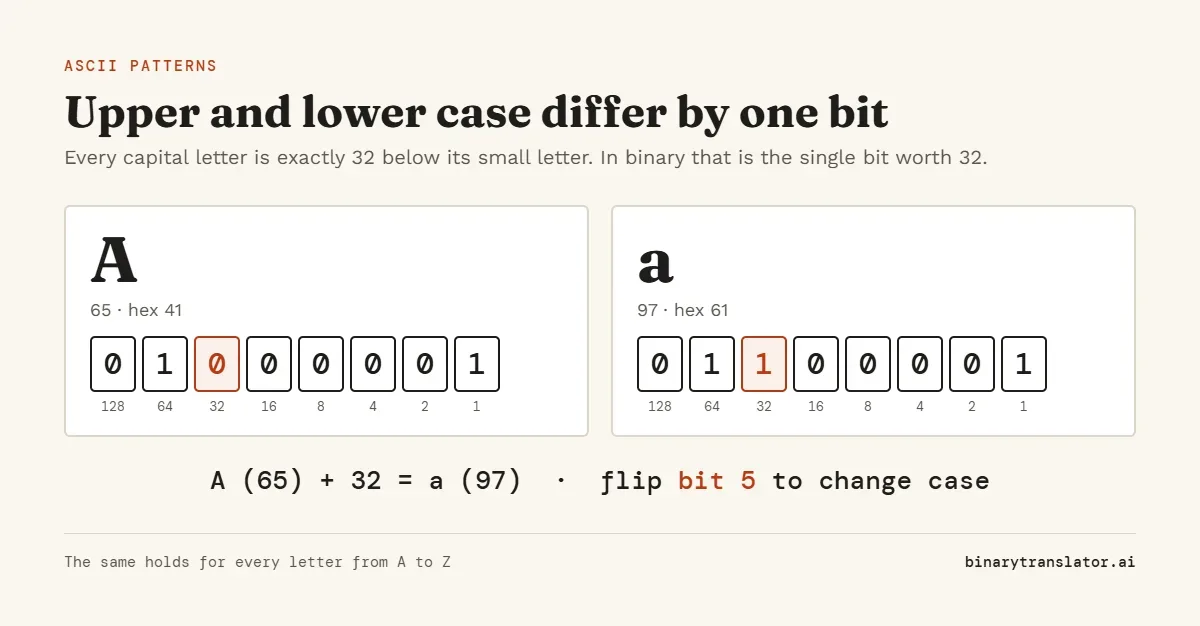
A capital letter and its small version are always 32 apart. A is 65 and a is 97. In binary that is a single bit, so changing case is a one-bit flip.
The digit characters start at 48, so the character 7 is code 55. Subtracting 48 from a digit's code gives its value, which is the classic way to turn the text "7" into the number 7. In hex the pattern is even clearer: digits are 30 to 39, so the second hex digit is the number itself. Letters work the same way from their starting point: A is 65, so the nth letter of the alphabet is 64 + n.
Control characters you still meet
Most of codes 0 to 31 were meant for teleprinters and are rarely used now. A handful still matter, and programmers usually write them as escape sequences.
| Code | Name | Escape | Where you see it |
|---|---|---|---|
| 0 | NUL, null | \0 | Marks the end of a string in C |
| 7 | BEL, bell | \a | Makes a terminal beep |
| 8 | BS, backspace | \b | Moves the cursor back one place |
| 9 | TAB, horizontal tab | \t | Indents text and separates columns in TSV files |
| 10 | LF, line feed | \n | Ends a line on Linux and macOS |
| 13 | CR, carriage return | \r | Windows ends lines with CR then LF |
| 27 | ESC, escape | \x1b | Starts the color codes used in terminals |
| 127 | DEL, delete | \x7f | Sent by the Backspace key in many terminals |
The difference in line endings is why a text file made on Windows can show stray ^M characters when opened on Linux: each line still has the CR before its LF.
Extended ASCII: 128 to 255
Codes 128 to 255 are not part of ASCII. Different systems filled them in different ways, which is why the same byte can show as é on one computer and as a box or a Greek letter on another. The checkbox above the table adds the Windows-1252 set, the most common on Western Windows PCs and the one browsers use for pages labeled ISO-8859-1, as the WHATWG Encoding Standard specifies. It puts € at 128 and é at 233. Old DOS programs used code page 437 instead, with box-drawing characters in the same range.
Anything outside 0 to 127, such as é, €, ✓ or an emoji, is a non-ASCII character. Modern text stores those with UTF-8, where they take two to four bytes each. The hex to text converter shows how those bytes decode under different encodings.
Typing a character by its code
In HTML, write &#, the decimal code and a semicolon: @ shows @ and © shows ©. On Windows, hold Alt and type the code on the number pad; Alt+64 gives @, and Alt+0233 gives é from the Windows-1252 set. In most programming languages, \x41 inside a string is the character with hex code 41, which is A.
ASCII values in C, C++, Python and JavaScript
In C and C++ a char already holds its ASCII code, so (int)'A' is 65 and 'a' - 'A' is 32. A loop such as for (int i = 32; i < 127; i++) printf("%d %c\n", i, i); prints the printable part of the table. In Python, ord('A') returns 65 and chr(65) returns 'A'. In JavaScript, 'A'.charCodeAt(0) returns 65 and String.fromCharCode(65) returns "A".
Converting text with ASCII codes
To turn whole words into codes rather than looking them up one at a time, use the text to binary converter, which can also output decimal and hex. The text to ASCII converter gives the decimal codes on their own, the way they appear in this table. To go from codes back to words, paste binary into the binary translator or hex into hex to text. Decimal codes such as 72 105 go into ASCII to text. The original 1969 network specification, RFC 20, still lists every code with its meaning.
Frequently asked questions
Can I download the ASCII table as a PDF?
Yes. Press Print or save as PDF above the table and choose Save as PDF in the print dialog. Only the rows on screen are printed, so pick a filter first if you want just the letters or just the control codes, and tick the 128 to 255 box first for the full extended table.
What is the ASCII code for A?
Capital A is 65 in decimal, 41 in hex and 01000001 in binary. Small a is 97.
What is the ASCII code for @?
64, or 40 in hex. It sits just before A, which is 65.
What is the ASCII code for an apostrophe?
The straight apostrophe ' is 39, or 27 in hex. The curly ’ that word processors insert is not ASCII; it is Unicode U+2019.
Is there an ASCII code for a check mark?
No. ✓ is not in the 128 ASCII characters. It is Unicode U+2713, which you can write in HTML as ✓.
How many ASCII characters are there?
128: 33 control codes (0 to 31 and 127) and 95 printable characters, counting the space.
What is ASCII 32?
The space character.
Why does ASCII use 7 bits and not 8?
Seven bits were enough for English letters, digits, punctuation and control codes, and the eighth bit was often used for error checking when data was sent over lines. Computers later stored each character in a full 8-bit byte, which left room for the extended sets.
Is ASCII the same as Unicode?
Unicode includes ASCII as its first 128 code points, with the same numbers. Unicode then goes on to cover well over 100,000 more characters.