Binary basics
Big endian vs little endian
Two ways to order the bytes of one number. See which byte goes where, which systems use each, and how to read byte order in a hex dump.
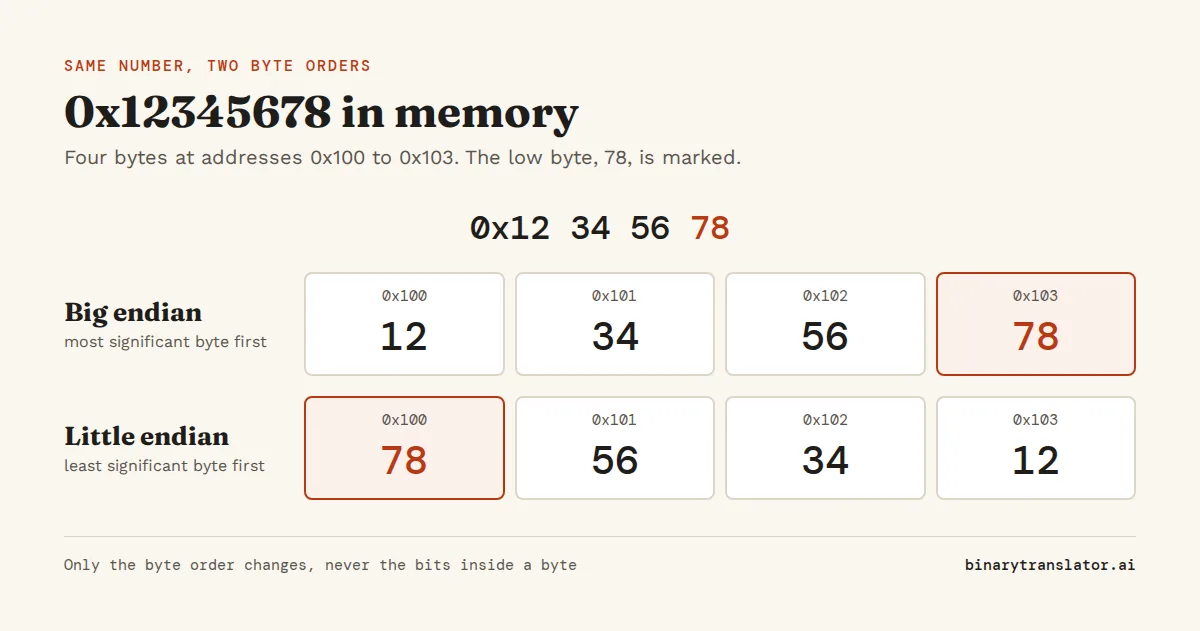
The four bytes E8 03 00 00 can mean 1,000 or 3,892,510,720. Which one you get depends on the end you start reading from. Big endian puts the most significant byte first, at the lowest memory address. Little endian puts the least significant byte first. So the 32-bit number 0x12345678 is stored as 12 34 56 78 in big endian and 78 56 34 12 in little endian. The value is the same and only the byte order changes. Most PCs and phones are little endian, while network protocols send numbers in big endian.
Key takeaways
| Big endian stores the most significant byte first, little endian stores the least significant byte first. | |
| 0x12345678 is 12 34 56 78 in big endian and 78 56 34 12 in little endian. | |
| Only the byte order changes. The bits inside each byte stay the same. | |
| x86 and nearly all phones are little endian, while internet protocols use big endian, called network byte order. | |
| To convert, pad the hex value to full width, split it into byte pairs and reverse the pairs. |
See a number in both byte orders
Enter a decimal or hex number (start hex with 0x) and pick a width. The tool shows which byte lands at each memory address in both orders.
What endianness means
Memory is a long row of bytes, each with its own address. A single byte holds a value from 0 to 255, so anything bigger, such as a 32-bit integer, needs several bytes in a row. The question endianness answers is which end of the number goes into the first of those bytes.
| Address | Big endian | Little endian |
|---|---|---|
0x100 | 12 | 78 |
0x101 | 34 | 56 |
0x102 | 56 | 34 |
0x103 | 78 | 12 |
Big endian matches the way you write numbers, biggest part first. Little endian looks reversed when you read memory left to right. What you get in return is that the byte at the starting address is always the lowest part of the number. Reading 0x12345678 as a 16-bit or 8-bit value from the same address in little endian gives 0x5678 or 0x78, the low end of the same number.
Only bytes are reversed, not bits
People often assume little endian reverses every bit. It doesn't. Each byte keeps its bits in the normal order, and only the order of whole bytes changes. 0x12 is 00010010 in both systems. If you convert a little-endian byte sequence to big endian, reverse the bytes, not the binary digits. The hex to binary converter shows the bits inside each byte if you want to check.
Which systems use big endian and which use little endian
| Little endian | Big endian |
|---|---|
| Intel and AMD x86 and x86-64 processors | Network byte order in TCP/IP headers (IP addresses, ports) |
| ARM in the usual setup, so most phones, tablets and Apple silicon Macs | IBM mainframes (z/Architecture) |
| RISC-V | Older Motorola 68000 and PowerPC Macs |
| File formats such as BMP, WAV and ZIP | File formats such as PNG and JPEG, and Java class files |
ARM and PowerPC chips can run in either order, which is called bi-endian, but operating systems pick one and stick with it. Because almost every desktop and phone is little endian today, the byte order mostly matters when data crosses from one place to another: a network packet, a file written on another machine, or a binary protocol.
Network byte order
The internet protocols were written when big-endian machines were common, so TCP/IP headers store multi-byte numbers in big endian. This is called network byte order. A little-endian PC has to swap the bytes of a port number or address before it sends a packet and swap them back when it reads one. In C the standard functions, documented in the Linux byteorder man page, are htons and htonl (host to network) and ntohs and ntohl (network to host). On a big-endian host they do nothing. If you forget the swap on a PC, port 443 (0x01BB) goes out as BB 01, and the other side reads it as port 47873.
IP addresses follow the same rule. 192.168.1.10 is sent as the bytes C0 A8 01 0A in that order. The IP to binary converter shows each of those bytes in binary.
Reading byte order in a hex dump
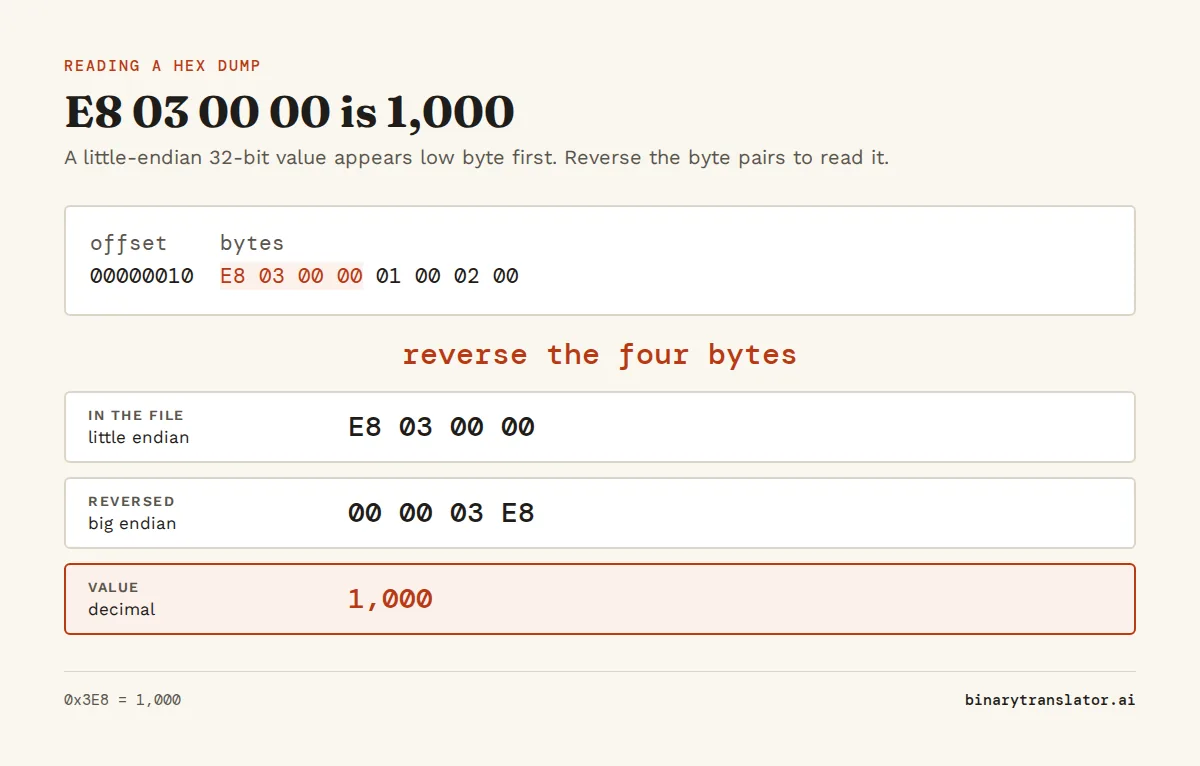
Hex dumps and hex editors show bytes in the order they sit in the file. If a little-endian file stores the 32-bit length 1,000, the dump shows E8 03 00 00, not 00 00 03 E8. Read the bytes right to left to get 0x000003E8, which is 1,000. Read them in the wrong order and you get 3,892,510,720, a number far too big for a length. That's the usual sign of a byte order mix-up. Zero bytes at the end of a field are a hint that you're looking at a small little-endian number.
Text encoded as UTF-16 often starts with a byte order mark that tells you which order was used: FE FF means big endian and FF FE means little endian. You can open a file in the hex dump tool or the hex editor to look at its first bytes.
Where the names come from
The terms come from Gulliver's Travels by Jonathan Swift, where two nations go to war over which end of a boiled egg to crack: the big end or the little end. Computer scientist Danny Cohen borrowed the names in 1980 in a note called "On Holy Wars and a Plea for Peace". His point was that the choice mattered less than everyone agreeing on one.
Advantages of each
- Big endian is easier for people to read in memory dumps. Comparing two numbers byte by byte from the start also gives the right order, so sorting the raw bytes sorts unsigned numbers of the same width.
- Little endian lets a program read the same address as an 8, 16 or 32-bit value and always get the low part of the number. Adding multi-byte numbers also starts at the lowest byte, which is the first one in memory.
- In practice, neither is faster on modern hardware. What matters is that the writer and the reader of the data agree.
Converting between big and little endian in code
Most languages let you say which byte order you want when you turn a number into bytes. Always write it out, because struct with no prefix uses the native order of whatever machine runs the code. In Python, use int.to_bytes() for a single number and the struct module for whole records:
| Language | Big endian | Little endian |
|---|---|---|
| Python | n.to_bytes(4, 'big') | n.to_bytes(4, 'little') |
| Python struct | struct.pack('>I', n) | struct.pack('<I', n) |
| JavaScript | view.setUint32(0, n, false) | view.setUint32(0, n, true) |
| C | htonl(n) | native on x86 and ARM |
To check a value by hand, convert it with the decimal to hex converter, pad it to the full width with leading zeros, split it into pairs of hex digits and reverse the pairs. For 1,000 in 32 bits that's 3E8, then 000003E8, then 00 00 03 E8, and little endian gives E8 03 00 00.
Questions people ask
What is the difference between big endian and little endian?
Big endian stores the most significant byte at the lowest address, and little endian stores the least significant byte there. 0x1234 is 12 34 in big endian and 34 12 in little endian.
Is x86 big endian or little endian?
Little endian. Intel and AMD processors, in both 32-bit and 64-bit mode, store the lowest byte first.
Is ARM little endian?
ARM can run either way, but Android, iOS, Windows on ARM and Apple silicon Macs all run it in little-endian mode.
What is network byte order?
Big endian. Internet protocols send multi-byte numbers such as ports and lengths with the most significant byte first.
Does endianness reverse the bits in a byte?
No. Only the order of the bytes changes. The bits inside each byte stay in the same order on every common system.
Does endianness affect UTF-8 text?
No. UTF-8 is a sequence of single bytes with a fixed order, so it reads the same everywhere. UTF-16 and UTF-32 use multi-byte units, so they come in big-endian and little-endian forms.
About the authors

Zachary Painter is a technical writer at GitLab, where he writes developer documentation and UI text. He has written API documentation for REST and GraphQL APIs and reference docs for Kubernetes, Docker and command-line tools, earlier as a technical writer at Pomerium and a senior technical content writer at Stream. He holds a BA in English and German studies from the University of North Carolina at Greensboro. On binarytranslator.ai he writes guides and the how-to sections on tool pages.

Sam Siewert is the O'Connell Endowed Professor of computer science at California State University, Chico, where he teaches numeric and parallel computing, computer vision and machine learning. He has taught real-time embedded systems at the University of Colorado Boulder since 2000 and co-founded its Embedded Systems Engineering program. Both fields depend on how computers store numbers in binary, from fixed-width integers to floating point. He earned his PhD and MS in computer science at the University of Colorado Boulder and is a senior member of IEEE. On binarytranslator.ai he reviews the math behind the converters and the number system guides.
Keep reading
All posts Binary basics
MSB and LSB: most and least significant bits, signed integers and overflow
The MSB is the leftmost, highest-value bit and the LSB the rightmost. See what each tells you, how signed integers use the MSB as a sign bit, and how integer overflow wraps values around.9 min read Binary basics
Floating point numbers explained: why 0.1 + 0.2 is not 0.3
A floating point number is scientific notation in binary. See why 0.1 + 0.2 is 0.30000000000000004, how precise floats are, float vs double, and how to compare floats and handle money.9 min read Binary basics