Binary basics
How to read binary
Every row of 0s and 1s follows one rule. Learn it once and you can turn any byte into a number, and the number into a letter.
You have a row like 01001000 01101001 and want to know what it says. Split it into groups of 8 bits, write 128, 64, 32, 16, 8, 4, 2 and 1 above each group, and add up the values that sit over a 1. Each total is a number from 0 to 255. If the binary is text, the ASCII table tells you which letter that number stands for: 01001000 works out to 72, a capital H, and the two bytes together spell Hi.
Key takeaways
| Split binary into groups of 8 bits. Each group is one byte. | |
| Write 128, 64, 32, 16, 8, 4, 2 and 1 over the bits and add the values that sit over a 1. | |
| Each byte gives a number from 0 to 255. For text, look it up in ASCII: A is 65 and a is 97. | |
| Capital and lowercase letters differ by one bit, the one worth 32. | |
| If the digit count is not a multiple of 8, a digit is missing or the text uses 7-bit groups. |
What binary code is
Binary is a way of writing numbers with only two digits, 0 and 1. Each digit is called a bit. Computers use it because a circuit is either off or on, and those two states map neatly onto 0 and 1.
Bits are grouped in eights. A group of 8 bits is a byte, and one byte can hold 256 different patterns, from 00000000 to 11111111. That is enough for every letter, digit and punctuation mark in plain English text, which is why most binary you see online comes in 8-digit blocks.
How to read binary numbers
In everyday decimal numbers, each place is worth ten times the one to its right: ones, tens, hundreds. Binary works the same way with twos. Starting from the right, the places are worth 1, 2, 4, 8, 16, 32, 64 and 128. To read a byte, write those values above the bits and add only the ones that sit over a 1.
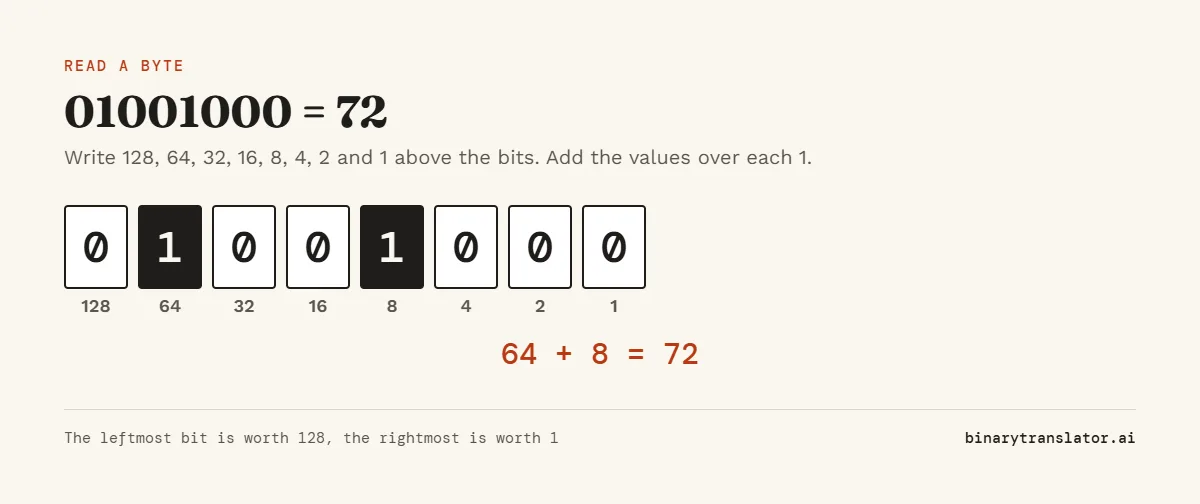
Take 01001000. The 1s are under 64 and 8, so the byte equals 64 + 8 = 72. A few more to get a feel for it:
00000101is 4 + 1 = 500101010is 32 + 8 + 2 = 4211111111is 128 + 64 + 32 + 16 + 8 + 4 + 2 + 1 = 255, the largest value one byte can hold
Shorter numbers work the same way. Count the places from the right, because the rightmost bit is always worth 1 no matter how long the number is. 10101 has five bits worth 16, 8, 4, 2 and 1, so it is 16 + 4 + 1 = 21.
Try it below. Click any bit to switch it between 0 and 1, and the total and letter update as you go.
To check your answer, or for numbers longer than a byte, paste them into the binary to decimal converter. It shows the same sum, so you can see where yours went wrong.
How to read binary code as letters
A byte is only a number until a program decides what it stands for. For text, the usual key is ASCII, a table that gives each common character a number from 0 to 127, the same 7-bit code laid out in RFC 20 for network text. Capital A is 65, lowercase a is 97, the digit 0 is 48 and a space is 32. Once you have the number, look it up in the ASCII table.
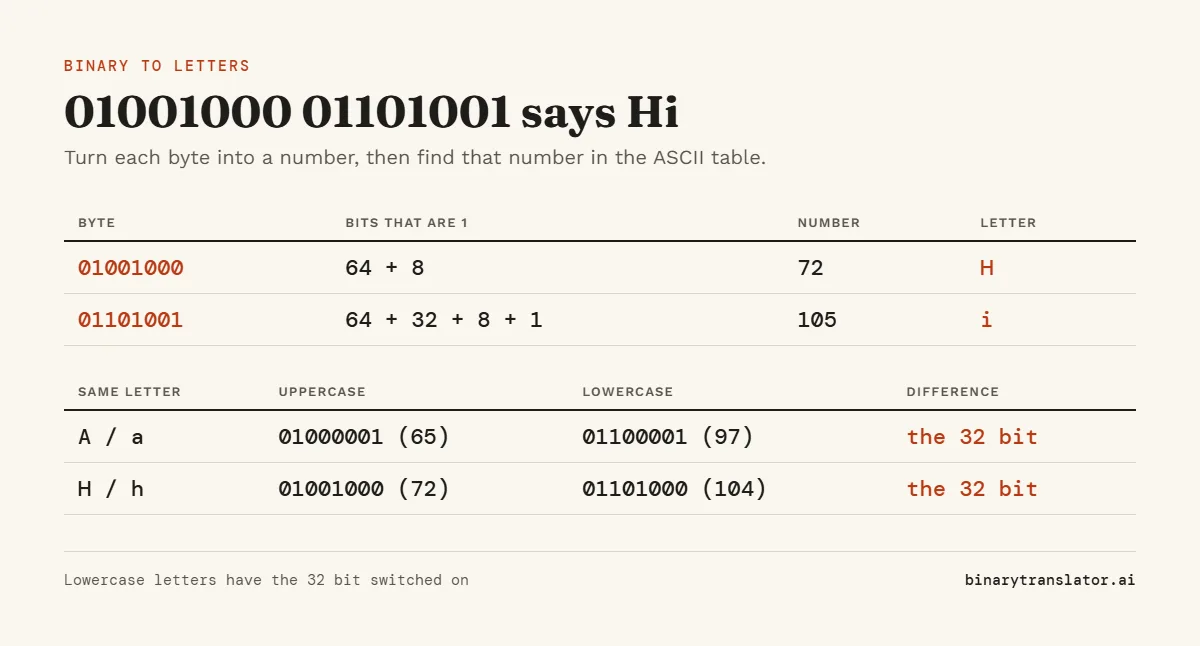
| Binary | Bits that are 1 | Number | Letter |
|---|---|---|---|
01001000 | 64 + 8 | 72 | H |
01101001 | 64 + 32 + 8 + 1 | 105 | i |
Those two bytes spell Hi. In the same way, 01100001 is 97, the letter a, and 01100101 is 101, the letter e.
One shortcut saves time. Uppercase and lowercase letters differ by exactly one bit, the one worth 32, which is the third from the left. A is 01000001 and a is 01100001. If that bit is 1 and the byte starts with 01, the letter is lowercase. The binary alphabet lists every letter if you would rather look them up than add.
Read a whole message, step by step
- Remove spaces, commas and anything else that is not a 0 or a 1, then split the digits into groups of 8. If there were no spaces, count 8 digits from the left each time.
- Write 128, 64, 32, 16, 8, 4, 2 and 1 over each group.
- Add the values above the 1s to get one number per group.
- Look each number up in the ASCII table and write the letters down in order.
Count the digits before you start. If the total is not a multiple of 8, a digit went missing when the text was copied, or the message uses a different code. Some older examples use 7 bits per character, so try groups of 7 before you give up.
Practice: I love you in binary
A lot of people want to write this phrase in binary, and decoding it uses every step above. Here is the full message:
01001001 00100000 01101100 01101111 01110110 01100101 00100000 01111001 01101111 01110101
| Character | Binary | Number |
|---|---|---|
| I | 01001001 | 73 |
| space | 00100000 | 32 |
| l | 01101100 | 108 |
| o | 01101111 | 111 |
| v | 01110110 | 118 |
| e | 01100101 | 101 |
| y | 01111001 | 121 |
| u | 01110101 | 117 |
Work out the first byte before you check the table: 01001001 has 1s under 64, 8 and 1, which makes 73, the capital I. To write your own message, use the text to binary converter.
How to count in binary
Counting follows one rule: change the rightmost 0 to a 1, and turn every 1 to the right of it back into a 0. From zero to eight that gives 0, 1, 10, 11, 100, 101, 110, 111 and 1000.
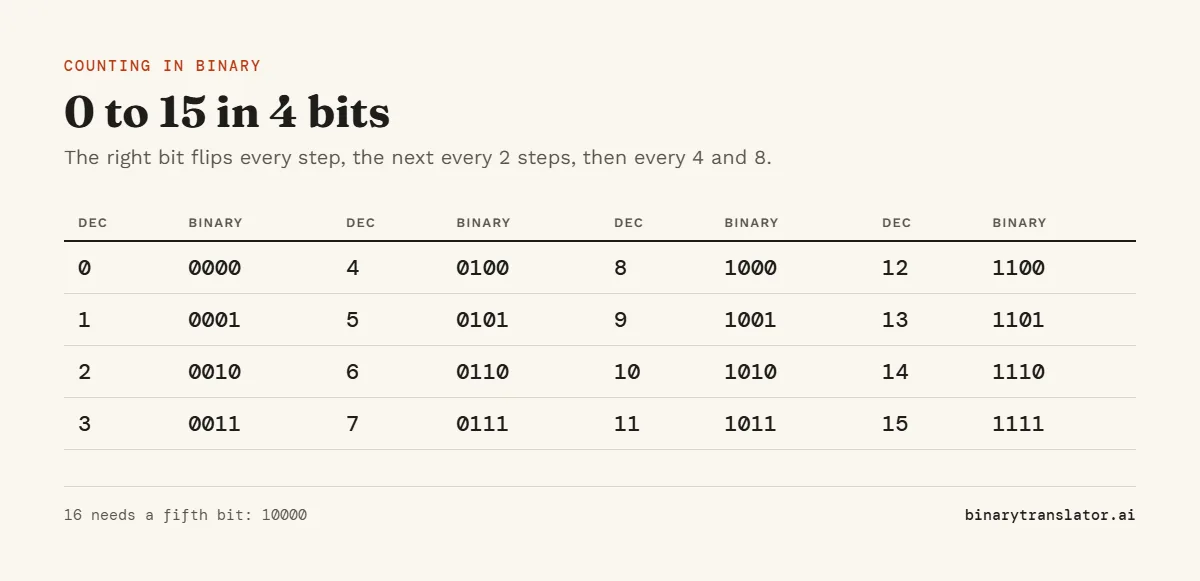
A 1 followed only by zeros is always a power of two, which is why 1000 is 8 and 10000 is 16. The binary numbers chart lists every value up to 1023.
Mistakes that give the wrong letter
- Every letter comes out as nonsense. You probably read the place values backwards. The biggest value, 128, belongs to the leftmost bit of a byte, not the rightmost, and reading
01001000the wrong way gives 18 instead of 72. - The first few letters are right, then the rest turn to garbage. A leading zero went missing.
1001000and01001000are the same number on their own, but in a message with no spaces, one lost zero shifts every group after it. - You decode bytes from an image or program file and get random letters. Most of those bytes were never text.
01000001is 65 whether or not it means A, so only read it as a letter when you know the data is text. - An accented letter turns into two odd characters such as é. Letters outside ASCII, such as accented letters and emoji, take 2 to 4 bytes each in UTF-8. The letter é is
11000011 10101001. The Unicode converter shows the bytes for any character.
How binary code works inside a computer
Inside a chip, each bit is a tiny voltage that is either high or low. Memory, drives and network cables all store or carry these two states, and the program that reads them decides what they mean. The byte 01000001 is the letter A in a text file, the number 65 in a spreadsheet cell and part of a pixel color in a photo. When you read binary by hand, you are doing the same job the computer does, only slower.
Questions people ask
How do I say hi in binary?
01001000 01101001 spells Hi with a capital H. For all lowercase, use 01101000 01101001.
What does 11111111 mean in binary?
It is 255, the largest number one byte can hold. All eight bits are on, so you add every place value from 128 down to 1.
What does 10101 mean in binary?
It is 21. The 1s sit in the places worth 16, 4 and 1.
Is there a faster way to read binary?
Paste the code into the binary translator. It turns binary into text as you type and shows each byte.
How do I learn binary code quickly?
Memorize the eight place values, 128, 64, 32, 16, 8, 4, 2 and 1, then decode a short word such as your name by hand. The printable binary worksheets give you more to practice on, with answer keys.
About the authors

Uma Victor is a technical writer and software engineer with seven years of engineering work. He writes API documentation, integration guides and tutorials for developer tools, and his articles have run in Smashing Magazine, freeCodeCamp and LogRocket. He runs the code before he writes about it. On binarytranslator.ai he writes the guides on binary, hex and text encoding.

Sam Siewert is the O'Connell Endowed Professor of computer science at California State University, Chico, where he teaches numeric and parallel computing, computer vision and machine learning. He has taught real-time embedded systems at the University of Colorado Boulder since 2000 and co-founded its Embedded Systems Engineering program. Both fields depend on how computers store numbers in binary, from fixed-width integers to floating point. He earned his PhD and MS in computer science at the University of Colorado Boulder and is a senior member of IEEE. On binarytranslator.ai he reviews the math behind the converters and the number system guides.
Keep reading
All posts Binary basics
MSB and LSB: most and least significant bits, signed integers and overflow
The MSB is the leftmost, highest-value bit and the LSB the rightmost. See what each tells you, how signed integers use the MSB as a sign bit, and how integer overflow wraps values around.9 min read Binary basics
Floating point numbers explained: why 0.1 + 0.2 is not 0.3
A floating point number is scientific notation in binary. See why 0.1 + 0.2 is 0.30000000000000004, how precise floats are, float vs double, and how to compare floats and handle money.9 min read Binary basics