Python
Python ord() and chr()
Turn a character into its number with ord() and a number back into a character with chr(), with ASCII, Unicode and emoji examples.
ord('a') is 97 and chr(97) is 'a'. That is the whole job of these two Python functions: ord() turns a character into its number and chr() turns the number back into the character. The number is the character's Unicode code point. For the first 128 characters it matches the ASCII code, so the same two functions work for English letters, accented letters, Chinese characters and emoji.
Key takeaways
| ord() takes one character and returns its Unicode code point, for example ord('a') is 97. | |
| chr() does the reverse and accepts any integer from 0 to 1,114,111. | |
| For the first 128 characters the code point equals the ASCII code. | |
| ord() gives code points, while encode() gives bytes, so é is 233 with ord() but 195 169 in UTF-8. | |
| Characters built from several code points, such as some emoji, need a loop or NFC normalization. |
print(ord('a'))
print(chr(97))
print(chr(ord('a')))
97
a
aLook up any character
Type a character to see what ord() returns for it, or type a number to see what chr() gives back. The tool also shows the hex and binary forms and the Python line that produces each result.
What ord() does
The syntax is ord(c), where c is a string that holds exactly one character. The function returns an integer. The name is short for "ordinal", the position of the character in the Unicode list.
for c in ['A', 'a', '0', ' ', 'é', '€', '😀']:
    print(repr(c), ord(c))
'A' 65
'a' 97
'0' 48
' ' 32
'é' 233
'€' 8364
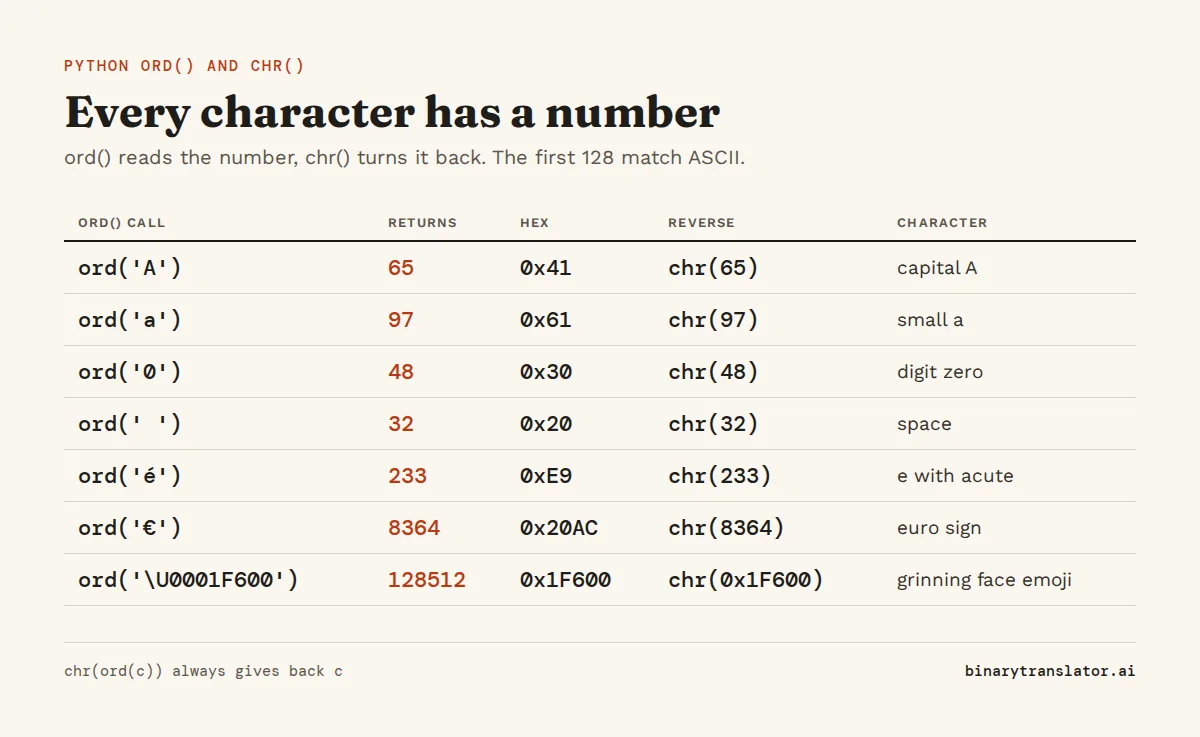
'😀' 128512Capital A is 65 and small a is 97 because that is where ASCII put them (the capitals in 1963, the lowercase letters in 1967), and Unicode kept the same numbers for its first 128 characters. The digit '0' is 48, not 0, so ord('7') gives 55. If you wanted the value 7, subtract ord('0'), as shown further down. The space is 32. Characters outside ASCII get larger numbers: é is 233, the euro sign is 8364 and the grinning face emoji is 128512. The ASCII table lists codes 0 to 127 with their binary and hex values.
ord() also accepts a bytes or bytearray object of length 1 and returns the byte value. In practice you rarely need that, because indexing a bytes object already gives an integer: b'A'[0] is 65.
What chr() does
chr(i) is the reverse. It takes an integer from 0 to 1,114,111 (0x10FFFF in hex, the highest Unicode code point) and returns a one-character string, as the Python docs for chr() spell out. You can pass the number in decimal or as a hex literal, which is handy when you copy a code point such as U+20AC from a Unicode chart.
print(chr(65))
print(chr(8364))
print(chr(0x20AC))
print(chr(0x1F600))
A
€
€
😀Python 2 had a separate unichr() for characters above 255. In Python 3 chr() covers the whole Unicode range, so unichr no longer exists.
Get the ASCII value of every character in a string
ord() handles one character at a time, so loop over the string or use a list comprehension. Joining the numbers with spaces gives the format most text to ASCII converters show.
text = 'Hello'
codes = [ord(c) for c in text]
print(codes)
print(' '.join(str(n) for n in codes))
print(''.join(chr(n) for n in codes))
[72, 101, 108, 108, 111]
72 101 108 108 111
HelloFor plain English text, list(text.encode('ascii')) returns the same list. That shortcut breaks once the text has an accented letter or an emoji: 'café'.encode('ascii') stops with UnicodeEncodeError: 'ascii' codec can't encode character. Switching to UTF-8 avoids the error but changes the numbers, because ord() gives code points while encode() gives bytes:
word = 'café'
print([ord(c) for c in word])
print(list(word.encode('utf-8')))
[99, 97, 102, 233]
[99, 97, 102, 195, 169]The é is code point 233, but UTF-8 stores it as the two bytes 195 and 169. That difference is explained in Unicode, UTF-8 and ASCII, and the bytes and strings guide covers encode() and decode() in detail.
Show the code in hex, binary or U+ notation
ord() returns a plain integer, so any integer formatting works on it. hex(n) is the quickest way to see hex. format(n, '08b') gives binary padded to 8 bits. For the U+ notation Unicode charts use, write f'U+{n:04X}', which pads to four uppercase hex digits.
for c in 'A€':
    n = ord(c)
    print(c, n, hex(n), format(n, '08b'), f'U+{n:04X}')
A 65 0x41 01000001 U+0041
€ 8364 0x20ac 10000010101100 U+20ACThe euro sign needs 14 bits, so '08b' has nothing to pad and prints all 14. The 8 is a minimum width, not a limit. The int, binary and hex guide covers these format specs and the reverse conversions.
Practical uses
Shift letters: a Caesar cipher
Subtract the code of 'a' to get a position from 0 to 25, then add the shift. The % 26 wraps the result so that z shifted by 3 lands on c instead of a symbol past z. Add ord('a') back and chr() turns it into a letter.
def caesar(text, shift):
    out = []
    for c in text:
        if 'a' <= c <= 'z':
            out.append(chr((ord(c) - ord('a') + shift) % 26 + ord('a')))
        elif 'A' <= c <= 'Z':
            out.append(chr((ord(c) - ord('A') + shift) % 26 + ord('A')))
        else:
            out.append(c)
    return ''.join(out)

print(caesar('Hello, World', 3))
print(caesar('Khoor, Zruog', -3))
Khoor, Zruog
Hello, WorldLetter position in the alphabet
The same subtraction gives A1Z26 numbers, where A is 1 and Z is 26. Lowercase the letter first so A and a give the same result. The letters to numbers converter does this for whole words.
print([ord(c) - ord('a') + 1 for c in 'Hello'.lower()])[8, 5, 12, 12, 15]Build an alphabet or a range of characters
print(''.join(chr(i) for i in range(ord('a'), ord('z') + 1)))
print(''.join(chr(i) for i in range(0x391, 0x3A2)))
abcdefghijklmnopqrstuvwxyz
ΑΒΓΔΕΖΗΘΙΚΛΜΝΞΟΠΡFor the English alphabet, string.ascii_lowercase and string.ascii_uppercase are already defined. The chr() range is useful for other scripts, such as the Greek capitals from U+0391 to U+03A1 in the second line.
Turn a digit character into its value
ord('7') - ord('0') is 7, which is how a parser written by hand reads digits. In normal code, int('7') is clearer and also handles multi-digit numbers.
Errors you may see
The usual one: you call ord('Hello') on a whole word to get its codes and Python stops with TypeError: ord() expected a character, but string of length 5 found. ord() only ever takes one character, so loop over the word. The table lists that error and the others you're likely to hit.
| Error | Cause | Fix |
|---|---|---|
TypeError: ord() expected a character, but string of length 5 found | You passed a whole word | Loop over the characters: [ord(c) for c in s] |
TypeError: ord() expected string of length 1, but int found | The value is already a number | Use chr(n) to go from number to character |
ValueError: chr() arg not in range(0x110000) | The number is negative or above 1,114,111 | Check the source of the number, or catch the error |
TypeError: ord() expected a character, but string of length 2 found on an emoji or accented letter | The character is built from two or more code points | Normalize with unicodedata or loop over the code points |
The last row trips people up, because the character on screen looks like one symbol. Underneath, it is stored as several code points. An é can be a single code point (U+00E9) or an e followed by a combining accent (U+0065 U+0301). Flags and many emoji, such as the thumbs up with a skin tone, are two or more code points joined together.
import unicodedata
s = 'e\u0301'
print(len(s), [hex(ord(c)) for c in s])
nfc = unicodedata.normalize('NFC', s)
print(len(nfc), ord(nfc))
thumbs = '\U0001F44D\U0001F3FD'
print(len(thumbs), [f'U+{ord(c):X}' for c in thumbs])
2 ['0x65', '0x301']
1 233
2 ['U+1F44D', 'U+1F3FD']NFC normalization merges the e and the accent into the single code point 233, so ord() works again. The thumbs up has no single-code-point form, so loop over it instead and treat it as two numbers.
The same thing in other languages
| Language | Character to number | Number to character |
|---|---|---|
| Python | ord('A') | chr(65) |
| JavaScript | 'A'.codePointAt(0) | String.fromCodePoint(65) |
| Java | (int) 'A' or "A".codePointAt(0) | Character.toString(65) |
| C and C++ | (int) 'A' | (char) 65 |
| C# | (int) 'A' | (char) 65 or char.ConvertFromUtf32(65) |
| PHP | ord('A') (one byte) or mb_ord('A') | chr(65) or mb_chr(65) |
JavaScript also has charCodeAt(), which returns UTF-16 units instead of code points, so it gives 55357 rather than 128512 for 😀. Use codePointAt() when the text may contain emoji. PHP's plain ord() reads one byte, which is why it returns 195 for é in a UTF-8 string, while mb_ord() returns 233.
Questions people ask
What does ord() stand for in Python?
Ordinal. ord() returns the ordinal number of a character, its position in the Unicode character list, which is the same as its ASCII code for the first 128 characters.
What will ord('a') return?
97. Lowercase letters run from 97 for a to 122 for z, and uppercase letters run from 65 for A to 90 for Z.
Why is ord('a') 97?
ASCII placed the lowercase letters at 97 to 122, exactly 32 above the capitals, so a single bit separates the two cases. Unicode kept the ASCII numbers for its first 128 characters, and Python uses Unicode code points.
What is the opposite of ord() in Python?
chr(). It takes an integer from 0 to 1,114,111 and returns the matching character, so chr(ord(c)) always gives back c.
How do I get the ASCII value of a character in Python?
Call ord() on it, for example ord('A') returns 65. For a whole string use [ord(c) for c in text].
Can ord() take a number or a word?
No. ord() needs a string of exactly one character. Passing an int or a longer string raises a TypeError.
About the authors

Uma Victor is a technical writer and software engineer with seven years of engineering work. He writes API documentation, integration guides and tutorials for developer tools, and his articles have run in Smashing Magazine, freeCodeCamp and LogRocket. He runs the code before he writes about it. On binarytranslator.ai he writes the guides on binary, hex and text encoding.

Khushboo Gupta is a PhD student in computer science at the University of Illinois Chicago, where she researches natural language processing. As a graduate teaching assistant she has taught Program Design, Data Structures, Introduction to Data Science and Natural Language Processing. Before her PhD she was a software development engineer at Amazon Web Services and a software engineer at Pacific Northwest National Laboratory, and she holds an MS in computer science from Syracuse University. On binarytranslator.ai she reviews the guides on text encoding, data structures and number systems.
Keep reading
All posts Programming
The xxd command: hex dumps on Linux and macOS
Use xxd to read the bytes in any file, get plain hex with -p, turn hex back into binary with -r, patch a byte, print bits, make C arrays and diff binary files.9 min read Programming
Base64 encode and decode in Python, JavaScript, Linux and PowerShell
Base64 one-liners for Python, the browser, Node.js, Linux, macOS and PowerShell, with a command builder and fixes for padding errors, echo newlines, line wrapping and UTF-16.13 min read Programming