Text and encoding
LF vs CRLF: newline characters explained
What line feed and carriage return are, why Windows uses both, and how to fix scripts, Git warnings and files with the wrong line endings.
A new line in a text file is not empty space. It is one or two invisible bytes. Linux and macOS end each line with LF, the line feed, written \n in code and stored as the byte 0A. Windows ends each line with CR LF, a carriage return followed by a line feed, written \r\n and stored as 0D 0A. That one extra byte is behind most line ending trouble: a script that fails on Linux, a Git warning about CRLF, a CSV value that never matches.
Key takeaways
| A newline is a byte, not blank space: LF (0A) on Linux and macOS, CR LF (0D 0A) on Windows. | |
| CR and LF come from teleprinters, where one moved the print head back and the other rolled the paper. | |
| A Windows line ending in a Linux script makes bash read a hidden \r as part of each command. | |
| "LF will be replaced by CRLF" is a Git warning about core.autocrlf, not an error. | |
| A .gitattributes file with * text=auto eol=lf sets one rule for everyone working on a repository. |
Open any text file below and see which line endings it really has. You can convert it to LF or CRLF and download the result. The file stays in your browser.
CR and LF are ASCII control characters
Both characters come from the first 32 codes of ASCII, the control characters that do something instead of printing a symbol. Each has a few names, and you will meet all of them in error messages and editors.
| Name | In code | Decimal | Hex | Shown as | Unicode |
|---|---|---|---|---|---|
| Line feed (LF), newline | \n | 10 | 0A | ^J, ␊ | U+000A |
| Carriage return (CR) | \r | 13 | 0D | ^M, ␍ | U+000D |
| CR LF together | \r\n | 13 10 | 0D 0A | ^M at the end of a line | two code points |
"Newline" usually means LF, because that is what \n stands for in Python, JavaScript, C and the shell, and Python's ord() function returns 10 for it. The ASCII table lists both codes next to the other control characters, such as tab (9) and form feed (12).
See the bytes: the same text on Linux and Windows
Here are two files with the same two words, Hi and there, on separate lines. One was saved with Linux line endings and one with Windows line endings. The xxd command prints the bytes in hexadecimal, two digits per byte:
xxd linux.txt
xxd windows.txt
00000000: 4869 0a74 6865 7265 0a Hi.there.
00000000: 4869 0d0a 7468 6572 650d 0a Hi..there..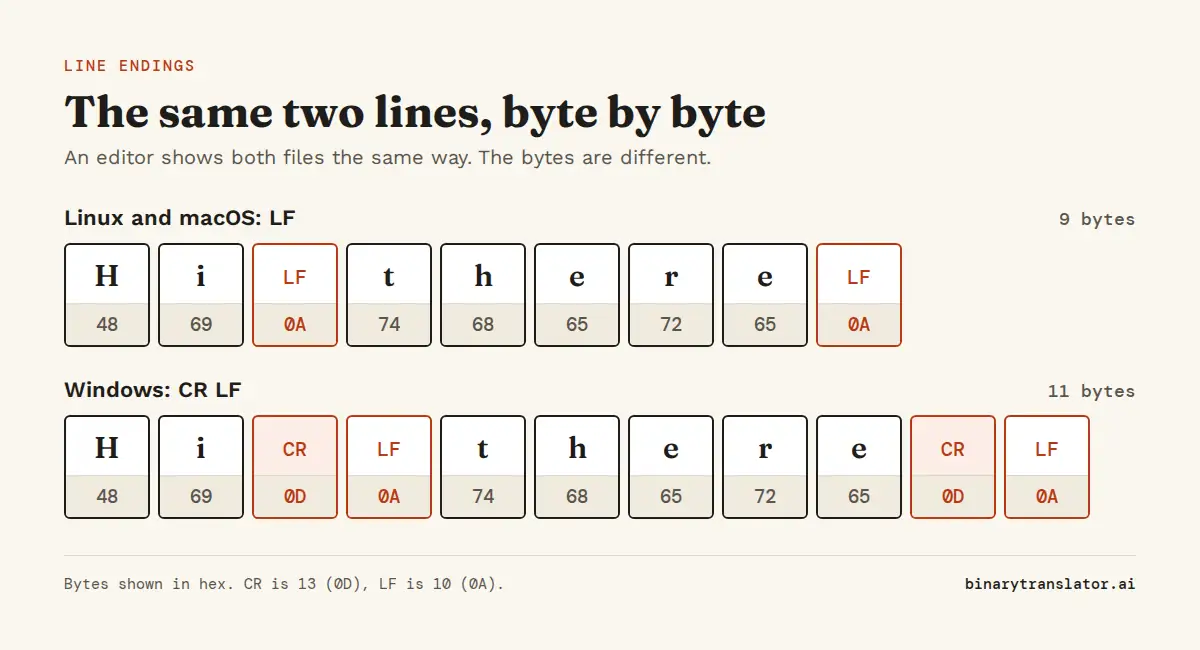
The Linux file is 9 bytes: 0a after Hi and another after there. The Windows file is 11 bytes, because each line ending is 0d 0a. Most text editors show both files the same way, which is why this kind of bug is hard to see without a hex view. Our xxd guide explains the three columns, and if you have no terminal, paste the text into the text to hex converter or open the file in the online hex editor.
The file command answers the same question in words:
file linux.txt windows.txtlinux.txt: ASCII text
windows.txt: ASCII text, with CRLF line terminatorsWhy Windows uses two characters
The two characters were once two separate movements of a machine. On a teleprinter such as the Teletype Model 33, carriage return slid the print head back to the left margin and line feed rolled the paper up one line. To start a new line you sent both, and text stored for those machines kept both.
When operating systems moved to screens, they picked different rules. Multics, and then Unix, kept only LF in files and let the terminal driver add the CR when printing. CP/M kept CR LF, MS-DOS copied CP/M, and Windows kept what MS-DOS did. Classic Mac OS used CR alone until Mac OS X arrived in 2001. Being Unix underneath, it switched to LF.
So today there are two conventions in common use, and a third you only meet in old files:
| Where | Line ending | Bytes |
|---|---|---|
| Linux, macOS, Android, iOS | LF | 0A |
| Windows text files | CR LF | 0D 0A |
| HTTP/1.1 headers, email (SMTP), CSV files (RFC 4180) | CR LF | 0D 0A |
| Classic Mac OS (before 2001) | CR | 0D |
Internet protocols use CR LF because they took it from the Telnet network terminal of the teleprinter era, and changing it now would break existing servers and clients. The HTTP/1.1 standard still ends each header line with \r\n, even when both the client and the server run Linux.
Problems that CRLF causes, and how to fix them
Most programs handle both line endings today. Microsoft added LF support to Windows Notepad in the Windows 10 October 2018 Update. The trouble starts when a file made on one system is read by a program that expects the other. These are the cases people run into most.
A shell script from Windows fails on Linux
You write deploy.sh in a Windows editor, copy it to a server, set its execute permission and run it. Every line now ends in an invisible CR, and bash treats that CR as part of the command:
bash deploy.shdeploy.sh: line 2: cd: $'/tmp\r': No such file or directory
doneThe $'/tmp\r' in the error is the clue. Bash tried to change to a folder called /tmp followed by a carriage return, and no such folder exists. The echo line printed web, then the CR sent the cursor back to the start, and done was printed over it. If you run it as ./deploy.sh and the CR sits on the first line, after #!/bin/bash, the script will not start at all. Recent bash prints "cannot execute: required file not found", and older systems print "/bin/bash^M: bad interpreter: No such file or directory".
Strip the CRs and the script works:
sed -i 's/\r$//' deploy.sh
bash deploy.sh
web doneOn macOS, BSD sed needs an empty argument after -i, so the command is sed -i '' $'s/\r$//' deploy.sh. The conversion section below lists other ways to do it.
Text read from a Windows file never matches
You read a CSV file from Windows, split it on \n and compare a value. The comparison fails even though the text looks right, because each line still ends in \r. Printing the list shows it:
data = b'id,name\r\n1,Ada\r\n'
print(data.decode().split('\n'))
print(data.decode().splitlines())
['id,name\r', '1,Ada\r', '']
['id,name', '1,Ada']splitlines() treats \r\n, \n and \r all as line breaks, so it is the safe choice when you do not control where the text came from. In JavaScript, split on a pattern that allows an optional CR: text.split(/\r?\n/). The same bug turns up in values from database exports and in API responses written on Windows.
Every line shows ^M
In Vim, in git diff or in a terminal, a ^M at the end of each line is a CR the program did not expect. Caret notation writes a control character as ^ plus the character 64 places above its code, and CR is 13, so it becomes M. It usually means a file has CR LF endings while the tool expects LF, or a file mixes both. In Vim, :set ff? shows the current file format, and :set ff=unix followed by :w saves it with LF.
The whole file is on one line
An old Windows program opens a file from Linux and shows it as a single long line, because it only breaks lines on CR LF and finds none. A file with only CR line endings, from classic Mac OS or a misconfigured export, has no LF at all, so wc -l reports 0 lines and grep treats the whole file as one line. Converting the file to the endings the program expects fixes both.
What "LF will be replaced by CRLF" means in Git
On Windows you run git add and see this:
warning: in the working copy of 'notes.txt', LF will be replaced by CRLF the next time Git touches itIt is a warning, not an error, and your commit is fine. Git is telling you two things. The file in your folder has LF endings, and your Git setting core.autocrlf is true, which the Git for Windows installer sets by default. With that setting Git stores LF in the repository and writes CR LF into your folder whenever it checks a file out. The next time that happens to notes.txt, for example after switching branches, its LF endings will become CR LF. Older versions of Git word the same warning as "LF will be replaced by CRLF in notes.txt".
The reverse message, "CRLF will be replaced by LF", appears when core.autocrlf is input and you add a file with Windows endings. Git converts them to LF when it stores the file.
| core.autocrlf | When you commit | When Git checks a file out | Typical use |
|---|---|---|---|
true | CR LF becomes LF | LF becomes CR LF | Windows, the installer default |
input | CR LF becomes LF | nothing changes | Linux and macOS, if you set it (the default there is false) |
false | nothing changes | nothing changes | when the repository sets the rules itself |
The better fix is a .gitattributes file in the repository. core.autocrlf is a setting on each person's computer, so a team where one person has true and another has false keeps producing commits that change every line. A .gitattributes file travels with the code and applies to everyone, and the Git documentation on gitattributes lists every setting it accepts. This one stores all text files with LF and also checks them out with LF, while keeping Windows batch files as CR LF:
# .gitattributes
* text=auto eol=lf
*.bat text eol=crlf
*.cmd text eol=crlf
*.png binary
Commit the file, then run git add --renormalize . and commit again. That rewrites the line endings of the files already in the repository, so every later diff shows only real changes.
Convert CRLF to LF, and LF to CRLF
Pick the method that fits where you are. On a Linux or macOS server, the command line is quickest. In an editor, the setting is one click. In a repository, use .gitattributes as above, because a one-time conversion will drift back.
| Where | CRLF to LF | LF to CRLF |
|---|---|---|
| dos2unix package | dos2unix file.txt | unix2dos file.txt |
| GNU sed (Linux) | sed -i 's/\r$//' file.txt | sed -i 's/$/\r/' file.txt (LF files only) |
| tr | tr -d '\r' < in.txt > out.txt | not suited |
| VS Code | click CRLF in the status bar, choose LF | click LF, choose CRLF |
| Notepad++ | Edit, EOL Conversion, Unix (LF) | Edit, EOL Conversion, Windows (CR LF) |
| Vim | :set ff=unix then :w | :set ff=dos then :w |
dos2unix is the safest choice when you can install it, with sudo apt install dos2unix or brew install dos2unix, because it skips binary files and keeps the file in place. The sed command only removes a CR at the very end of a line, so a CR in the middle of a line stays. tr with -d removes every CR in the file, wherever it is. An old Mac file uses CR alone, so deleting its CRs would join every line into one. Turn them into LFs instead, with tr '\r' '\n'. In VS Code, the files.eol setting chooses the ending for new files.
In Python, open the file with newline='' when you need to keep or write exact line endings. Without it, Python translates for you: on reading, any of \r\n, \r and \n becomes \n, and on writing, \n becomes the line ending of the system the code runs on.
text = open('windows.txt', newline='').read()
print(repr(text))
open('converted.txt', 'w', newline='').write(text.replace('\r\n', '\n'))
print(open('converted.txt', 'rb').read())
'Hi\r\nthere\r\n'
b'Hi\nthere\n'The b in b'Hi\nthere\n' marks raw bytes, so this is what is really on disk. Our guide to Python bytes and strings covers decoding in more depth.
Newlines in code
In most languages \n inside a string is one LF character, on every operating system. Python, JavaScript, Java, C and Go all work this way. The difference is in what gets written to a file or a terminal.
- Python:
print()adds a newline after its output. To print without one, passend='', as inprint('Loading', end=''). Files opened in text mode on Windows write\r\nfor each\n. - JavaScript:
console.log()adds a newline. In Node.js,os.EOLis'\r\n'on Windows and'\n'elsewhere, for when a file must match the system. - Java:
System.lineSeparator()returns the line ending of the current system, and%ninString.format()prints it. - C: in text mode on Windows, the C library writes
\r\nwhen you write\n. Open the file in binary mode, with"wb", to write exactly the bytes you give it.
A safe habit for files other programs will read: write LF unless the format says otherwise, and use CR LF where a standard requires it, such as HTTP headers and strict CSV.
Other line break characters
CR and LF cover almost every file you will see, but Unicode defines a few more line breaks. They show up in text copied from Word, PDFs and some web pages.
| Character | Code point | Where you meet it |
|---|---|---|
| Next line (NEL) | U+0085 | old IBM mainframe text, converted from EBCDIC |
| Line separator | U+2028 | text copied from some PDFs and web pages |
| Paragraph separator | U+2029 | rare, mostly in Unicode-aware editors |
| Form feed | U+000C | page breaks in old printouts and source code |
| Vertical tab | U+000B | manual line breaks (Shift+Enter) in text taken from Microsoft Word |
Python's splitlines() breaks on all of these, while split('\n') only breaks on LF. If a string looks like it has a line break that your code cannot find, look up its characters in the Unicode converter to see which code point it really is. The guide to Unicode, UTF-8 and ASCII explains how those code points turn into bytes.
Questions people ask
What is a carriage return?
A carriage return (CR) is ASCII control character 13, written \r and stored as the byte 0D. On a teleprinter it moved the print head back to the start of the line. In files today it is the first half of the Windows line ending, CR LF.
What is CRLF?
CRLF is a carriage return followed by a line feed, the two bytes 0D 0A. Windows uses it to end each line of a text file, and HTTP headers, email and CSV files use it too.
Is \n LF or CRLF?
\n is LF, a single byte 0A. \r\n is CRLF. Some languages translate \n into CRLF when writing a text file on Windows, but the character itself is always LF.
Should I use LF or CRLF?
Use LF for code, scripts and files that run on Linux, macOS or in containers, and store LF in Git. Use CRLF only where a format requires it or for Windows tools that need it, such as .bat files.
What does ^M mean?
^M is how many editors and terminals show a carriage return, the byte 0D. Seeing it at the end of every line means the file has Windows line endings and the program expected LF.
Does macOS use CR or LF?
LF. macOS has used LF since Mac OS X in 2001. Only classic Mac OS, version 9 and earlier, used CR alone.
How can I see which line endings a file has?
Run file name.txt on Linux or macOS, which reports "with CRLF line terminators" for Windows files. VS Code shows LF or CRLF in the status bar, and a hex view shows 0D 0A for each Windows line ending.
About the authors

Zachary Painter is a technical writer at GitLab, where he writes developer documentation and UI text. He has written API documentation for REST and GraphQL APIs and reference docs for Kubernetes, Docker and command-line tools, earlier as a technical writer at Pomerium and a senior technical content writer at Stream. He holds a BA in English and German studies from the University of North Carolina at Greensboro. On binarytranslator.ai he writes guides and the how-to sections on tool pages.

Khushboo Gupta is a PhD student in computer science at the University of Illinois Chicago, where she researches natural language processing. As a graduate teaching assistant she has taught Program Design, Data Structures, Introduction to Data Science and Natural Language Processing. Before her PhD she was a software development engineer at Amazon Web Services and a software engineer at Pacific Northwest National Laboratory, and she holds an MS in computer science from Syracuse University. On binarytranslator.ai she reviews the guides on text encoding, data structures and number systems.
Keep reading
All posts Programming
The xxd command: hex dumps on Linux and macOS
Use xxd to read the bytes in any file, get plain hex with -p, turn hex back into binary with -r, patch a byte, print bits, make C arrays and diff binary files.9 min read Programming
Base64 encode and decode in Python, JavaScript, Linux and PowerShell
Base64 one-liners for Python, the browser, Node.js, Linux, macOS and PowerShell, with a command builder and fixes for padding errors, echo newlines, line wrapping and UTF-16.11 min read Programming